Hi there,
I’ve been using the program for years but this has come out of nowhere. If I uninstall/reinstall, it opens the file fine. There is no corruption, there is no nothing. Yet, if I try to use the themes that come WITH the program, it only stays on “loading project” and refuses to open. Dark mode, solarized dark, etc, do not work with opening. I’ve changed it and every single time it will refuse to load the program further past the little S. I know it’s not the file and I do have backups- but only this project doesn’t actually load with the default themes.
It also won’t load with any themes actually - default or otherwise.
- I’ve tested running as admin
- looked at the event viewer, nothing is happening
- it immediately goes to background processes, not loading further, even after 20 minutes or more while I’m looking at the task manager.
- Clean install, opening it up on other user files do not work either - but opening a new project and choosing dark mode works.
- Win 11, I’ve used it for years on Win 11 and I have no issues.
- It only seems to be one file?? I can turn it on dark mode for other projects but not this one.
I feel a bit silly since I might be missing something but this file I’ve had for months, backed it up fine, over 500k words and only now it does this? No new updates for the program or windows. Am I just missing something? Is it corrupted and I just need to import files in another project? I’m at a loss.
Hi
See if perhaps the project folder is optimized to save disk space (or perhaps write protected - although I don’t think that that would prevent loading it).
That’s one thing I would ultimately try, yes. (In a blank new project.)
Are you sure you’re not opening a zipped backup of this Project? Just checking…
If using latest version have you gone to File > options > General > Warnings and set up show internal log, you can snapshot and image of when it jams and send to Scrivener support.
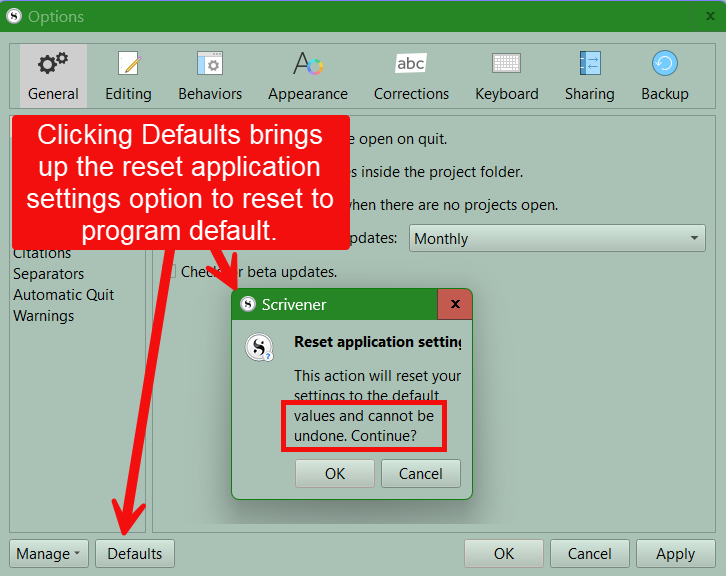
The other option is that the preferences may be messed up for the project. You could reset preferences, Ideally save your current ones, but this could be the issue.
Click the default button ( in the options panel), but consider saving preferences first.
1 Like
Thank you for all your suggestions - the first two didn’t seem to work. I was not writing to a protected file and I wasn’t opening up a backup even though that didn’t work either. It seemed to be a combination of @GoalieDad suggestions and an idea of it on my own. So defaulting it on a fresh refresh did not work. However, for some reason, I reset to default, it froze again, and then a did another clean install, and instead of defaulting it right away - I started a new project, changed the fonts and layout, defaulted that, then opened up my file from previously, changed the fonts again, defaulted, and then tried my fonts again AND separated the last page I had created, into a new page/folder. It all seemed to work again and I’ve opened it up, closed it, and did it again. I actually have no idea what of these steps worked but thank you all so much for helping me out with so many suggestions. You all are great. 
1 Like