I have the folllowing structure:
book1
chapter 1
chapter 2 …
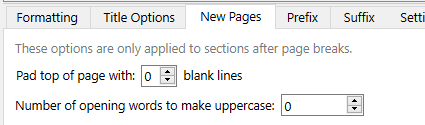
I’ve set the 1st 5 chars to be uppercase. However, when I compile to pdf, uppercase gets applied only to chapter 1. what am i doing wrong?
I have the folllowing structure:
book1
chapter 1
chapter 2 …
I’ve set the 1st 5 chars to be uppercase. However, when I compile to pdf, uppercase gets applied only to chapter 1. what am i doing wrong?
Hi.
A specific reason why you mention PDF? Does it work in other formats?
If it just doesn’t work no matter the format, make sure your parent documents / chapters are assigned the right section type in the metadata panel of the inspector.
You also need a page-break between your chapters for the auto-uppercase to happen (new page). Make sure the separator is set properly in your compile format’s Separators panel.

(I assumed you meant the first five words to be uppercased, not characters.)
If you don’t want the page-breaks in there, you’d need to make your words uppercase manually, in the editor.
You might really want to specify this yourself anyway on a chapter-by-chapter basis, rather than try to automate it. Some typesetter’s judgement is needed to decide how much of the lead-in phrase to treat this way. It is partly about how far across the text column the phrase stretches (highly dependent on word lengths). It is partly about what is the phrase that gets emphasized in this way and where that emphasis stops.
I think the typesetting nicety you are after is usually done with small caps, not all caps. When I want to do something like this, I use a defined character style in Scriv to mark the phrase and this then turns into genuine small caps when my compiled output is dropped into inDesign (because I have a same-named character style there that calls for small caps).
My recollection is that Scrivener doesn’t “do” real small caps, so if you are going straight to pdf maybe getting actual small caps would be a challenge. (Scrivener seems to fake small caps: If you use Scrivener’s Make Small Caps, you will notice a telltale reduction in font size. Also, I just noticed, Remove Small Caps appears to be non-functional.)
Depends. If the font supports them and you format / style the text accordingly… Emphasis on “you”. Scrivener doesn’t care. It won’t produce proper small caps by itself, but it also doesn’t stop you.
I’d do like @GR and create a style, using a font that has a Small caps variant if possible. These are ones I have, but there must be others:
Serif
Sans
Of these, I like EB Garamond (12) the best (EB Garamond 08 is rather heavy to my eye).

Mark
By the way, I wouldn’t compile straight to PDF anyway; I’d compile to RTF (all the major wordprocessors read RTF and I’d leave them to do any conversion; I use NWP which, like Scrivener has RTF as its native format) check it over and print/Export to PDF from there. Much better results!