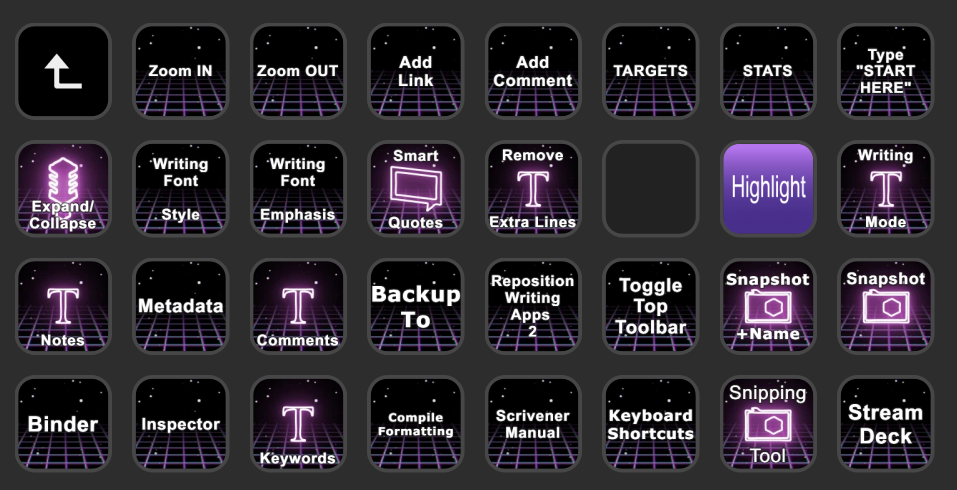
I make extensive use of Elgato Stream Deck with certain music-writing apps, namely Dorico and Cubase. So, since I already have Stream Deck, I figured I’d use it for my most often-used Scrivener functions:
Mostly, these buttons trigger Scrivener’s keyboard shortcuts (I use the Windows version of Scrivener). However, in the case of the “Remove Extra Lines” button, Scrivener’s keyboard shortcut, Alt+Shift+1, doesn’t work (it’s a bug that has already been acknowledged). A suggestion from @AmberV in this thread, Navigating by keyboard to remove empty lines between paragraphs - #5 by SCN, led me to the solution of using AutoHotkey to trigger this Scrivener function. Problem solved.
Anyway, I’m curious if others use Stream Deck as part of their writing workflow. I’d enjoy learning what shortcut keys you’ve found helpful, as I’m still feeling my way along here and could use ideas and suggestions.
I don’t (as I write from cafes, or a WeWork, rather than a perminant office space), but I really love this idea. If I still had my home office space, this would be right up my street.
I don’t use a Stream Deck – I’m far too minimalistic for such extravagance – but I basically do the same thing with BetterTouchTool (BTT) on macOS, which I guess is similar to AutoHotkey.
BTT allows you to define a “hyper key”, which I assign to Caps Lock. Then by holding that, every other key can be assigned a function to it (by app).
It can do far more than that, though. For example, I have one-keystroke operations for: compiling (and overwriting); creating a TODO annotation; opening and closing my TODO list Collection; launching my default Scrivener setup and adjusting layouts, etc. – I use multiple projects.
I think everyone will have different needs, and varying tolerance for adding what seems like more complexity to achieve less – and I somewhat sympathise, because learning new tools can be a time-sink. It’s all good when it works, of course.
I need to setup BTT for this. I use it for other apps, for never got around to tailoring things for Scrivener (it’s only been a decade…)
I have it setup for VS Code. For example double tapping either shift key within 200ms brings up the dynamic search panel (I wish Scrivener had this! But different subject…).
Hmm. I keep a sustain pedal for my MIDI keyboard near my right foot. I wouldn’t want to add an Elgato foot pedal as it would mess with my muscle memory.
I thought about using the Elgato pedal as a sustain pedal, but I’d have to do that through the computer as the Elgato pedal will not plug into my MIDI keyboard or, even if it did, interact with MIDI.
I could, though, map the Stream Deck pedal’s USB input to trigger MIDI CC messages using a MIDI translator app or perhaps Cubase and Dorico key-to-MIDI mapping. But I worry about latency, though my PC has robust resources.
Yep, that’s the one. It uses Apples accessibility tools to monitor keyboard/mouse/trackpad and chain together interactions (such as key taps with delays, or hot-corners on a trackpad)
 I could, though, map the Stream Deck pedal’s USB input to trigger MIDI CC messages using a MIDI translator app or perhaps Cubase and Dorico key-to-MIDI mapping. But I worry about latency, though my PC has robust resources.


