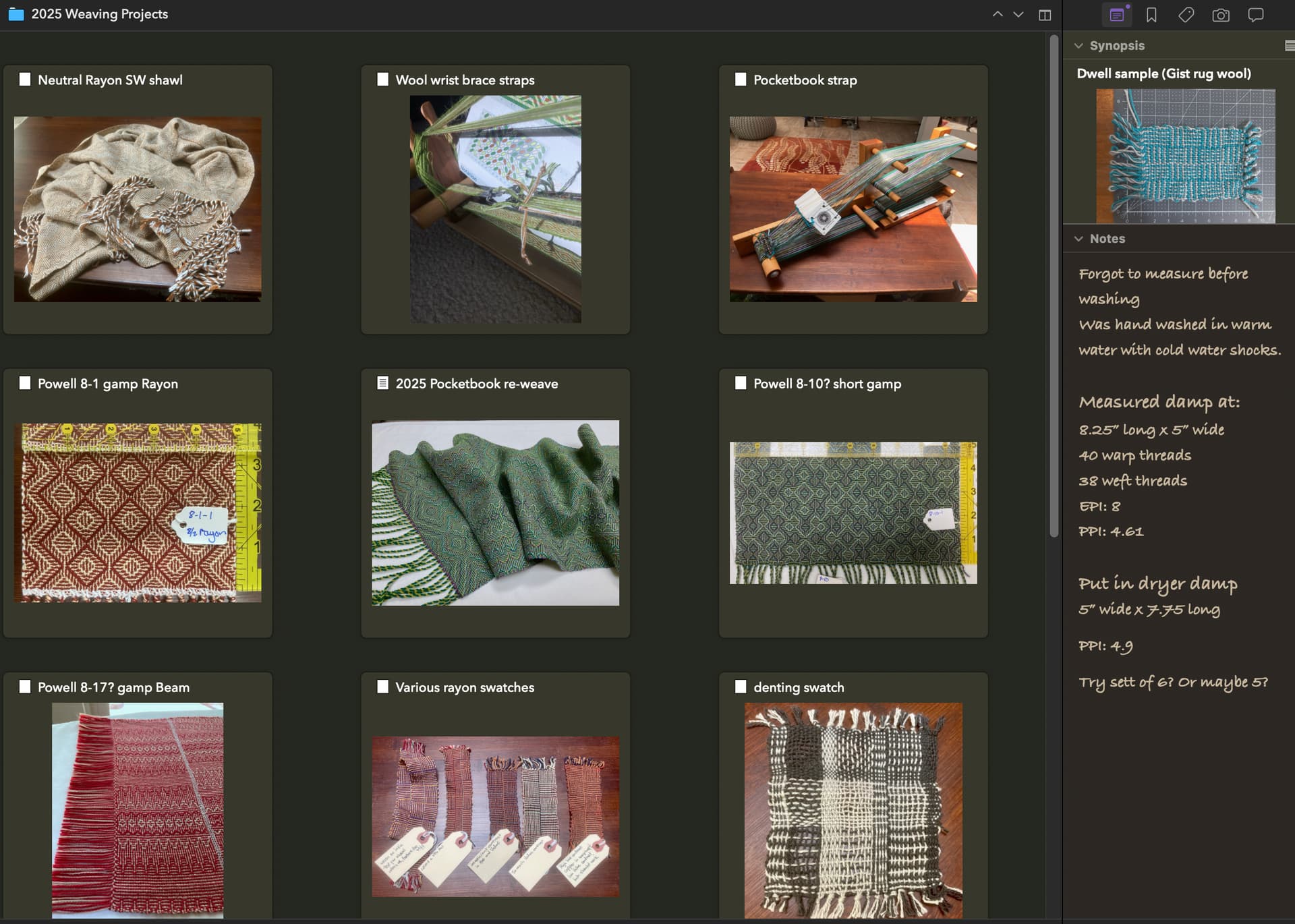
I am a fiber artist, and working on a book. Loving the app!
My question is this:
I’ve moved notes on my projects and details of my materials into the research folder, and am finding that I would like a way to view them outside the app.
For instance:
Right now I am looking at a yarn sale on my iphone, and would like to know what colors of a specific yarn I have in stock to know if I should order anything from the sale.
Yesterday I was creating a new weaving pattern and wanted to look back at an older pattern that used the same yarn to remind myself how I spaced out the yarn.
Is there any way to auto-generate an export of the research notes or somesuch so that I can view things like this when it’s not convenient to launch the app?
In case you aren’t aware, you can load any non-text/folder in the binder into an external viewer/editor with a single click or keyboard shortcut. §8.1.3, Viewing Media in the Editor, in the user manual PDF, is a good place to go for all the details on how the main editor works with media, and how you can easily load things in an external editor.
That aside, I understand the main question is how to get at these things easily when Scrivener is closed. The typical and best answer to that question is to not fully import media into the binder, to leave it outside of Scrivener so that it is easily accessible to everything else—but to use imported alises / shortcuts in the binder. These act, in all important ways, precisely like a PDF or image file you’ve fully imported. You can do everything with them, and the only noticeable difference you will see is a little arrow in the corner of the binder icon, letting you know this resource is linked.
Refer to §9.2, Linking to Research Material for the details on that.
The only real downside is that they aren’t packaged with the project, for the sake of backups and easy transfer to other machines. But if you make a folder for all of this, that’s not too big of a problem. I’m thinking of something like:
Obviously however you organise the contents of the master folder is up to you, but the key thing is that you now have one master folder you can sync or drag to other disks, or right-click to compress to make periodic backups.
That’s why I was hoping there might be a way to export that information.
It was a wonderful exercise to go back through all my project notes related to the book and get them into Scrivener in a systematic way, and also to catalog all of my yarn, but now it’s hard to reference when I’m not in the app.
Hmm, well you can export the Notes with File ▸ Export ▸ Files... (look among the options checkboxes), but from what I can see from your screenshot, you’ve basically got an empty text file that you’ve switched the Synopsis card to image mode for, and then dropped the image into that (well, maybe some text items have some content, like 2025 Pocketbook re-weave).
That’s going to be more difficult to export because synopsis images are kind of unique to Scrivener (at least in comparison to how files and folders work).
Future reference, I would just drop the image itself straight into the binder (or as an alias, as suggested above). You’re using a feature that isn’t designed to be easily exported in any fashion.