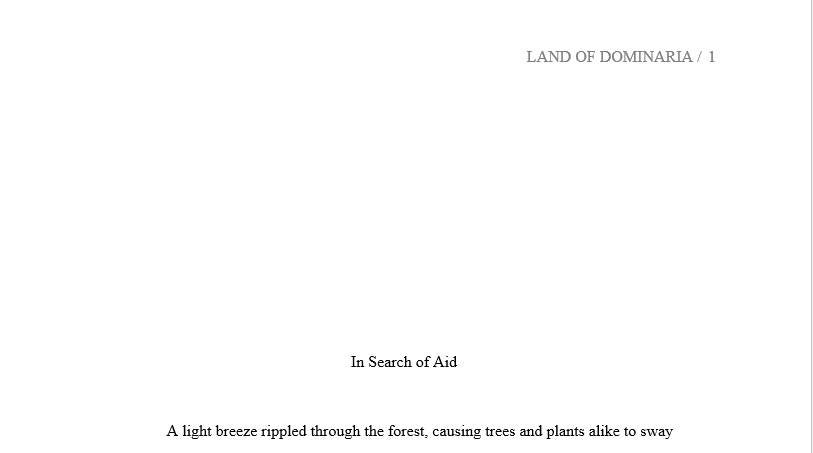
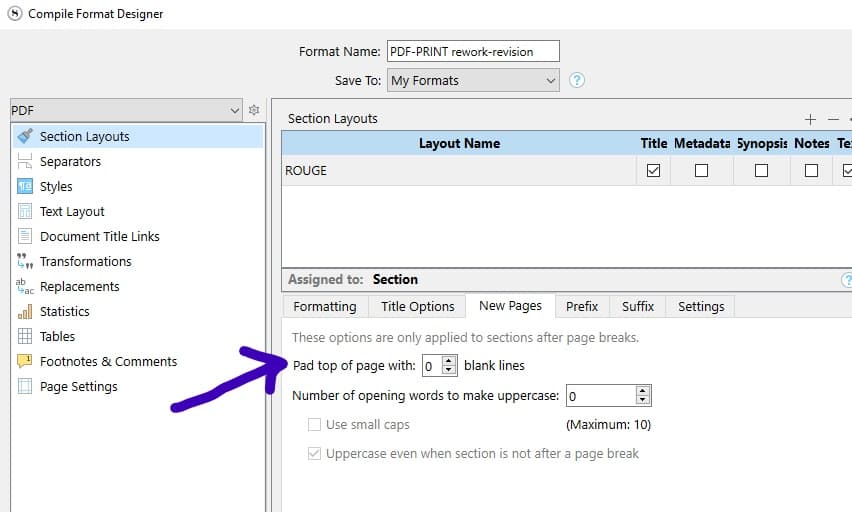
Like many others, I am trying to figure out the Scrivener compile feature. A major annoyance for me right now is that Scrivener insists on putting a huge chunk of whitespace at the start of each chapter (see screenshot for example). How can I change the settings so that the chapter title is near the top of the page, and the white space is gone?
(Do so for the proper section layout → if you have more than one in your compile format, look for the one in the list in the top section that happens to have a few lines of padding.)
If this is something you did on purpose for another part of your project, you’ll then have to create a new section type + a new section layout for that. If that is the case, do it then for whatever is less present of both situations throughout your project. (Less reassigning to do…)
One item to keep in mind as you’re changing that setting: Many publishers, journals, agents, and so on actually require that each chapter has a certain amount of whitespace at the beginning. Hence, Scrivener’s default formatting.
Make sure you’ve read and re-read any submissions guidelines for formatting your project, to ensure you’ve made changes that are appropriate.
Great point, thanks! In this particular case, I am compiling articles for an internet freelance writing gig I am doing, so the white space is just annoying for my editor. But I have dealt with publishing requirements before, and you are exactly right.