I’ve been using Scrivener for years. I’ve just realised that the option to compile to .mobi is gone now, which is super inconvenient. I often compile things that I’m writing to add to my Kindle app directly. Epub adds extra steps and I don’t want to have to rely on “send to Kindle” every time. Why was it removed? Is it a bug on my Scrivener maybe?
Hi.
It is still available under the Windows version. Perhaps you are looking for the wrong name.
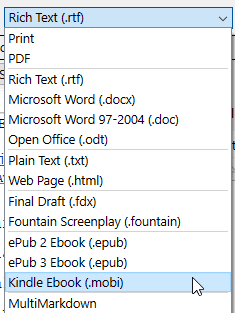
If you are a Mac user, and the format has been removed, as a guess I would say that this would be because the format has been discontinued by Amazon.
2 Likes
Yes, this is the case, and here is the relevant line from the Mac 3.5 change logs:
Kindle (.mobi) has now been removed as a Compile export option, since Amazon no longer supports the .mobi format and now expects ebooks to be submitted using the ePub file format. Existing Compile formats set to use Kindle are automatically switched to use ePub.
We just haven’t had a Windows release since that decision was made.
1 Like
Yes I use mac. At least it wasn’t a bug on mine  thank you for the explanation!
1 Like
Calibre can export to .mobi.
You can use Scrivener to compile to .epub, then import that into Calibre, use the book conversion process and select .mobi for the output.
1 Like
Yes, and quite frankly using Calibre (or other dedicated conversion tools) to create proofing files for Kindle has always been the superior way of doing this. Using Amazon’s kindlegen utility, which is all we had available (short of reinventing the entire thing like Calibre did) was never ideal because that was always meant to be a production tool. This tool was made back when uploading a .mobi to KDP was the best way to go. Its Mobi files contained two separate books in them, one using the ancient MobiPocket standard, and the other using the newer proprietary Kindle File Format (known as KF8 or AZW). This is why it made sense for a tool like Scrivener to integrate with that tool, since the main reason to use it was to upload to KDP.
But that it was in fact two books in one (twice the necessary size), many older Kindle readers wouldn’t read it well enough for proofing, since they were expecting a .mobi file to be MobiPocket from start to finish. You can go back to the early days in this forum to find how that confusion has been a constant grumble ever since Amazon decided it was a good idea to pack two separate file formats into one file using a legacy file extension to represent them.
Calibre on the other hand makes a MobiPocket file, which again is only good for proofing on extremely old devices at this point, but for these, that is at least the type of file you want. In that vein, if you have a Kindle that’s newer than 2007 or so, you shouldn’t be converting to .mobi anyway, you should be using the AZW3 option in Calibre to create an .azw ebook. Indeed that is what it will select automatically if you try to send an .epub to a Kindle you’ve got plugged in.
2 Likes