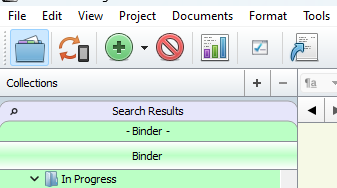
While I was working in my novel project today, I noticed I have a Search Results and Binder tab above the normal Binder header. I don’t know how these got here and I can’t figure out how to collapse them back down so that it just shows “Binder” underneath the Collections header. I’m on version 1.9. Anyone know what I should do here? Thanks!
It looks like you have collections selected.
With Collections Tabs visible, the top tab is the Binder Collection, used to return to the Binder after looking at the items of a Collection, the second is the Title bar of the Binder, indicating you are currently showing the Binder, and not a Collection.
HTH
1 Like
Refer to §7.4, Using Collections, in the user manual PDF. The highlighted button right above the tabs, in your main toolbar, is what you clicked, by the way. This is how you can toggle between project search results, and the main binder list, without having to run your search over and over. You don’t actually have any collections yet, but if you had those, as the others pointed out, this is where you would manage them as tabs.
1 Like