Installed, activated and launched on Linux Mint Debian Edition 7 - Cinnamon 64 bit.
2 Likes
If you want to wipe the slate clean and start over:
flatpak uninstall com.local.Scrivenix -y
That uninstalls it.
Then this will wipe out the build directory and installation directory and basically everything putting you back at square one. You would start back over in the instructions at step 3. You would NOT need to reinstall flatpak-builder or any of the runtimes.
  rm -rf ~/.var/app/com.local.Scrivenix
  rm -rf build-dir .flatpak-builder repo
It’s so weird. I’m guessing there was a silent crash in the .NET installation which comes immediately prior to the Wine configuration step. Wine will hold off until it get’s the all clear that .Net has finished successfully. I’m 90% confident .NET is the culprit.
1 Like
That’s awesome! Thanks for the information. Let me know if you hit any snags using the software.
Uninstalled on Mint Cinnamon and re-ran from Step 3. Still getting the wine not found when I run the terminal command for it, but I’m not sure what else I can do there. I’ve tried running it in the directory where scrivenix lives with no change. However, Scrivener seems to be running. I complied an in-process project as a pdf and that seemed to come out just fine. Fingers crossed it all works.
Wanted to mention that .Net seemed to install twice. This might be entirely normal, but it seemed to install and then install a second time - the second time brought up the meaningless warning.
Only other odd thing was that the desktop link to open Scrivener is there and is clearly meant to be a link, but it does nothing but spin when clicked. Not sure if that’s at all related to this or if it’s just part of scrivener on Linux.
I hope this information is helpful!
Scrivener is running and working. Were you also able to activate the license? If so that means .NET installed despite the obnoxious hang up.
Yes that’s exactly as expected. I think I’m going to record a successful install and include a link of top, just so folks can see exactly how it ought to go if things are working correctly.
Now to be super clear, your desktop icon is it the actual official Scrivener icon or is it my icon, the green S on a black background with a gold circle around the outer edge? If it is the official one then that probably isn’t going to work and was created by Scrivener itself. Try clicking the Scrivenix icon in your launcher and see if that one works.
If it is my icon and it isn’t working then I think this is probably an artifact of the install not running as intended either time. You can create a manual desktop shortcut that executes the flatpak run com.local.Scrivenix command. You can point it at the Icon I included or the native scrivener icon if you want a more authentic look.
I was able to reproduce the hang you experienced today on Fedora. I opened the system monitor and I watched wine-server, and several other processes with my icon beside them using CPU and making small disk writes. But after 45 minutes I knew it was stuck in a loop. I right clicked the wineserver process and killed it. Within 30 seconds the script moved on to the next step and finished the install successfully. My script currently has a flag for the next step to wait until it get’s the all clear that .Net is finished and sometimes it isn’t getting that all clear so it waits indefinitely. I’m looking at ways to revise the script and address or bypass the problem. My best idea at the moment is to have a timer and if it hasn’t finished its business after X amount of minutes the script can kill wine-server and move on to the next step. That comes with some risk of terminating the process too early on really old/slow hardware, or of adding unnecessary wait time for faster machines. I may ask if you’ll try again with a fresh install with the new script since you are getting the hang up consistently and I have only been able to reproduce it once. Makes it hard for me to know if I’ve fixed it if it isn’t consistently breaking for me.
2 Likes
I have updated the .sh file in a way that resolved my eternal hangup on the .NET installation and uploaded it to the GitHub repository. Hopefully that eliminates that issue.
1 Like
In between laying the flooring and installing frames on my new home, I’ve had a quick play with Ubuntu.
In Step 2, it seems to be installing, though not asking user, until
flatpak install --user flathub org.winehq.Wine//stable-23.08
Response - Looking for matches…
error: Nothing matches org.winehq.Wine in remote flathub
1 Like
Sounds like you have lot’s of spare time…
Thanks for the information. Ubuntu is a big distro with a lot of others based upon it. I’ll definitely dig into this. I based off the Scrivener script and my prior Bottles tutorial and they called for those 23.08 version runtimes which are end of life. I’m going to experiment with running the most recent versions instead and see what happens. Thanks again for finding this hang-up. I’ll see what I can figure out.
I get the same error in Debian which suggests an issue my end.
Maybe not. I’ve updated everything to the 24.08 runtime which are not end of life.
When/IF you have time and inclination:
- Not sure you got far enough to even install it, but run the uninstall command just in case.
flatpak uninstall com.local.Scrivenix -y
-
Get rid of the install directory and build directory. Again, you may not have even gotten this far in if the runtimes would not install. Run them anyway to make sure we are getting a clean slate.
rm -rf ~/.var/app/com.local.Scrivenix rm -rf build-dir .flatpak-builder repo -
Delete ALL of the installation files you had previously downloaded from my GitHub
-
Visit GitHub - adgalloway/Scrivenix: A WINE based application for running Scrivener 3 seamlessly on Linux · GitHub and download the updated files.
-
Open the new install.txt and see if you can proceed through the instructions and let me know if you run into any issues. You’ll be keying in the same terminal commands as before but this time for the 24.08 variants of those runtimes rather than the older 23.08.
What I think I’ve fixed this go:
- Scrivenix shortcut should actually launch the app now. (may still require a restart on Cinnamon desktop) Some users were having to launch from terminal each time.
- First start Winecfg changes should reflect in Scrivener on first launch
- Wine should default to Windows 10 instead of 7, but this can be changed in winecfg if needed.
- Believe I’ve sorted out the endless hang some users experienced after .Net installed
- Fixed a silent failure to launch some users encountered.
- Updated to the 24.08 runtimes as some users were not finding the 23.08 variants in their repositories.
3 Likes
Nice work. Just installed the latest on a completely fresh install of Mint (on a different laptop). Only encountered one issue so far: after changing the dpi (from 162 to 144) the program got stuck and couldn’t force quit either. Needed to reboot.
I’ll keep on using and see if anything comes up.
The two versions of Scrivenix previously installed (Debian and Mint) have been running completely fine, no problems since install.
1 Like
Ubuntu 24.04.4/KDE (X11) here. It did install and open. Some feedback”
- The desktop link doesn’t have the Scrivenix icon, and opens up Bottles and asks me to select a bottle and then does nothing afterwards. The shortcut from the application tray is properly filed and launches appropriately.
- When I first ran, the instructions for how to adjust the DPI closed out when I went ahead, would have been nice to have those kept up while I walked through (went back to the install.txt on github to review). Even at 144dpi, the fonts are a little bit wobbly. Running at 4k, no scaling.
- I have a secondary internal drive on my machine which is where my backups go, but flatpak doesn’t see the drive by default so setting up my backup location as Step 1 failed. I was able to add the mountpoint via flatseal, wouldn’t have said no to anything that would have made that easier to enable during installation.
- Opened up an existing .scriv project and it loaded fine. Compiled to an ePub and successfully printed a page to my local printer. Interface (apart from font scaling) appears to all be good,
- Probably going to keep using my old Lutris install for now since the fonts are a little better with that. If I have to re-install my distro I might check in on this again. I appreciate the effort on this but hoping that this isn’t the closest we get to Linux native app–Definitely hoping we can get linux filesystem dialogs and local fonts sometime down the road.
Thanks for your help!
1 Like
Regarding the desktop link, is this the one Scrivener creates at the end of the install dialogue? If so, I’ll add a note to the install.txt indicating folks should uncheck that box. It doesn’t hurt anything, but as you noted it won’t work because Scrivener has no idea it is running on Linux in a sandbox.
Regarding the 4K display. I’ve not had anybody with a 4K display test this before and would be appreciative if you could do a little further testing. What happens if you increase the DPI to a higher setting, say 192? Does that clear the fonts at all? I run 144 on a 2560x1440 display, I would imagine you’d need a higher setting? What are your display settings in Lutris? Does right clicking the Scrivenix icon and selecting the reapply font configuration do anything for you?
Regarding access to other drives and Linux directories by default, I’ll have to look into that and what the Flathub rules/requirements are. I’m getting ready to prep the files for a pull request to Flathub, so I’ll be getting into the specifics of their requirements soon.
Regarding importing local fonts: I think I can add that functionality pretty easily.
Thanks for giving a try and sending some feedback.
3 Likes
Hi! Been using this (it was the literal only way Scrivener worked on my laptop) and it’s been great so far! Just noticed a bug when trying to open the Corrections tab of the Options pop-up menu, it crashes Scriv entirely. I have a friend who also tested it, and we both click Corrections and it immediately crashes.
I wanted to make sure that you were aware of this bug! Thank you for your work on this, it was a life saver!
Nope, this is a new issue that I was not aware of. I’ll see if I can reproduce it tomorrow and find a fix. Thanks for letting me know.
What Linux distribution and desktop environment?
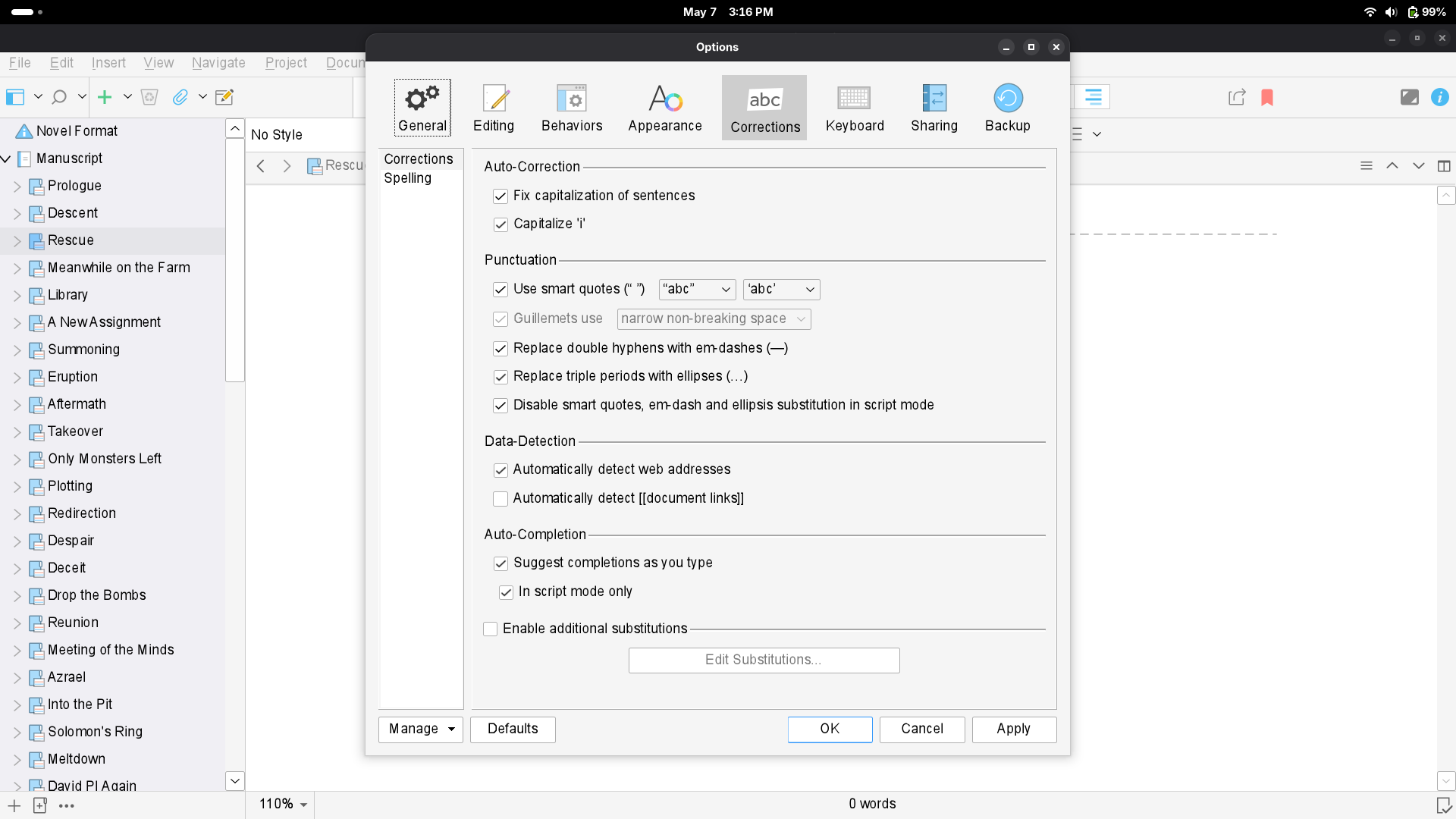
Is this where you mean? If so, I’ve tried it several times, saved changes, closed it, reopened it. Haven’t been able to get it to crash yet. Can you tell me anything specific about your setup that might help me narrow this down?
Yes that’s exactly where it crashed for us. We are both on CachyOS.
You should try running it from the command line, so you can see all of the Wine debugging messages. There will be a lot that can be ignored, what happens right before the crash would be most important.
The only thing that is a little different about this tab is in the spelling section, where it would need to probe the install folder to see which spelling dictionaries you have installed.
1 Like
Step 1 — check for missing extensions:
flatpak list --runtime | grep Wine
You should see lines for both org.winehq.Wine.gecko and org.winehq.Wine.mono.
If either is missing, install it:
flatpak install flathub org.winehq.Wine.gecko
flatpak install flathub org.winehq.Wine.mono
Then relaunch Scrivenix and test the Corrections tab.
Step 2 — if extensions are present, check for missing fonts in the Wine
prefix:
ls ~/.var/app/com.local.Scrivenix/wine/drive_c/windows/Fonts/ | grep -i arial
If that returns nothing, the corefonts install failed silently during setup.
You can reinstall them by opening a terminal and running:
flatpak run --env=WINEPREFIX=$HOME/.var/app/com.local.Scrivenix/wine --command=/app/bin/winetricks com.local.Scrivenix -q corefonts
If neither of those turn up the issue let me know. The next step is that I can provide you with a modified script file to replace the one in your app directory. We will quickly rebuild Scrivenix with the new script with WINE debugging enabled, will only take a few seconds, and then we will launch it with a specific command to run the wine debug log. You can reproduce the crash and we will have a log file to review to see exactly what the system was trying to do when it failed.
2 Likes
I’ve tried running the command to run scrivenix and it gives me no Wine debugging messages. I’m new to Linux, so I’m assuming you mean the command given in the original post, but if not, please let me know!