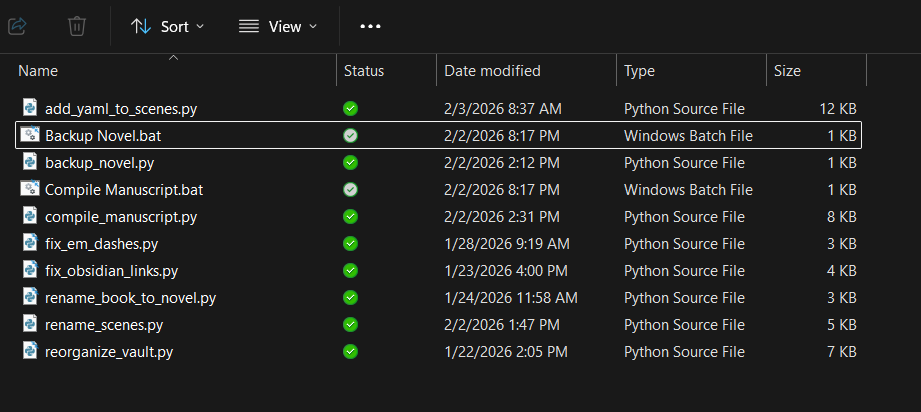
Same here. In a well-defined problem with examples and guidance, an LLM is basically a junior coder. It can pattern-match with supervision, and do it fairly well. “Good enough” for most solutions. Python is my primary language these days, and I would completely consider using an LLM to make a filter for me. I’d even turn it loose on Lua, of which I have a reading understanding.
For creative writing content and Scrivener projects, LLMs are kept away with the proverbial ten-foot pole. For professional code where the industry is in a “use or perish” state, for sure.
The key difference is that you don’t need the “A.I.” and you understand its limitations, when it goes off the rails and why, and how to get it back on track or take over. If a pilot engages the autopilot, that’s not a concern. If the pilot gets replaced by a random passenger using the autopilot… well.
You can’t run Python inside Scrivener. In this case, you can use Python scripts to work on your projects, exporting or syncing drafts to external folders.
Since Scrivener will automatically update changes, and your script can read or modify text files there. In my opinion, this is the easiest way to combine these two processes without breaking anything.
It all depends on the use case and skill set: a good engineer knows how to ask the right questions and catch the errors an LLM may generate. In that case, LLMs (Copilot, for example) are incredibly powerful and can be really useful for rapidly prototyping solutions (or suggesting development steps if not using in Agented mode).
If you are an inexperienced engineer, stay well clear of LLMs. They will easily lead you down a path that is either super-insecure or doesn’t work. Worse still, it might give you false confidence.
I use Copilot a fair bit at work for code completion and rapid prototypes, but I’ve been building web apps/things since the web was a thing ('92-ish) and know software architecture & various languages inside out. Even then, I am very cautious of the code it suggests.
Scrivener doesn’t have a direct Python API. So it’s best to work with files in your project folder or use plain text synchronization with an external folder. If your scripts read or generate text files, this is the easiest way to integrate Python into your workflow.
One thing I was thinking of was a way to bulk-import OPML files into my draft folder, so they become my chapters and scenes. At the moment, I have to do this manually.
Let’s see…most of these are for Obsidian, but for Scrivener fix_em_dashes.py fixed a bunch of em dashes that were messed up. I think I caused that with a Scrivener search and replace, where em dashes were --- but I needed them to be —. The script fixed them in the .md files in the Sync folder. I synced them back to Scrivener and the problem was solved.
I’ve had occasional things like that and wrote scripts to solve, then deleted the scripts.
The “compile_manuscript.py” is an interesting one, though it’s for Obsidian. It takes my novel’s chapters and scenes and puts them into a nice Word file, complete with chapter numbers and scene names.
UPDATE: I had given the wrong link to the other discussion. Also, the script I mentioned that compiles to a Word file is for Obsidian, not Scrivener. These errors are now corrected. Sorry about that.
I see I made a mistake, though. My script is to compile individual chapter and scene files in Obsidian to a Word document file, not Scrivener as I had written. (I’ve fixed that in my post.) Is your script for compiling from Scrivener somehow?
I compile a TXT from Scrivener (and inject some custom metadata using compile). Script 1 (Codex) creates a JSON from that, and Script 2 (Liber) creates a markdown from the JSON that I can use elsewhere. It’s mostly for outline automation.
I built an alternate compiler called Squarto in Python. So I write entirely in Scrivener. Then Squarto will process all the files to generate the folder/file structure for a Quarto Book project, automatically running Quarto/pamdoc to build the book in HTML, Word, PDF, etc. The exported files are committed to version control (git).
I have a thread for this project, but it’s terribly outdated. I’ll see if I can update with some screenshots soon.