Hi. i have been working on three novels at once. Now the system has lost or mislaid them. it says the projects are empty. Can anyone advise please? This is a snip of one message.
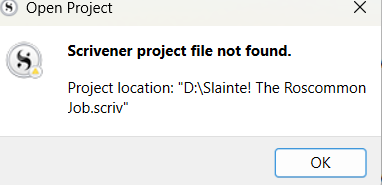
Do you store your project files in folders which are synced by a third-party (independent of Scrivener)?
If so, see Scrivener did not eat your data
Thank you. No. What I do is, I write a chapter (one folder) in Scrivener, then copy it across to a word doc. Having said that, the problem seems to have arisen after I attempted yesterday (without success) to back up to a memory stick.
How are you “copying over” to Word? Not using compile?
Exactly how did you attempt to (presumably manually) backup your project? Not using the automatic method built in to Scrivener?
What was the error message that told you that you did not have success?
Do you have Scrivener backups (created automatically) and/or system backups you can restore from?
Correct. Not using compile. I write a chapter in scrivener, then select it, copy it and paste it into a word doc. I use compile when the entire book is finished.
Yes. For some reason auto back up (when you exit Scrivener) turned off. I didn’t follow that up. I was one of the customers who upgraded and paid the extra some time back. I felt as I was saving to Word I was okay.
There was no error message. The system just seemed to ignore me. I thought no more about it until I logged on this morning.
Backups. I’ve searched my ssd drive and my memory stick. there is nothing there. The ‘recent projects’ in Scrivener still have my drafts listed but when i click on them I get that ‘scrivener project file not found’.
I mean, I have my work saved in Word. So it’s not a disaster to that extent  But where have my Scrivener projects disappeared too Thank you for helping. I’m still searching here.
I like the folder system in Scrivener which is the main reason i use the software, plus the notes and chapter synopsis is very handy. it is easier to navigate. i have never compiled the entire book to print or email readiness. i was thinking of doing that this time.
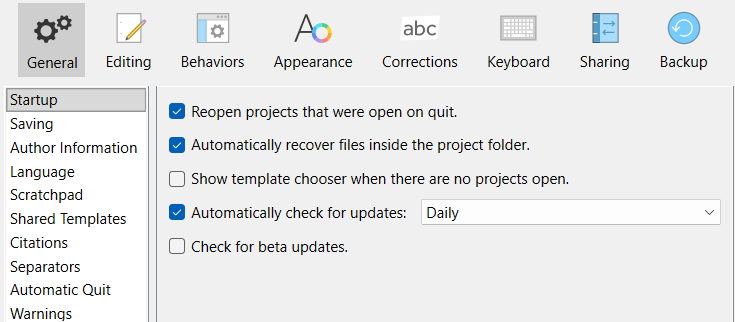
i see it is set to ‘reopen projects that were open on quit’; and I’m not sure what ‘automatically recover files inside the project folder’ means but it sounds like it should just open my current work. But the system won’t do it.
This indicates that the project was moved. Recent Projects knows where the project was when last opened, but can’t keep tracks of moves outside of Scrivener.
The most likely situation, given the rest of your description, is that it was opened from a USB stick or external drive which is no longer attached to the system. It’s also possible that some sort of “cleanup” process moved it on your behalf.
I mostly work on the Mac, but I’d suggest checking your OneDrive settings. My understanding is that it’s pretty deeply entangled with the system.
1 Like
Welp, I’m waiting to hear where those projects ended up hiding.
Okay, thank you. I don’t use OneDrive. But you live and learn.
I wish i knew. I’ve tried the memory stick, the ssd drive, my laptop, downloads. Nothing. Gone by the looks of things.
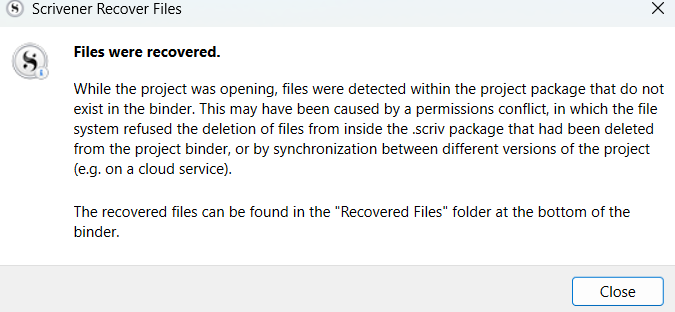
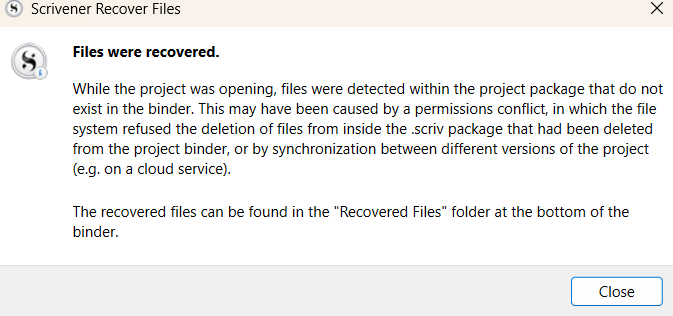
Latest update on the lost files saga. The only bit I understand is the last sentence about recovered files.
I got some of it back. But a novel i was working on has only c 1; whereas there should be five filled folders. The folders are there, but there is nothing in them. I can reload from Word but that’s hardly the point. But what can you do.
According to your original post, you were attempting to open a project on D: drive, which would typically be an external drive or flash disk, unless you have partitioned your SSD into two drives.
Where do you normally save your Scrivener projects? From your further descriptions, it appears your projects became tangled in one another.
A good practice would be to have them in Documents > Scrivener > Projects and then Project 1.scriv, Project 2.scriv, etc.as separate folders for each project.
Providing a screen capture of File > Options > Backup might help to show if any backups were set to save and where. There’s also an Open Backup Folder button to click in there, which might lead to recent backups. However, I did note a post by you elsewhere in which you stated that you switched off backups, finding them unnecessarily too much.
The best search option is to click on the root folder for c: drive, using File Explorer, to search for *.scriv, which would find all your projects on your SSD.
When you pasted into Word, was it a long, ongoing document or separate files each time Scrivener document. If the former, then all you need to do is import everything using a symbol like a hash at the top of each chapter or scene to separate each novel’s content into separate folders in a Scrivener project. (There are options in the File > Import menu to facilitate this.) Sadly, those backups don’t cater for your synopsis, notes, snapshots, comments or metadata held in Scrivener projects. Well, they could, if you exported selecting the components, but your methodology suggests otherwise.
1 Like
“Files within the project package that do not exist in the Binder.”
Could be conflicted versions created by a cloud service. Could happen if you accidentally or deliberately saved something – like those Word “backups?” – inside the .scriv folder. Could happen if you accidentally or deliberately saved a project or a backup inside a .scriv folder.
One thing you could try is using having Windows search for text that you would expect to find in the missing material.
2 Likes
Two other tricks
File > Show Project in Windows Explorer will reveal current location of file, opening up file explorer to the folder.
Personally I keep all my Scrivener projects in one Folder on my main computer drive. So I always know where they are.
For any cloud services active on your computer (may not be intentionally using on Scrivener, but folder may have been accidently included) make sure set to keep local copy.
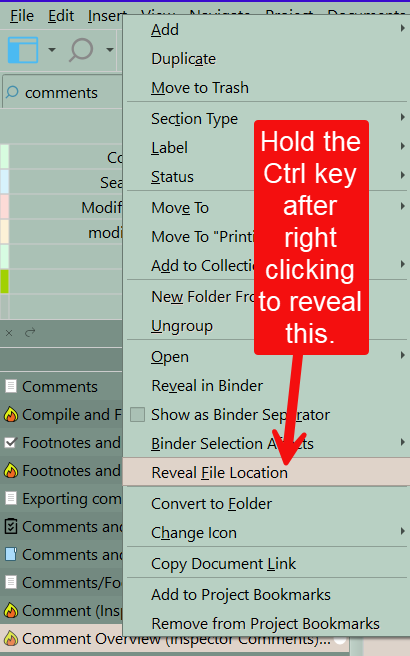
In the right click menu of the binder, you can click on any binder item and if while keeping the right click menu open hit the Ctrl Key will see a new entry reveal file location. This reveals the file location INSIDE your project of the data for the binder item. Don’t know if will help, but might be worth a try.
Thank you, there is a lot of information here. i will get to it tomorrow and then reply again. Thank you so much
Thank you. I will check this out and then reply to you again. i am learning an amazing amount from this crisis. That has to be positive.
 this is what I’m left with from originally about 1800 words from one draft. The other has lost four chapters out of five. I’m not teckkie enough to sort this one Thank guys for the help. I’ll go scouting now to see if any of it finds anything
Thank you. I don’t fully understand all this, but i will revisit it. I think I might just try and start again and copy and paste my work back into scrivener and hope it doesn’t happen again. Can you tell me, how do i stop the system from putting up these messages evert time i open scrivener? They are of no use now but i can’t stop them. Here is one. it says they have recovered the files but that is not the case. I just want the messages to stop coming up every time i open scrivener. What a pickle Thank you
How do i turn on automatic back up? it used to be on but stopped for some reason