Well, I just watched a “Why I stopped Scrivener (and Started Using Deckle)”. apparently it makes it a lot easier to output books in different formats than Scrivener does. Has anybody tried it out?
1 Like
It looks exactly as underwhelming as all the other cheap Scrivener knockoffs. (I swear there’s a factory somewhere producing them on an assembly line.)
When I say cheap, of course I’m not talking about the price. $197 at “full launch”. (Restricted to 2 devices.) What is a full launch? And what is it now, half-launched?
Oh, I see… “early access”. Makes sense. So you pay only $107 for the privilege to beta-test their software. Generous.
10 Likes
There are several videos on YouTube about this “Scrivener-killer” or “Replacement for Scrivener” writing app. All are the same: they go through what Deckle does and I’m saying over and over, “Scrivener can do that, Scrivener can do that, Scrivener can do that,” or “You can do that in Scrivener.”
The only apparent advantage is the preview of how your book will look in various formats, and the one-click formatting using templates (which are customizable.)
I hate Scrivener’s Compile feature; but all I end up doing is use the default compile format and finish up in Pages, LibreOffice and then Sigil and Calibre. These are all FREE. To me, Deckle isn’t worth the price.
6 Likes
At least they don’t actively slag off Scrivener on their web page, not quite. I’m all for new apps coming out that take some ideas from Scrivener, as long as, if they mention Scrivener at all, it’s to acknowledge the debt while saying why it didn’t quite work for the developers and what they want to do different. Scrivener started off with a debt to other apps (such as Ulysses), after all. What gets my goat is the apps whose sites and advertising expend a lot of energy telling prospective customers that Scrivener is terrible, or how much better their app is–although, I suppose, all publicity is good publicity.
Anyway, at first sight Deckle’s UI looks web-based, and it is indeed very expensive (although I applaud anyone not going the subscription route).
9 Likes
There’s no way I would contemplate spending £107 (that’s what it would be here in the UK), leave alone £197 on this, though it is clearly aimed at those who would otherwise spend £199 on Vellum alone.
It uses Typst as its rendering engine—though outputting DOCX and ePub can’t be done with Typst, which currently only supports PDF, SVG and PNG with HTML still being somewhat experimental—so they must use something else for that.
There is a contributor to the Typst forum who must have taken the FOMO bait as he says:
It does not import Markdown (only DOCX, ePub and Scrivener ZIP), copy/paste of rich text does not work, there is no support for tables, nor LaTeX expressions nor footnotes.
So only viable for novel-writing.
The claim that Scrivener is much more expensive is bogus. It is based on the facts that:
- Deckle is $107 for two licensed seats, whether on Linux, Windows or Mac;
- Scrivener is $59 for a single platform, so $118 if you want both Mac and Windows versions (ignoring the cross-platform discount)… but they don’t point out that for that you get 5 Mac and 5 Windows seats (which includes Linux under Wine/Lutris/Crossover etc.).
- It is targetting those who would also run Vellum or Atticus, rather than working out how to use Compile fully.
Compiling Scrivener through Typst will produce equally good typography. I am using that currently and gradually working on a “Pure Typst” Scrivener template which I will post here when it’s reached a state where it might be useful to others.
[1].
What I’ve been working on in Scrivener, since I’ve got my configuration files pretty much set up, I know it willl come out properly typeset—including alert boxes, margin notes etc.—so I can get on with writing without being distracted by final layout, just how Keith conceived Scrivener.
There is a certain amount of interest on the Typst forum in a good Scrivener-Typst template.

Mark
FYI, here’s a page from the recipe book I’m creating for the family—zipped 'cos the forum doesn’t like PDFs:
recipe-page.pdf.zip (47.1 KB)
PPS [1] Apologies; it doesn’t do a live preview, but it will be fast outputting to PDF. My recipe project compiles 69 pages in roughly 1 second..
6 Likes
Ahhhhhh, that is really useful to know. I hadn’t heard of Typst before. I kinda hesitate with web-based, subscription apps because I really HATE that model, especially when they raise the price midyear whilst you’re too busy with other matters to pay attention and then staring at your credit card statement and going “Dafuq???”
So Typst can be used to output books in Kindle format?
1 Like
Yeah, I do give them credit for that, which is why I bought them up here. Now I’m daydreaming as to what Scrivener 4 will look like …
1 Like
Typst can’t, so Scrivener → Typst can’t. If Deckle Studio are claiming they can, they must be going through some other rendering engine.
And the Typst web-app is free, although there is a “Pro” subscription model for those who want to publish packages and use more server space. I’m nowhere near my space allowance as Typst projects are basically plain text unless you wish to include photo type images.
Mark
2 Likes
The magical “Kindle format” is just ePub with DRM. (Or, at the very least, ePub is what Amazon expects as input, whatever they do with it afterward.) And ePub is, rendering-wise, “just HTML”. If you can output HTML, you’re almost there. Push it through Pandoc for convenience and out comes a valid ePub file.
What I find suspicious and forgot to mention earlier: If the developer doesn’t trust the app to sell, maybe it’s crap to begin with?
Download the installer for your platform above and run it. On first launch, Deckle will ask for your license key
Somehow they forgot to implement a trial period. Shit happens. But don’t worry, this completely anonymous entity will certainly honor the 30 days money back guarantee. Right? Only one way to find out.
But wait, there’s another red flag! I think they sell those in pairs for some reason. Buckle up:
If macOS shows a warning that Deckle “cannot be opened because the developer cannot be verified”, go to System Settings → Privacy & Security , scroll down, and click Open Anyway next to the Deckle entry. You only need to do this once.
In other words: “You only have to let the Trojan horse in once!” 
It’s a scam, guys.
3 Likes
You may be on to something. I’ve done some poking around and there does need to be some more forthcoming info with regard to “Ezzy”. I’ll be keeping an eye on this for a week or so
1 Like
Scam or not, I can imagine people will still go for it.
HTML export from Typst is still under development, so shouldn’t really be relied on for production purposes. I did wonder if they were actually compiling to SVG and parsing that to convert it to ePub and DOCX, but I know nothing of such things.
Of course, part of the “smoke and mirrors” thing is that outputting to PDF, you get the high-quality typesetting that Typst provides, but as soon as you compile it as ePub or DOCX, that becomes pretty much irrelevant, given (a) that the reader controls the appearance on their Kindle/Kobo/whatever, and with DOCX you are dependent on the typography of Word/LibreOffice/whatever.
Mark
P.S. If you’re charging your beta-testers $107 for the privilege, you can afford to pay the developer fee to get your code signed!
4 Likes
Of course they will.
Selling only one beta-copy per year and they’ll be an Apple developer ($99) and even make a profit on top. It’s safe to assume that money isn’t the deterrent here. 
3 Likes
Ulysses predates Scrivener? I thought it came after.
Ulysses came out in 2003, Scrivener in 2007.
1 Like
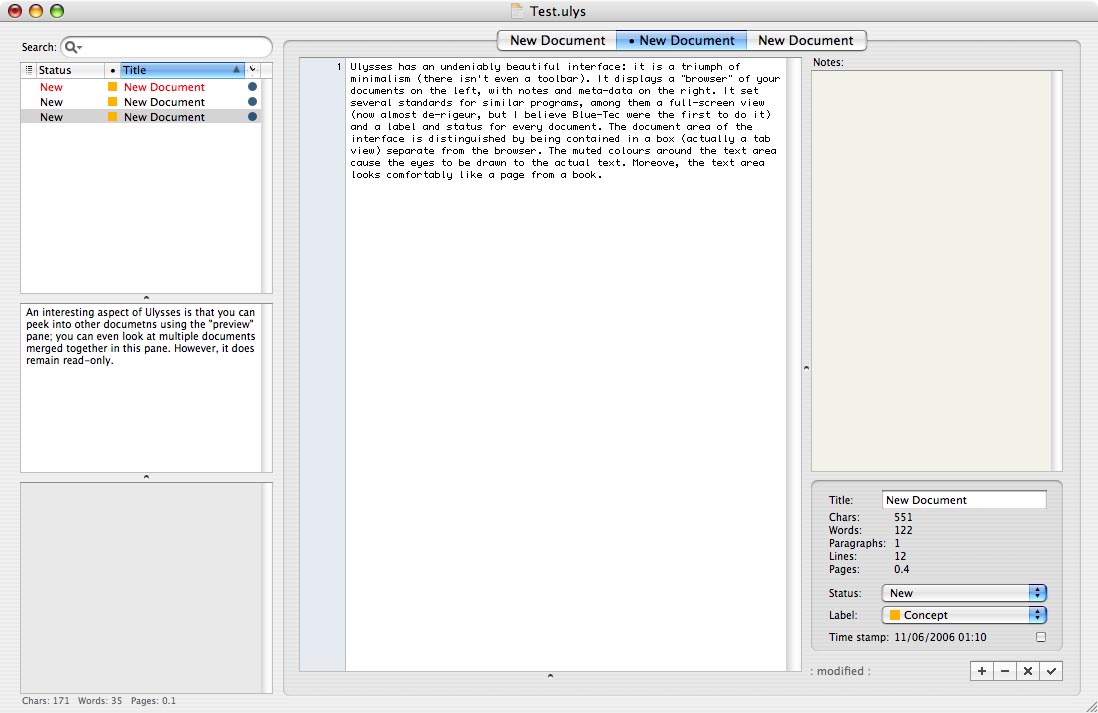
Yep, Ulysses was around several years before Scrivener. It was one of the earliest writing apps that went beyond being a word processor, I believe, and it was one of the apps I tried when looking for my perfect writing app before deciding to make my own. Here’s what Ulysses looked like when I tried it, before Scrivener:
The main apps that had some influence on Scrivener were, if I recall correctly:
- Ulysses. I really loved those early versions of Ulysses, but I’m a rich text guy so I wanted rich text, and I also wanted a structured outline - Ulysses back then only supported a flat list of documents. So as much as I admired it, it just didn’t work for my writing. The idea of the notes on the right, and status and label pop-ups, were all “borrowed” from the original Ulysses.
- Jer’s Novel Writer. (I don’t think I borrowed anything from that, but I liked it a lot.)
- Hog Bay Notes. This had the unique concept of allowing you to switch any item in the outline between being a folder or a text item. Scrivener’s ability to do that was directly inspired by Hog Bay.
- RoughDraft. A Windows program that allowed you to work on RTF documents and have them organised in a sidebar (but they were all stored separately on disk, and it was just a flat list, I believe).
There were more, too, but it was a long time ago now. The snapshots feature was definitely borrowed from another app (a Windows app, I think), but I’ve forgotten its name now. (EDIT: I believe it was from a piece of software called PageFour, which has been replaced by SmartEdit Writer.)
While Scrivener was in the beta stages, I wrote to both the Ulysses developers and Jesse at Hog Bay to let them know what I was working on and that I had borrowed some of their features, but assuring them that my app was very different and would appeal to different users. They were both very gracious and wished me luck (the Mac development community was smaller then, and has always been good at helping each other out). I still have enormous respect for Hog Bay and Ulysses.
13 Likes
Recipe page looks great!
1 Like
I remember Jer’s Novel Writer!
1 Like
Just out of curiosity, didn’t you also explore word processors like MS Word, Pages, and others from that era? I’m wondering if they hadn’t any impact on the creation of Scrivener. When it comes to new software, I tend to be a bit suspicious, preferring ones that have been around for a while or whose developers have a track record of similar projects. I like Ulysses, which is good at hiding Markdown syntax when you don’t bother to see it. Ulysses’ advantages are converting between Markdown and HTML, too, which is nice for writers who spend a lot of time on the web. We all know Scrivener’s strengths, so I won’t go into that. I’m really looking forward to seeing your new lightweight writing app, especially since I’ve understood it can import and export to Scrivener.
In 2005/6, although I was basically happy with the then Nisus Writer (Pro came along later, I think), I started looking for something that would help me organise all my teaching material, and came across Ulysses.
I tried it out but couldn’t get on with it, I’m not sure why. I think at that time, the editor had white characters on a blue background, which I couldn’t stand (In the early days of the Scrivener forum, someone posted words to the effect that serious writers only worked with white characters on a blue background and that Scrivener was bound to fail because it didn’t meet that requirement!). However, looking at KB’s screenshot, I can only suppose I was so put off generally that I didn’t explore any Preferences.
Perhaps it was that, like KB, I was looking for something hierarchical and Ulysses was a flat list.
But at the end of 2006 or January 2007 (I can’t remember exactly when, but I joined the forum on 29th January 2007), I came across Scrivener and it clicked immediately; I bought my licence one day into the trial period. After that, the rest is history.
Mark
11 Likes
One app I’ve never seen mentioned here is Storyist which also came out in 2007.
I have an old licence, but there was something about it that never gelled for me, can’t remember what.