Hi, I’m trying to download UK english, but it keeps telling me the dictionary download is failing - please help!
Thanks
Katie
Hi, I’m trying to download UK english, but it keeps telling me the dictionary download is failing - please help!
Thanks
Katie
Hi.
This user had the same issue. See if the proposed solution in this thread fixes your problem (?).
Exactly the same for me -
Different issue, same solution.
Thanks, but that hasn’t helped, I looked, but my system doesn’t appear to have what you have shown?
You have an antivirus, most certainly. You need to find where to set a permission for Scrivener, in your antivirus’ options/settings. Or, you can just turn it off, and super fast (with Scrivener ready) download your dictionary (takes like 95ms) and turn your antivirus back on.
The first option is safer, and might spare you the issue in the future. You can expect that if it is your antivirus returning a false positive on Scrivener, you’ll have other problems later on. Setting a permission would fix any potential issue(s) right away.
Thanks, I will have another look. it’s Windows 11
There must be another fix? I have no idea what I’m doing here. Is there an update for Scrivener that sorts this?
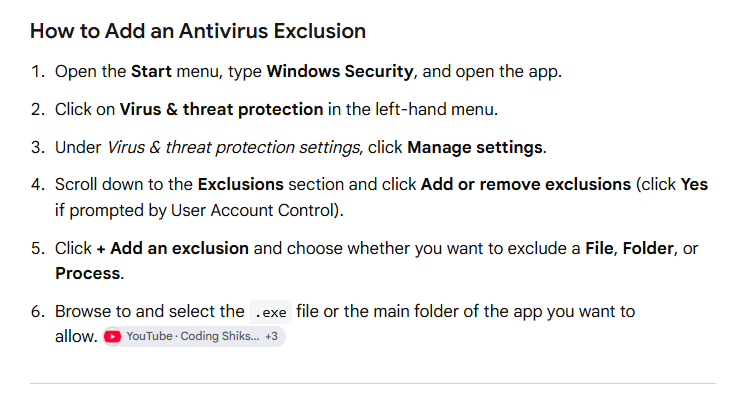
Thank you, but I’m such a luddite. I assume I’m excluding a file? and where do I find this, and how do I browse to find it - as it brings up all the files, all the places - desktop etc.
or is it file type, and I simply type in Scrivener?
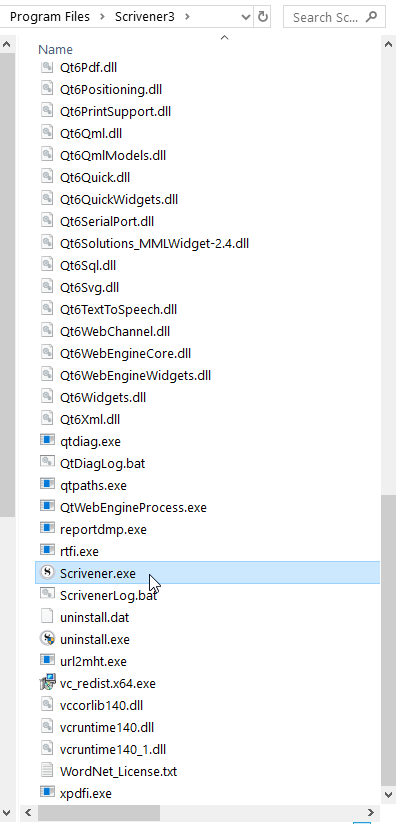
You want to tell your antivirus (the one that comes with the OS), to leave Scrivener.exe be.
Or McAffee, or AVG, whichever antivirus you installed. If you didn’t install any, then it is the OS’ built-in one (Microsoft Defender). Follow the instructions above, then, at step 6, browse to Scrivener.exe – in the folder where Scrivener3 is installed.
I really appreciate your patience - thank you.
I believe I excluded the right file - the closest I could find/get to the one you highlighted was scrivener3 - then scrivener.exe on the end. I then tried to download the dictionary and got the same message.
I will try again tomorrow, thanks again, and hoprfully it will work.
Start by doing a complete reboot, before your next attempt. Perhaps that’ll finalize something in need, and then it’ll work.
My pleasure. 
You can find a long term solution here MacBook Pro - Apple (UK) 
Something else to check is that you’re running the most recent version of Scrivener. Help ▸ About Scrivener should give the version as 3.1.6. If you’re seeing anything earlier than 3.1.5, the dictionary download location is outdated and you’ll need to follow the directions in this knowledge base article to get the dictionary set up. However, if you’re able to run 64-bit applications, I would recommend upgrading Scrivener. You can download the latest version and install it in place of your current app as long as Scrivener is closed.
Thankyou. I think this may be more than just a dictionary issue, as I’ve gone to check for updates, and it tells me that that too has failed, download aborted, so not sure what is going on. My licence was for an upgraded Scrivener, and I downloaded the new Scrivener 3 about two weeks ago.
I’m going to leave this for now, and simply add the english UK spellings, as this is draining and frustrating, and something for another time, but huge thank you to everyone that has tried to help. I’ve tried all that was suggested, but sadly none of it has worked.
It is most certainly all the same issue. Your firewall or antivirus is blocking Scrivener.