Does anyone know how to Compile for MS Word without making section breaks? I have tried every combination of the Section Type in the Compile pane and the only one that seems to produce chapters with text is the Section Type - Structure Based. This produces section breaks on every chapter in the Word document, making it a real chore trying to have a common head and footer across every chapter (which are now have section breaks between them). I don’t remember having this problem before (last year) when I compiled a novel for Word. Any help wooujld be welcome. Thanks. Steve.
1 Like
Hi.
I don’t use Word and therefore I don’t really have a clear definition of what “section breaks” can mean in this app’s context, but if it is something added on the Scrivener’s side, that’s where it would happen :
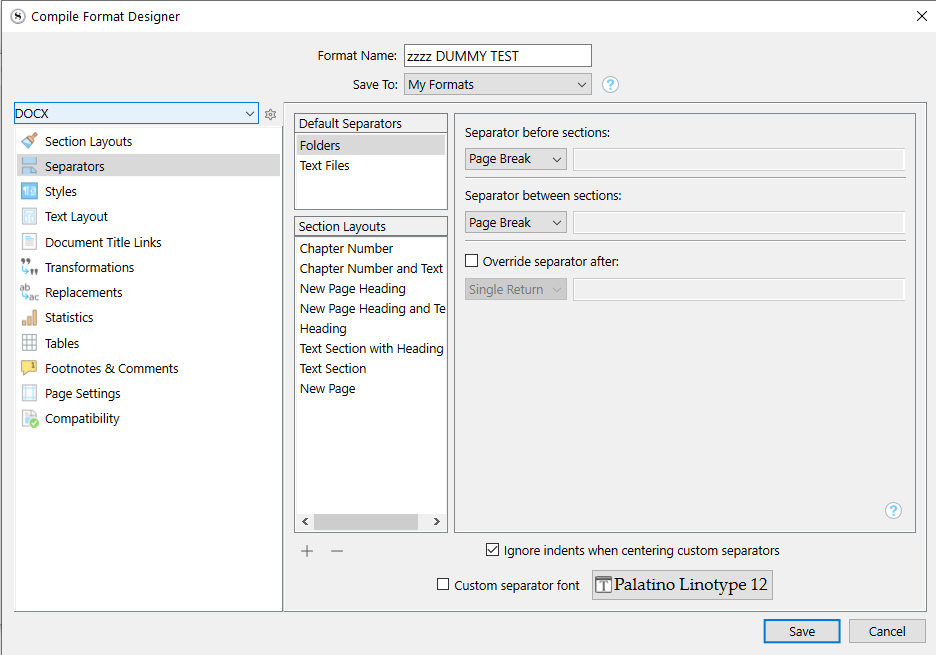
The “Separators” tab/panel of the compile format is where you determine what will be inserted between binder’s documents at compile ; either solely based on their file/folder nature (default separators) or that again but differently in concordance to their section layout.
(Middle column/list.)
. . . . . . . . .
I would suspect that that’s how Word interprets a page-break. (?) Which would then leave you with little to no options other than to fix it manually in Word. (Can’t really do without page-breaks, now can we?) Surely there is a way to set the Header/Footers to bahave globally in Word. (I’d Google that.)
Else, is what you are trying to do in Word not something you could do in Scrivener at compile? (You say your issue is with pages’ Header and Footer. You could do what is intended at compile, no?)
Actually, no. Page Breaks set in Scrivener come across as Page Breaks in Word, just as expected.
I am not actually sure how the OP is ending up with any Section Breaks in Word. (Double-check on OP: when you show invisibles in Word, the breaks declare themselves as Section Breaks, yes?)
If you compile using the Default compile format (which is “As-Is”), do you still get section breaks in the Word output?
2 Likes
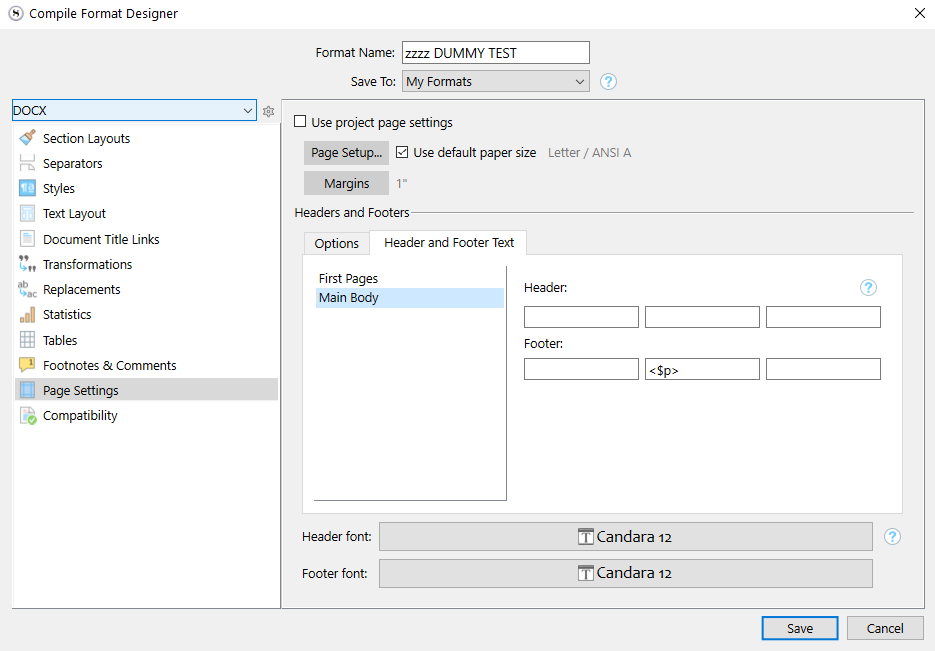
If you tell Scrivener to use “different headers and footers,” either on first pages or pages following page breaks, that will generate section breaks in Word. Section breaks are how Word knows to change the header/footer.
To check that setting, edit the Compile Format and look at the Page Settings tab.
You can also generate a section break if you’ve configured part of your manuscript to use multiple columns. Again, the section break is how Word knows the layout should change.
3 Likes
I was having this same issue and this fixed it. But from what I am gathering there is no way to compile for Word where the entire document is treated as a single continuous section (so that chapter and page count is continuous and the header/footer is the same throughout) BUT the first page of chapters does NOT have the header. That any break/change of the header is read as a new section by Work on compile? Is this correct? Is there an easy work around? Thanks.
I wouldn’t phrase it exactly that way.
I would say that headers in Word are defined in terms of sections. That is, changing the header in Word requires a section break, whether Scrivener is in the mix or not.
(To demonstrate this, create a test document directly in Word with a few pages of lorem ipsum text and try to change the headers.)
2 Likes
If you would like to use a more sensible word processor, LibreOffice is a good alternative that only asks for a donation if you can afford it. It uses a superior approach to document design, where styles drive formatting, all the way down to page headers and footers (or even paper sizes for that matter). In other words, you make your chapter text “Heading 1” in Scrivener, and in LibreOffice that generates the page break, what side of the book it prints on, whether it has a header on that page, what page style it should resume to after that point, and so on.
What you compile out of Scrivener can then be almost entirely devoid of intentional formatting (even page breaks), where the only thing that matters is the names of the styles you use, so that they match up with the names of the styles your LibreOffice template uses.
2 Likes
Hi AmberV. I loathe MS word and I only use it as a bridge between Scrivener and Vellum and to give editors copy for editing. LibreOffice looks rather nice. Does it help using that as the bridge between Scrivener export and Vellum import? Maybe I’ve been doing it wrong all this time and should just export as MS Word format and then import directly to Vellum. I’ve been opening my exports in Word, fixing up all the formatting and pulling my hair over the mess. I need a Word compatible file to give to editors. They won’t use Scrivener files and most don’t want pdfs. If I open an export in LibreOffice and then send that to an editor, will they be able to open it in Word? Sorry, too many questions. Hope you might be able to help. LibreOffice looks so much more sophisticated than the behemoth that is Word.
Sorry I don’t know much about Vellum, but it is my recollection that it works somewhat similarly to LibreOffice in approach. You basically need to have styles set up with the right names for it to match its template system, and it then takes over full control of the formatting at that point. The main difference between the two after that point is that LO is a complete word processor, and thus capable of designing your templates, whereas Vellum is more of a prepackaged thing.
Something that may help you out, if you’re using two different softwares that like style-name-matching to work right, is a text field in the Styles compile format option pane, which will rewrite the name of the style on output. Have a look at the “Vellum Export” stock compile Format’s settings, to see how it renames many of the styles to Vellum-friendly names (if you have not been using that, maybe this is all the bridge you need?). You could make another Format that renamed the same styles to LibreOffice-friendly names.
But as for your editor, sure, they will probably never know that you do not use Word to save the .docx file. And if they use track changes to make markings, you’ll be able to work with those in LibreOffice, too.
1 Like
Thank you for the explanation (and the replies that followed). I assume that there is NOT a work around you know of where the entire manuscript compile to Word can be one section, but the first page of each chapter does NOT have the header that is the same throughout the document. Meaning that even excluding a header on a page, even without a change in text, requires a section break and that there is no way to trick this behavior through the Scrivener compile?
Excluding the header is still a “different” header, and still requires a section break.
Again, this is a Word behavior and nothing to do with Scrivener.
Going back to your original post, though, worrying about section breaks is a red herring. You can configure Scrivener to exclude the header on the first page of a chapter and otherwise use the same header throughout. See the Page Settings pane of the Compile Format Editor, and Section 24.20.5 in the manual.
2 Likes