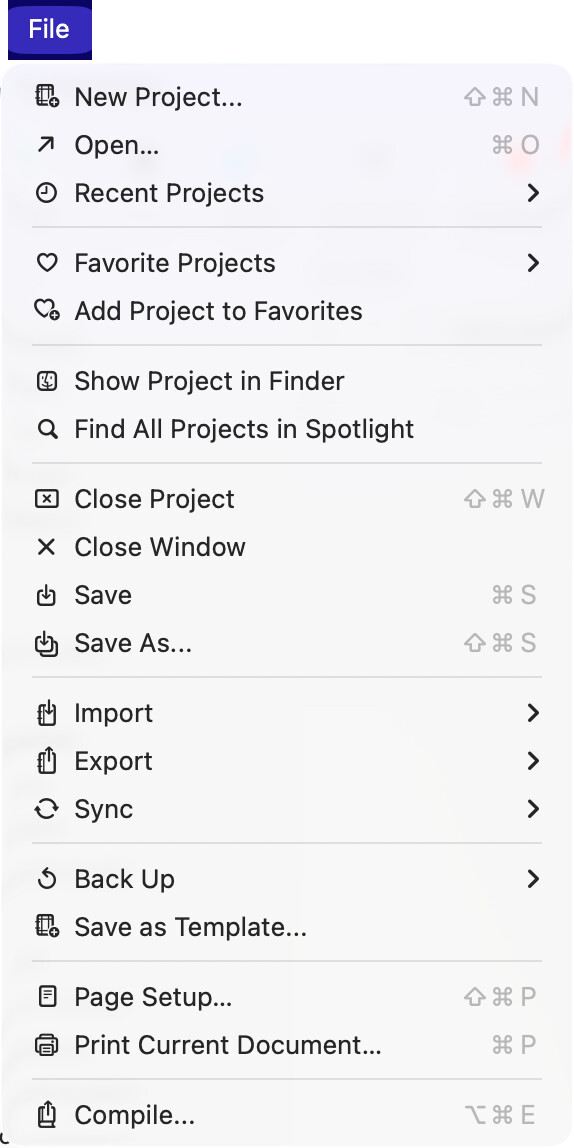
I ugraded my Mac to Tahoe and now there are icons to the left of almost every menu bar item in Scrivener 3.5.2. I couldn’t find any way of disabling the icons. The icons are very distracting. Is there any way to turn them off? Thanks!
1 Like
Welcome to your entire operating system! Anything you see that doesn’t have all of them yet isn’t conforming to the guidelines put forth by Apple. They want an icon on everything, even if there is no icon that would make sense for it, or you’ve got four or five in a row that really could only use the same icon. Even if you use different icons for the same exact type of thing from one program to the next (as they have shown the way).
Here’s a great article on just how bad this idea is:
Make your voice heard, send feedback to Apple.[1]
Sure, they probably just train AI off of it before dumping it in the digital shredder, but it’s worth at least tying up their server time over it. ↩︎
2 Likes
This article was shocking to read. The number of glaring errors (of commission and of omission) in the latest macOS interface is simply astounding, and this article places it front-and-center for all to see. I hope the folks at Apple read it.
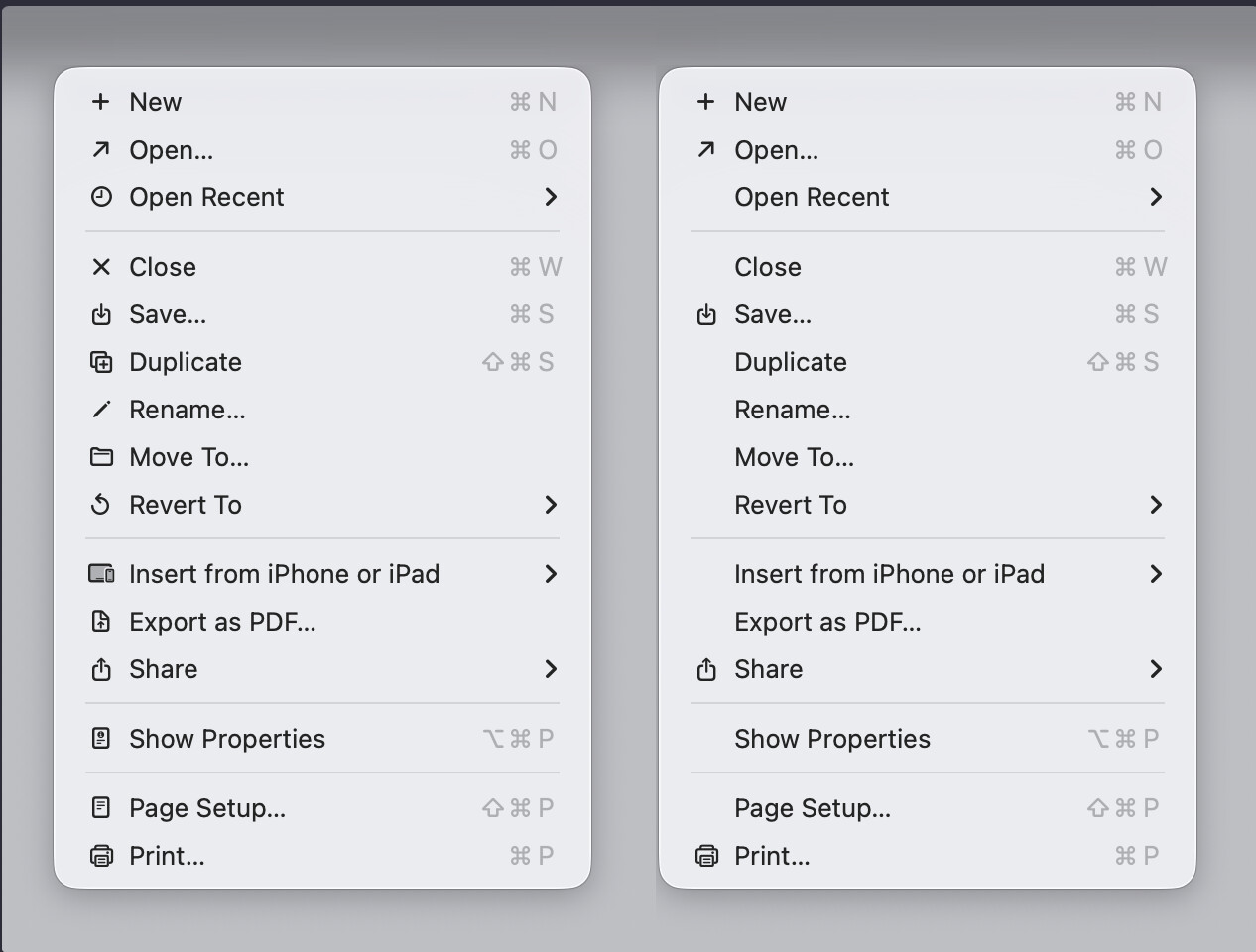
I love this comparison that shows how selective use of icons can help, but overuse will hurt…
3 Likes
Thanks very much. I provided feedback to Apple. It appears that many developers, like Rogue Amoeba, are offering users the option to remove the icons from menu items. Here’s an article about it: Rogue Amoeba - Under the Microscope » Blog Archive » Removing Tahoe’s Unwanted Menu Icons . It would be great if L&L could offer the same option as well.
2 Likes
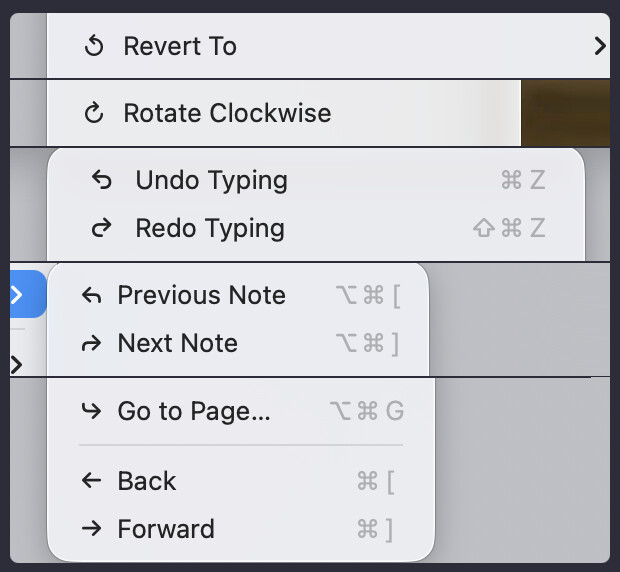
Thanks for the link! I traced down the technical discussion from that and pasted it to our internal message board. It looks like you do have to do some trickery to really do that, because not every menu command you see in Scrivener is even coming from Scrivener. The OS, and even other software, can inject their own. But there may be some ways around that. No promises on a toggle, to be clear, but it’s an interesting thing to consider.
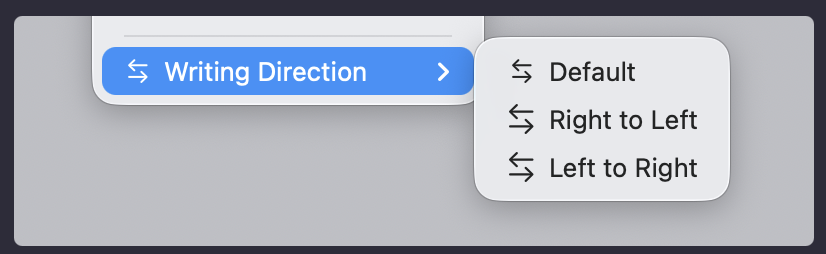
@cavalierex : And the arrows are hilarious.
The arrows are probably my favourite, but right up there with the confusing array of how many different ways there are to say “New” across different Apple programs.
3 Likes
Have you guys looked at the icons list to see if there are icons to icons. Lol. (One of those days where I am very happy to be a Windoze user.)
(I sympathize.)
2 Likes
As a visual person, I happen to love the icons despite being on Windows.
Mac had its golden era of iconography (possibly two eras, with classic Mac and then Aqua). I miss it. Even Windows enjoyed some nice iconography in the early 2000s.
2 Likes
IMO the icons on Tahoe are fine, it just needs some getting used to.
I actually don’t hate them, either. At the moment, at least. It’s very possible I will come to  . I see in earlier examples how selective icons helps you scan the menu, but for my brain, it also makes the non-icon items invisible. For now, it’s helping me read menus more carefully and notice things I hadn’t before. As someone who has designed plenty of things with icons, though, I do sympathize with how stupid selecting them for absolutely everything can be.
I’m not massively bothered by them either on a personal level, but there are good foundational design principles that Apple have just… torn up. Like the psychology around cogniative load (screen clutter & white space) - really basic rules around what works and what doesn’t. I’m happy for new things to tried, but this is a step back to the before-times when we didn’t have extensive UX research, screen recording tools and vast audiences to test what works and what doesn’t. Apple have just gone with “change”, rather than “make it better”, IMO (backed up by years of UX/UI research).
1 Like
What I do think this is a precursor to: ultimately larger icons to support a wider range of touch devices, such as touch screen MacBooks.
Ouch. So, they have transformed the Mac into Windows. It is true that Tahoe is Vista resurrected.
1 Like
I have many of them. But you wouldn’t want to hear them.
1 Like
The beta that keeps on betaing.
2 Likes
I think that’s not going to work for everyone. I’ve always had troubles in particular with interfaces that demand one look at a lot of small, wireframe, monochrome icons to use it. It’s a borderline migraine sort of reaction that I get from having to work in software filled with that kind of stuff. It is not an exaggeration to say that that design direction, over the past years, is large part of what drove me off of a Mac (there were piles of other reasons too of course, but that would all be a digression).
So for me, menus like this, are impossible. I lose a big chunk of advanced literacy and find myself having to slowly read through words trying to find what I need, in our own menus, that I have memorised from top to bottom. In properly designed menus I just look at the whole thing and can read it all at once, like a short sentence or phrases would be read.
Thank goodness it’s just a testing partition I only boot into when I absolutely have to. Hopefully by the time macOS 15.x is a security risk to have online, this mess will all be cleaned up.
@ptram : Ouch. So, they have transformed the Mac into Windows. It is true that Tahoe is Vista resurrected.
I was thinking about that just the other day, and how on Linux (KDE at least) it is not uncommon to see a lot of icons in menus. But it’s really not the same at all. Using icons to accentuate commands, using colour, using icons that have been designed to scale rather than a smudgy, downscaled mess of chicken scratches you can’t decipher (and everything else that article went into), is all one part of it—but the main problem is the edict to put an icon on everything.
If developers have to do that, whether or not they are visual thinkers or designers, then you’re going to end up with a lot of junk that makes no sense, and the more of that you have, the more you ignore it, and it just becomes noise. So what then, we’re learning to ignore something we don’t need, that doesn’t help anyone, just because we need to learn to ignore it? That’s fantastic design!
So I guess that’s a very optimistic way of looking at what I’m going through with them.  Yeah, I can’t use them like a second language any more, so I have to read them all out, and sure, maybe I find new features that way. But when I’m squinting through Scrivener’s menus looking for “Outliner Options”, something has gone terribly wrong.
2 Likes
This is my issue. Had I realized just what a mess Tahoe would be visually and how much interacting with their new interface choices would affect me, I’d have never upgraded to this mess. I’ve noticed I end my workday with headaches and eyestrain more often since installing it.
I’ve never seriously considered switching to Linux seriously until now. I had toyed with the idea just to be one of the “cool kids.” Now, I’m wondering if it’s something I’ll have to investigate.
1 Like
Well, everyone is different. But I’m ND, so visual things help.
Exactly, me too, but the “D” part of that can be wildly different from one person to the next.  I think perhaps because visual things do help me, if something is visual it screams louder than everything else, and if the screaming isn’t helpful it becomes extremely counterproductive. I have a similar reaction to the amount of rounding on elements everywhere in macOS 11+. My brain interprets detailing as significant, so to have so much detail everywhere, in every row of the file manager for example, it’s too loud and I can’t as easily just read the contents of the window.
3 Likes