An Update:
I’ve been working on a way to create endnotes in a Scrivener-LaTeX project for those chapters and sections with footnotes that consume the better part of a page in the PDF printout. (See Is there a way to rename a character or paragraph Style? - #31 by scrive).
The solution includes a kludge that uses ‘reference Inline Footnotes’ (in § 18.2.2 of the manual) instead with referenced endnotes that are placed at the end of the appropriate chapter or section (instead of at the bottom of the page) where the endnote marker exists.
I’m left with one last kludgy manual step, however, that I don’t know how to incorporate into the compile process.
The kludge includes adding a short, unique text string that is prepended to each of the endnotes. The unique text string can be searched for and replaced. I prepended the unique text string <[@@]> to each endnote as a ‘referenced Inline Footnote’. Once compiled, the endnote appears as ‘\footnote{[@@]…’ followed by the balance of the endnote text.
What I haven’t been able to automate is to replace the prepended unique text string of the endnote ‘\footnote{[@@]…’ with ‘\endnote{…’ so that after compilation, I’m left with properly formatted endnotes located at the end of the chapter or section.
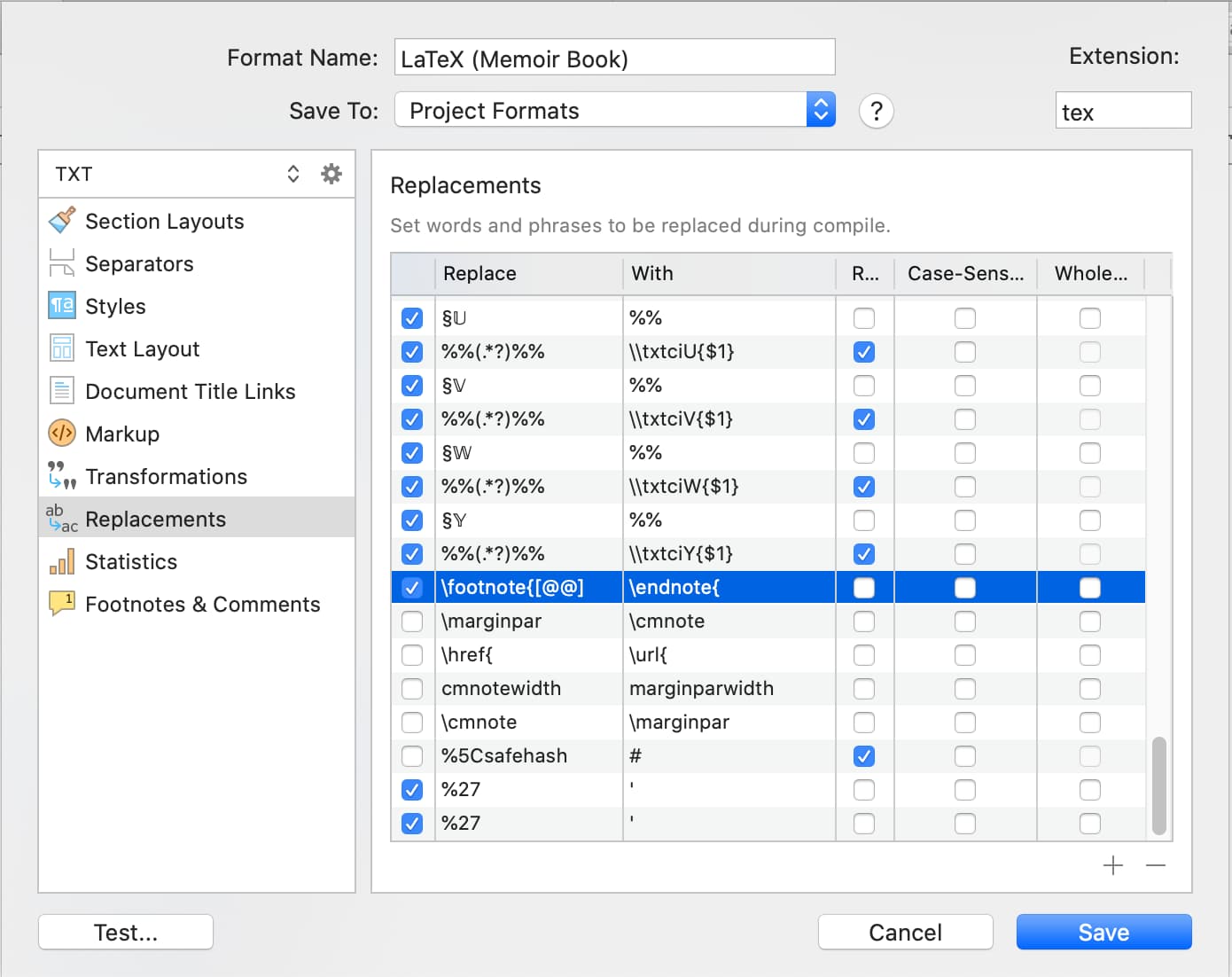
I’ve tried adding Replacements in both the Project Format screen:
and in the Compile screen:

but neither attempt to replace ‘\footnote{[@@]…’ with ‘\endnote{…’ in the final *.tex file worked as I thought it would.
I suspect the reason why neither of the above attempts at replacements worked is that they both occurred in the internal Scrivener compile process prior to the ‘referenced Inline Footnote’ replacement that creates the ‘\footnote{[@@]…’ text string to begin with.
So, I’m left with manually replacing the ‘\footnote{[@@]…’ text string with ‘\endnote{…’ for any endnotes in the final *.tex file.
If anyone has an idea how I might automate the last step to replace the ‘\footnote{[@@]…’ text string with ‘\endnote{…’, it would eliminate a manual step I’ll need to add after each compile. Not a big deal … I can certainly do a ‘replace all’ easily enough in the post-compile, pre-Typeset Latex screen if there are no other options.
Otherwise, I’m relieved that, even with the added manual replacement step, that I’ll be able to use endnotes in lieu of footnotes for those chapters and sections where there are bulky or numerous footnotes that consume a better part of a page in the PDF printout.
Thanks for reading,
scrive
