I’d like to share a workaround for a problem I encountered when compiling Korean text to PDF in Scrivener for macOS.
I was using an .otf font synced through Sandoll Cloud (a Korean subscription-based font service). The compiled PDF looked correct on screen, but copying and pasting the Korean text produced garbled characters instead of the original text.
I changed to a .ttf font, also synced through Sandoll Cloud, and compiled the document to PDF again. After that change, the Korean text copied and pasted correctly.
The results in my setup were:
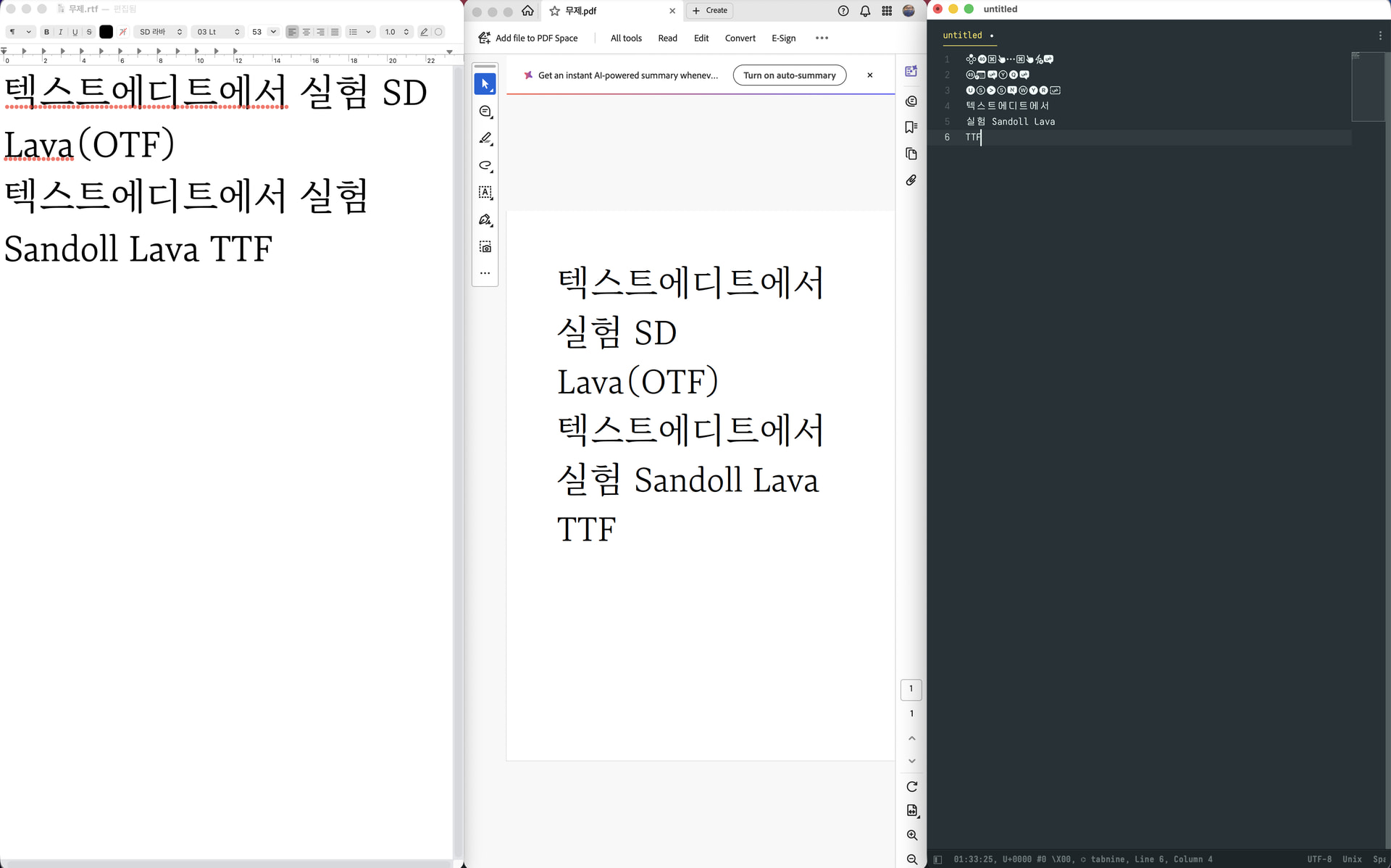
OTF font: Korean text displayed correctly, but copied as garbled characters.
TTF font: Korean text displayed correctly and copied correctly.
I found a couple of earlier discussions with related symptoms:
I don’t know whether these reports share the same underlying cause. My observation is limited to the fonts and setup I tested; I haven’t isolated whether the decisive factor was the font format, the particular font files, or their interaction with PDF compilation.
I’m sharing this in case trying a TTF font helps someone encountering a similar problem.
Has anyone else seen this with Korean, Chinese, or Japanese text, particularly when comparing .otf and .ttf fonts?
Could you test this using TextEdit, please? (Create a document in TextEdit, then print to PDF.)
For the text layer – what the Copy command sees – to not match the visible text probably indicates a problem well below the level of Scrivener’s own code. We depend on Apple’s tools for PDF generation.
As you suggested, I created a PDF using TextEdit, and the result is like the image. While the letters of OTF font are visible and can be selected for copying, the text appears garbled when pasted elsewhere.
The Mac version is 26.6.2 (25G83), but I believe this issue has existed since even earlier versions. My research suggests that in PDFs built using the native macOS engine, certain virtual Unicode segments—associated with Korean CID fonts or OTF-format fonts—may go missing, or the mapping tables may become completely corrupted, leading to a failure in reading the text layer (a “CMap parsing failure”).
It is said that Source Han OTF fonts are “exemplary” because they strictly adhere to Adobe’s standard CID technical specifications, while excluding all the ambiguous edge cases that might cause the Quartz engine’s legacy parser to malfunction—but it seems the font I used doesn’t meet that standard.