Hi, first time in the forum, so I’m sorry if this question has been dealt with before.
So, I have pasted my notes to the outer face of panels to rearrange and organize all the ideas, but I never write anything inside the panels.
Lately, a bug started occurring: I open scrivener to find that many of the panels are blank, are missing the text I have pasted to them.
If I click on them to move them, the text reappears, BUT if I click on the face of them and a cursor shows up on the panel, the text is erased, gone forever as far as I know, and I have no idea what I’ve lost.
If I can’t fix this issue, then Scrivener is completely useless, and I lose months of work.
Any help would be greatly appreciated.
Thank you
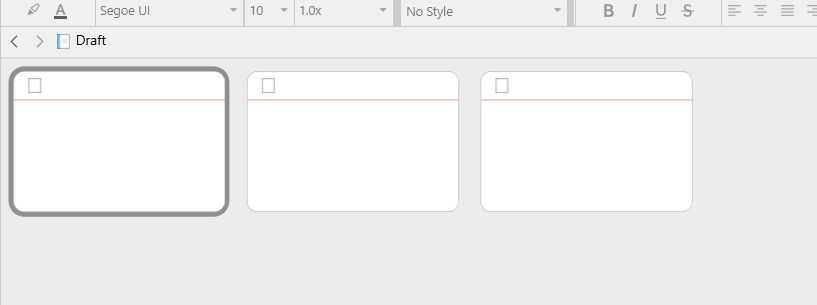

Yes, the panes, panels, whatever they are called. I write on the fronts of them only, not inside. Also, I have about 800 of them, so maybe it has to do with the fact there are so many?
These are called “Cards” or “Cue cards” (They are, indeed, virtual cue cards, like for a presentation, or to shuffle ideas.)
They are intended to show the synopsis of your documents. (Inspector panel.)
 … or
… or View > Inspector
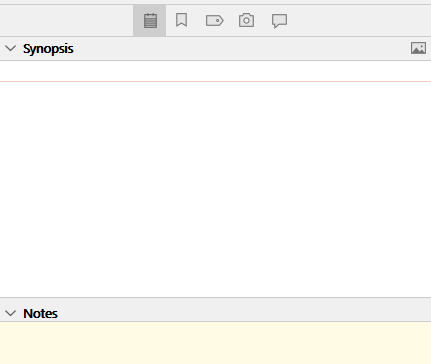
If the synopsis is empty, they’ll show the first few lines of the editor content instead. (The body text of your documents.)
This is only for reference, and is not editable in this view.
So, when you click in a card, it goes blank because you are now editing the synopsis.
That means that your text is in the main editor, in this view :

(Document selection is to be made in the binder – at the far left.)
If you want these snippets to be editable in corkboard view,

they, your snippets, need to be moved or copy/pasted in the synopsis panel (my above screenshot).
. . . . . . .
Now, there is a little bug in the Windows version, as per which the content doesn’t always redraw properly in corkboard view (you’ve encountered that). But not to worry, none of your work is lost.
(You should search the forum and/or read the manual about backups, while you’re at it.)
. . . . . . .
Voilà 
2 Likes
I’m not sure this is all of it. If the front of the cue card, when I’m looking at all the cue cards together, is the synopsis, then I’ve only written the synopsis, nothing once you click inside the cue card. I never click into the cue cards, just in the synopsis part.
But, every time I open scrivener, about 25% of the cue cards appear blank, and always the same ones. As soon as I grab a cue card to move it, the text reappears on the front and stays there. But, if I make the mistake of clicking on the center of the card where the synopsis is, and a cursor appears there, the synopsis is lost, and it never comes back. I suppose I could copy paste the synopsis into the body text area instead, but I would have to do that 800 times, and more for when I add all my other ideas from my documents from other programs. This will slow me way down, but I’ll do it if I have to.
Is any of this different than what you described?
I do really appreciate your help.
I need to double-click to edit a card’s synopsis content.
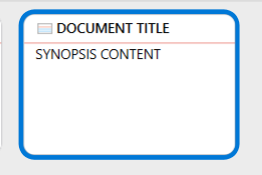
Please define “inside”. I have no idea what you mean. (Cards don’t have an “inside” or “backside” accessible somehow.)
. . . . . . . . .
This is not good. But I have no idea what could cause this at the moment.
(One thing I know for sure, though, is that you should do a backup of your project before testing whatever further more.)
. . . . . . .
P.S. I just saw in the options that the official term for them cards is “Index cards”. Not to mislead you, if you search the manual or something. (My bad.)
2 Likes
Described symptoms match yours :
The use of a cloud service seems to be the, or a potential cause of the issue, in both of these cases.
Is your project stored locally?
Do you use or have OneDrive active on your computer?
3 Likes
By “inside” I meant when you double click the little box in the upper left part of the card. I never use that, never go “into” the card like that. I only write in the synopsis part. I figured writing in the synopsis part was supposed to summarize the main content “inside” the card, which is found by double clicking the little box.
It does seem like that old poster had the same problem, but maybe they didn’t know the content wasn’t lost until they double clicked the synopsis part, if that was the case for them, too…
OK. That would actually be the main editor you access like that.
. . . . . . . .
I think your issue might very well be OneDrive.
It possibly snatched your files off of your computer.
Click this:
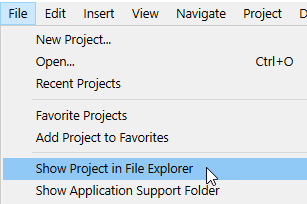
Then quit Scrivener.
Then right-click on this project folder (in Windows File Explorer), and in the menu find where to tell OneDrive to keep this folder (and files and sub-folders – the whole shebang) available offline. (I don’t have OneDrive, so that’s all the help I can provide as regard to that.)
If you find this menu command, set it right, then give it a few minutes for all of your files to download properly before reopening the project in Scrivener.
. . . . . . .
AGAIN : If you haven’t already, do a BACKUP of your project first.
2 Likes
A screenshot might be helpful. I’ve increased your trust level to allow you to post one.
1 Like
I guess I forgot to mention that I use dropbox so i can access my scrivener on two computers. the program file is saved in dropbox, but the backup is on my local disk. Also, i used scrivener this way for a while before this started happening. It only happens to more newly added index cards, too, but not all of them. On both computers it is the same cards every time. I did find that if I paste my notes into the main editor part of each card, it doesn’t disappear, and it still shows up in the synopsis section (grayed out). This could be a fine workaround for the future, though it will take me days to copy paste all 800 of my synopses into the main editor part of each card.
Also, if you think the problem arises from the fact that I am storing the file in dropbox, I could end that, and just not have access to it on my laptop. That would just mean I can’t work on my book when I travel… Or I guess I could put the backups on an external, and open the book on whatever computer I want from there?
Syncing through Dropbox should be fine. But you have to make sure that it syncs a local version available offline. Meaning that it syncs a complete copy on your hard-drives. If the project is solely on the cloud, in your dropbox, Scrivener can’t access your files in time or at all. (Those would be your vanishing files.)
You have to make sure Dropbox didn’t change that setting on its own. (Which I believe it does, silently, from time to time.)
…And which possibly doesn’t rule out OneDrive interference.
2 Likes
I deleted OneDrive, no change. The thing is, the cards are not vanishing, they are still there, and they appear blank, but only until I click and drag it with my mouse, even just a millimeter. As soon as I do that, the text just magically shows up on the formerly blank card. It’s like it’s there the whole time, just not visible, which wouldn’t be that much of a problem without the added problem that if I double click the center of the card, and a cursor appears, the text will delete permanently.
Anyway, if I put the text on the main editor attached to the card instead of the synopsis, the text stays, so I’ll just do that from now on.
Thank you so much for your help
Perhaps only for now.
If your cloud is acting up, set to save space on your computer, your files might very well disappear just the same, if left unmodified for a set time.
@Kewms would know much better than I do : I don’t sync, I don’t use a cloud, + I’ve ditched OneDrive as far as I could a long time ago.
2 Likes
Yes, that can definitely happen, and is the reason why any cloud service should be configured to make Scrivener projects available offline.
I’m still unsure about the source of the original problem, though.
2 Likes
I think there are two things happening at once.
The synopsis text that doesn’t display right away, and the fact that it disappears completely if editing is attempted by double-clicking in a card.
What I think – just think – is that Scrivener in order to display the coarkboard fetches the synopsis of the files represented, but not the whole file as it is unnecessary at this point. And that synopsis is stored in a temporary place for each card. But when double-clicking the card, Scrivener doesn’t actually have the synopsis in place (where it should be), and can’t get it as it normally would, because the file isn’t on disk. Thus the card turning blank, as the synopsis actually is.
Which cards display their synopsis at first and which don’t, likely – if that’s the case – being related to how the required files are sorted by the cloud provider. (Or if some files are still accessible on disk. – Those would actually have no issue.)
?
2 Likes
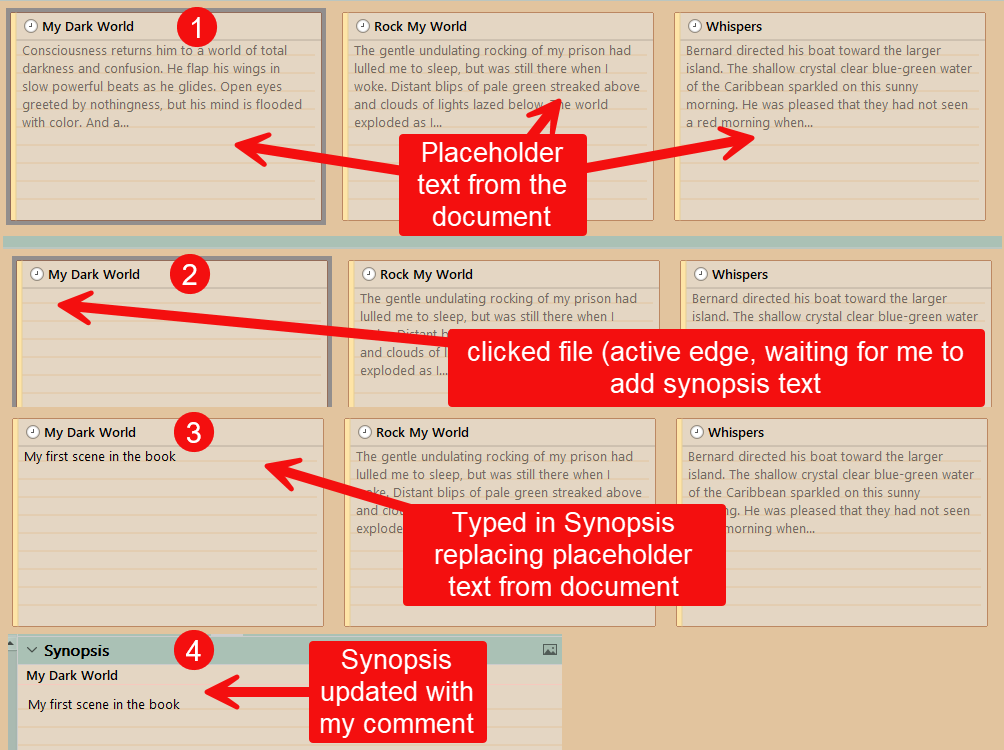
If you click in a card where there is no synopsis, but the first part of the text file in gray text, the text disappears because Scrivener thinks you intend to type in your own synopsis to replace the placeholder text from the document, which scrivener fills the empty synopsis with on the Corkboard. When you leave the card without typing then the placeholder text in light gray reappears.
This would be normal behavior.
3 Likes
Thank you, but this is not what’s occurring. There is no grayed text from the main editor. These cards have text ONLY on the synopsis part. They don’t go blank because I click on them, they (many of them) are blank when I open Scrivener. If I grab and drag them, the text magically appears as if it was always there. If I double click the center of the card, a cursor appears, and whatever hidden text was there is gone forever. Also, it didn’t happen for the first few months of me using the program. One day, cards just started showing up blank, and it’s been that way ever since.
It is your cloud service. (I’m 99% sure.) What you just said doesn’t lie. That’s how it happens for everyone to whom it happens.
1 Like
I deleted One Drive. Do I have to do more?