I am an illustrator and also write stories (picture books/graphic novels), so when I write my copy, I always add notes on action, illustration description, colour, etc (because I think in images). So what I need is to have 2 docs: We’ll call doc A the Master, and Doc b the Story.
The master (DocA) is like my brain vomit, where the narrative meets the notes on images, expressions, actions, etc.
The story (DocB) only has the narrative, the writing that will go in the book. I need Doc B so that I can read the clean story, where I can write and edit flow, rhythm etc. without the distraction of the rest of my brain junk
What I want is for any changes I make to Doc B to automatically update on Doc A. Is this an option on Scrivener?
I have an inkling this is either really simple and I just don¡t have the vocabulary to find the answer, or simply not supported.
There is no such automation in Scrivener. Nothing that will automatically fetch writings in a document and insert them live in another. Less even that would know where it goes.
What I would do in your case is to use a paragraph formatting style for the paragraphs/content that you want for your easy to read version.
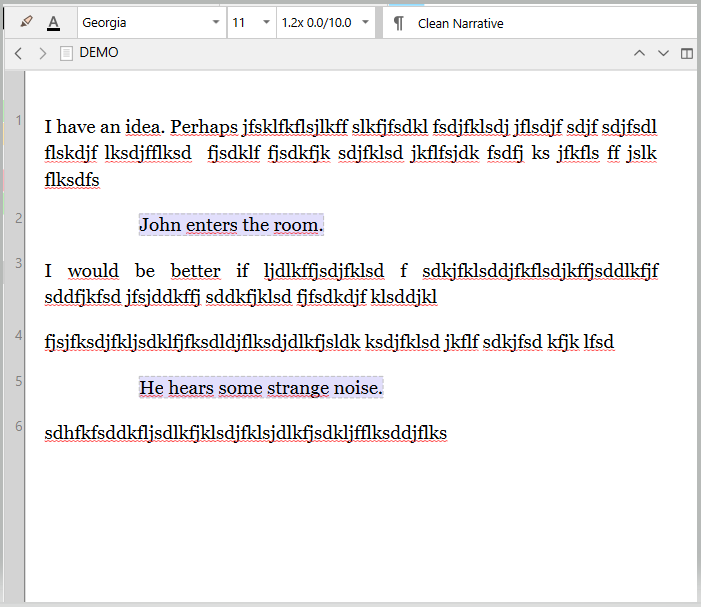
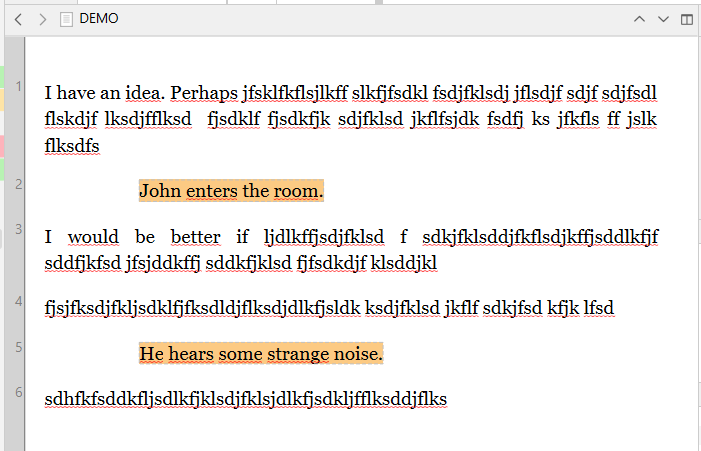
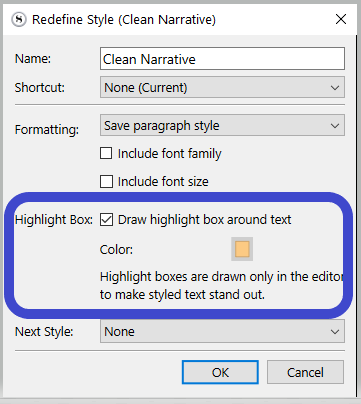
You’d then use a single document, with the content that is actually your B document easy to tell apart via its indentation and/or color box, as below.
(This box/color doesn’t compile. It is only a visual cue, for the user, in Scrivener’s editor.)
═════════════════════
If you use a style on both (each writing type (A/B) with its own dedicated style), you could then compile either your A or B version, by checking the Delete text of this style option/setting for the style you don’t want, in the styles panel of your compile format.
That would allow you three possibilities : A, B, A+B
but in general, yes. It is really simple. And only involves “One Doc” (so maybe the Doc B updading Doc A isn’t even necessary.)
Of course, for this to work, approach “One Doc” as a project (or a folder inside of a project), made of smaller chunks containing pieces of vomit and story, rather than literally “one” document or file.
So in the Binder it may look like:
vomit
story
vomit
whatever
vomit
story
Using metadata (labels, keywords, custom) you can tell Scrivener, what each piece “means”.
And then you create two Collections (saved searches), one for vomit, one for story.
That makes it very simple to view everything (just select the top folder in Scrivenings mode), or either vomit or story (by loading those in a Scrivenings session). That way it’s also simple to tell the Compiler to just output “story”.
It is entirely functional, but technically not the “correct” one. Not the one that qualifies as “by the book”, not the one in line with the way Scrivener is intended to be used.
But it works.
My understanding was that in the current case it would look like
A
A
B
A
B
A
A
B
and so it would be a hell of a lot of tiny chunks.
Or use annotations which can be excluded when you compile/export. I would use a combination of annotations (inside the editor) and comments where you can add side notes about what you want or are trying to achieve. I agree also with using document notes as well.
Hi, yes, I read the tutorial and saw a couple of videos. I initially thought I could tag bits of text within a doc and so having all the tagged text in both docs edit itself automatically when I edit it on one. I got stuck when I couldn’t tag text within the docs. Now I understand it’s about having one doc for each bit and filtering to visualize.
Thanks for all the help!!! I use comments for other stuff and also don’t help with the clean view I need to just focus on the text (my brain is very likely a little spicy, I’ve learned its easier to just go with it rather than fight it)
Here are some existing notes on supporting features, a sample project to demonstrate how this approach of using the outliner to take notes can be made easy, and other general thoughts:
 ) to be anchored to a specific place in the document.