On whether Scrivener should fix that iCloud-Windows can't sync projects

I have been using Scrivener for Windows and Scrivener for MacOS with OneDrive for years without issue. I can create a project on Windows or MacOS on OneDrive and read and work with the project on MacOS or Windows seamlessly. I honestly didn’t know what all the Mac users were complaining about with DropBox etc.

So, I decided to make better use of my iCloud storage and thought it would be a good place to put my Scrivener Projects. Not so fast!

MacOS Projects created on OneDrive open on Windows no problem.
Windows Projects created on OneDrive open on MacOS no problem.

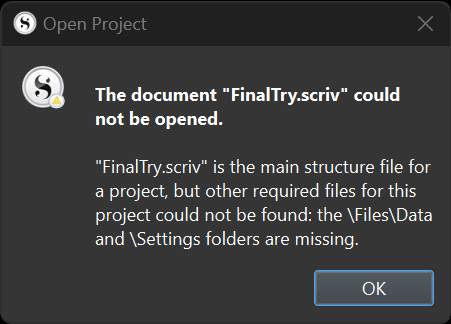
MacOS Projects created on iCloud will not sync to iCloud Windows. They have zero bytes.
Windows Projects created on iCloud will not sync to iCloud at all. Won’t even make a copy.

If you remove the .scriv extension from the Windows project it will sync to iCloud BUT it will not open in Scrivener for MacOS.

Files created on MacOS on an exFAT thumbdrive, or copied to an exFAT thumb drive will open on Windows.

Files created on Windows on an exFat thumbdrive, or copied to an exFAT thumb drive will open on MacOS.

It is pretty clear that for some reason iCloud treats scrivener project files differently. I have not had problems syncing other random file types. It only happens with Scrivener.

I suspect this has to do with Scrivener being able to use the IOS file system. It certainly doesn’t have anything to with the file format itself since it will open on exFAT, MacOS, Windows or OneDrive. Apple probably has some gate keeper system to prevent IOS applications from creating user readable files.

iOS wouldn’t be involved in anything like what you’re describing. As you note the project is just a folder with a bunch of normal files in it. It is that way everywhere, even on systems that obscure that fact. Anything that can copy a bunch of files around in a folder can copy or sync Scrivener projects. iOS is no different from Mac or Win in this regard (its difference is in how the OS itself heavily disables the ability to see or use the file system normally, but technologically its like a Mac).

In other words, if a folder of files does not sync with a particular service, and there is no explanation for it other than that service trying to be “smart” and fouling up, that’s probably all you’re seeing. Sometimes the simplest technology is the best (and that is most certainly not iCloud).

Differently from what?

A Scrivener project is different from “random file types,” in that it is actually a folder, with sub-folders and potentially hundreds of component files. The entire contents of the folder needs to travel wherever the project does. Your symptoms suggest that iCloud is “helpfully” storing all or part of the project exclusively in the cloud, to be downloaded on demand. You need to insist that the entire project be stored locally.

Different from other file types. I can put a jpg, png, doc, txt, just about anything onto iCloud and it will sync no problem. Just scrivener files won’t either from Mac to iCloud or Windows to iCloud.

I tried “fooling” iCloud by removing the .scriv extension putting the folder on iCloud and let it sync. Then I put the .scriv extension back. Everything synced OK.

When I open the project on the Mac, MacOS converts it to a “package” and adds the .scriv extension (again).

I don’t know if it syncs on iCloud because Windows cannot open the renamed “folder” at all. Just MacOS can access the (package) file/folder.

One has to wonder why OneDrive and exFat can deal with “package” files properly but iCloud cannot. One might suppose Microsoft wrote Onedrive to do a conversion, but clearly Apple is handling the “package” file properly when writing to exFat. Why not do that in iCloud for Windows?

Anyway, maybe Scrivener for MacOS should have the option to save as a file system rather than a package to be compatible with iCloud on other platforms. I looked, but I couldn’t find any such option.

Again, have you checked to make sure that iCloud is making the entire project available offline? The other examples you mentioned are all single files, while a Scrivener project is a folder.

The project format is exactly the same on all platforms. The only difference between Mac OS and Windows is how the two operating systems display the contents of the .scriv folder. Any service that performs any sort of “conversion” is doing something wrong.

Read what I did again more carefully. You have made assumptions which are incorrect.

I created a Scriver project on iCloud and it would not work (i.e. it would not sync). MacOS or Windows made no difference. I presume that Scrivener for MacOS and Scrivener for Windows knows how to make projects. Indeed when I do this on OneDrive it works without issue. So, create projects, OneDrive works, iCloud does not.

I copied the single project.scriv file from MacOS to OneDrive or a Thumb drive and it works on Windows without issue. I copied the project.scriv folder (I really don’t care if Windows calls it a folder and treats it like it does zip files) to OneDrive or Thumb drive from Windows and it works on MacOS without issue. So copying projects using OneDrive and Thumb Drive work.

The problem only arises when I use iCloud which will not sync a project.scriv between MacOS and Windows. iCloud WILL sync other file types or folders, created or copied without issue. If I create a Visual Studio Code project, and R-Studio project a TexStudio project on iCloud - they all work as expected.

When trying to fool iCloud deleting the .scriv, syncing and then adding back the extension on the folder name, MacOS gave me a warning that it had to convert my “folder” to a “package folder” for Scrivener to read the folder/files. After it converts it to a “package” it will no longer sync.

Why is it that Windows can properly recognize how to deal with a “package” file, but iCloud cannot?

Do your own testing. iCloud is the problem.

Yes, I understand that.

iCloud has a specific setting that allows it to store files – which in this case would mean both Scrivener projects and components of those projects – exclusively in the cloud. That setting is known to cause exactly this issue. I have asked, twice, if that setting is enabled.

This would be a question for Apple support. You are welcome to ask them. Please share any answer they provide with the forum.

I am using Ventura. I cannot find any such option.

I am using iCloud for Windows. I cannot find any such option.

I have checked iCloud web. I cannot find any such option.

I do not see Scrivener listed “special” applications for iCloud. So no options there.

I do not use Scrivener on IOS, but I checked anyway. No prizes for guessing I couldn’t find any such option.

Why should I ask Apple? All my other iCloud files sync properly. The issue is Scrivener and iCloud. Other programs work just fine with iCloud.

In Finder on the Mac, look at iCloud Drive. There should be icons indicating the synchronization status of the various items.

I think you answered your own question. Scrivener works fine with every other service. Scrivener works fine when transferring projects by non-cloud means such as a USB drive. The variable that causes syncing to break is iCloud.

Thanks for the view advise, but so what. It still doesn’t work even though it says the files are correctly syncing. That option also has nothing to do store only in the cloud which you said I should check.

Scriver works fine with other services such as OneDrive or even a thumb drive. Other programs work with iCloud. Scrivener doesn’t work with iCloud. Clearly the issue is between Scrivener and iCloud. That makes it an L+L problem because iCloud syncs other file types. Why should I ask Apple when a Scrivener file isn’t compatible with iCloud?

I really don’t care, I will continue to use OneDrive but don’t point the finger at others when the choice of how to use iCloud is entirely up to the Scrivener programmers. Other programs don’t have a problem with iCloud. That makes it an L+L problem by choice, by design or by bug.

L+L could use a different file type. L+L could figure out how to make the file type compatible with iCloud, L+L could ask Apple to fully support the package file format, L+L could state it doesn’t support iCloud syncing on Windows. Take your pick, but me asking Apple about iCloud is about as useful as yelling at a stone cat especially when it syncs other files and folder types perfectly fine.

Please provide the screen shot that shows you have configured OneDrive to keep all your Scrivener folders copied “offline”, e.g. on the local drive (which Scrivener needs to work properly).

Plenty of other users are able to use iCloud successfully with Scrivener projects. The screenshot that @rms asked for would be helpful, as would one showing your Scrivener projects in Finder on the Mac.

I turn Files On-Demand OFF so all files are stored locally as well as on OneDrive. On MacOS the option is less clear than it is on Windows 11 but it is there. On MacOS you can ask OneDrive to sync all files.

I am not always connected to the Internet so I always store files locally. A few years ago OneDrive changed the default to Files-On-Demand. Very annoying.

I don’t have problems with OneDrive. It works great. My problem is with iCloud.

I can use iCloud with Scrivener projects as long as I use MacOS. The files will not sync to iCloud Windows, while other programs have no problems syncing their files.

As I have said already, in my view this is still an L+L problem as L+L could choose to NOT use the package format that is incompatible or to figure out why it is not compatible and rectify that issue.

It could be as simple as setting or un-setting a file type flag or registering or un-registering the file with MacOS so iCloud treats it like a “standard” file.

My guess is that any changes will make the file type incompatible with Scrivener IOS, but that is just my guess. Apple goes to great lengths to ensure IOS remains a closed eco-system.

You seem so sure of yourself about how simple all this is would be for Literature & Latte to fix your problem.

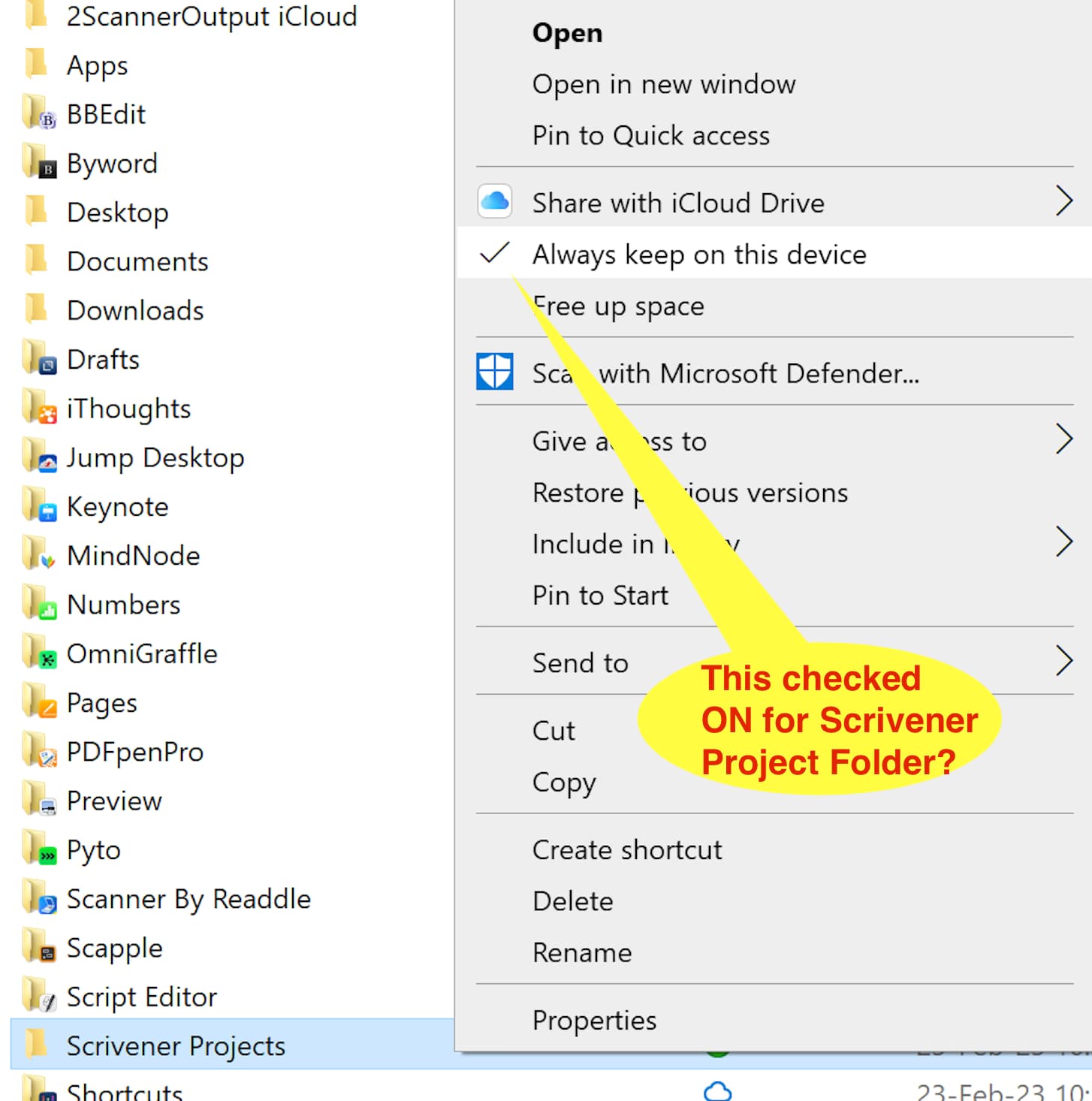
I’m going to try one more time. I installed (though I do not need) iCloud for Windows on my vm running Windows 10 (latest updates applied). see screen shot of the icloud folder in Windows where I right-mouse clicked on properties for a “dummy” folder I designated as the Scrivener Project Files.

Have you told iCloud on Windows for your root folder to “always keep on this device”?

Explained at Keep iCloud Drive files downloaded on your Windows computer – Apple Support (UK)

You know why I’m pretty sure? Because I test things first. Did you? Did you just tick the option or did you actually create a project on MacOS and then open it on Windows?

I have all the options properly checked. I have other non-Scrivener files which sync properly. The Scrivener File has ZERO bytes in my iCloud folder on Windows. It will not open.

image

It is only with Scrivener files. It only happens with iCloud. Other types of files sync fine. OneDrive works fine. I am sorry to repeat myself, but you seem to think this is a trival user error. If you had read the entire thread you would also see that zero byte sizes, the lack of syncing of Scrivener files in a common experience and not mine alone.

FWIW Creating a Scrivener project on iCloud in Windows won’t work either. iCloud won’t even try to sync it unless I remove the .scriv extension from the folder name.

As I have said already. I really don’t care because OneDrive works perfectly well for me. I can use iCloud storage for other project types that will sync properly.

The only reason I commented in this thread was because the original question was from a person who wanted to transfer projects from MacOS to Windows using iCloud and did not have any successes. My experience is the same. No success.

I would be very happy if you share a solution, but please don’t just parrot what Apple Support has to say without testing to see if it works first.

Also, I’m using Windows 11. I don’t think that really makes a difference, but who knows.

Exactly what I meant by the above: Scrivener’s files are just normal files, like JPG, TXT and so on. There is nothing “special” about its files that would make it difficult for them to sync anywhere.

The fact that by simply changing the filename of a directory makes iCloud work should tell you all you need to know about were the fault is: iCloud is fumbling when syncing a basic folder purely because of its name. I would steer very clear of any sync service that malfunctions while trying to be “smart” like that. Just keep sync simple, don’t assume you know better than what the user wants. A design ethic that lead to that decision has implications of how they approach things as a whole.

Scrivener has nothing to do with any of this, it is 100% an Apple bug or design flaw.

The only reason I commented in this thread was because the original question was from a person who wanted to transfer projects from MacOS to Windows using iCloud and did not have any successes. My experience is the same. No success.

Now that I can agree with. I have heard from multiple people that iCloud isn’t very good when working between Windows and Mac and that pretty much anything else is a better choice. That goes beyond whatever issues Apple has fabricated around packages, too.

As I have said already, in my view this is still an L+L problem as L+L could choose to NOT use the package format that is incompatible or to figure out why it is not compatible and rectify that issue.

No, we’re not going to change our entire file format just to appease one sync provider’s buggy mechanisms. Bear in mind, there is no such thing as a “package format” anywhere but within the context of the macOS GUI. Once you even leave the GUI and start using the command line you will see there is even no such thing as a “package format” on the Mac (in the whole, not just the part you work with normally), and it certainly is not a thing anywhere outside of the Mac. The only thing “package” means, is how a specifically named folder reacts to certain high level user events, like double-clicking on it, or whether there is an arrow to the left in Finder list view that lets you view its contents. That is all it is.

There is zero relevance when it comes to syncing, unless the sync service tries to play smart and recognise what “.app” means, or “.scriv” and suddenly stop working the way it normally would and do something else. That’s on the sync provider if they do that though, and if they do it incorrectly and mess up basic file and folder syncing, that’s their problem, not ours. We’re just making folders with files in them here, on PC and Mac.

So report it to them.

6 Likes

Taking one piece of the many pieces of evidence I presented and building an argument around is the very definition of cherry picking. To review:

  1. Visual Studio Code can create files, create folders, modify them on iCloud on MacOS and iCloud on Windows without problems. Sync is both ways.

  2. R-Studio statistical package can create files, create folders, modify them on iCloud on MacOS and iCloud on Windows without problems. Sync is both ways.

  3. TexStudio LaTex editor can create files, create folders, modify them on iCloud on MacOS and iCloud on Windows without problems. Sync is both ways.

  4. Scrivener can create projects on iCloud and modify them in MacOS. Scrivener can create projects on iCloud and modify them in Windows. iCloud does not sync those projects. The MacOS Scrivener project will create a file with ZERO bytes. The Windows Scrivener project will not sync at all.

  5. If I modify the Windows Scrivener project “folder” name and remove the “.scriv” the Windows Scrivener project folder will sync but needs to be modified on MacOS before it will open in Scrivener on MacOS. Something on MacOS converts the folder to a “package” format and then it opens without issue. The new “package” format will not sync and has ZERO bytes on iCloud Windows.

Why does Scrivener fail iCloud syncs when other programs work just fine? Are Microsoft, R-Studio and TexStudio being exceptionally clever with iCloud? Why only the package format file won’t sync?

Trouble shooting 101 change one thing and if it breaks, then that’s the problem.

So again, why just Scrivener?

Fix it, don’t fix it, I really don’t care because I use OneDrive anyway but if you think this isn’t L+L’s problem, then that is the problem.

It was fun and I learned a few things, but I am done troubleshooting your issue.

I don’t know, at this point I think you’re just stuck on calling it one thing, and no matter what anyone says, or what evidence is provided, it’s going to always be that thing you latched on to at first.

It is imposssible for this to be a Scrivener problem. Go on, try it. Use Visual Studio Code, to create for yourself from scratch a simple Scrivener project. This is something anyone can do with a little patience. All it is is a folder with some XML files, some subfolders, and a naming convention on the main folder. Make your “project” and put it in iCloud. Does it work?

It’s not cherry picking if the entire foundation of your argument is that it is “Scrivener’s fault” because the file name on the directory causes one sync service to croak. If that one thing proves your whole theory wrong, if changing the name lets it sync, then all of your other “evidence” falls apart.

But again, this is pointless. It will in your mind forever be our fault that iCloud Windows struggles to figure out how to sync “some file name.scriv”, but has no problem at all with “some file name.blahblah”.

2 Likes

Just like you decided it was iClouds fault and gave up?

Kettle, black.

Not really, because you have made an assertion but provided no evidence to support the assertion. Instead you have taken a single test and chosen one of the many possible explanations for those results. That is not troubleshooting. That is not evidence of anything but a lack of effort to investigate.

I’ve already shown that VSC works just fine. You prove it doesn’t. I’ve already shown I R-Studio and TexStudio sync as well. All three programs use complex and varied file types. Look at all the evidence and you quickly find it all has to do with the Scrivener file. I’ve provided evidence, you’ve provided nothing but instead blame it Apple.

Do your own testing. My livelihood doesn’t depend on Scrivener or iCloud. I just happen to use Scrivener on both MacOS and Windows. I like the program, but seriously why are you going after me - the customer?

FWIW, one of my earliest suggestions was to have “Save-As” option. I have never suggested making radical changes to the program, that is an assumption you have made. Maybe put the file in a compressed format like ZIP and save-as? A couple hours of programmer’s time to code and test? Maybe put to rest an issue that has been a source of user complaints for years?

I am not telling you how to run your business. I have made suggestions, is that not one of the purposes of this forum?

Update: Putting the Scrivener project in a ZIP file syncs perfectly on iCloud. Took me three minutes to test.