Sure. Because a ZIP file is a single file, and so the service’s handling of folders is irrelevant. We have always recommended sending ZIP files around as a great way to avoid the limitations of synchronization services.
Scrivener’s Backup command already creates ZIP files by default.
List of found file types that sync on iCloud (windows):
dll
autosave
backup
checksum
zip
ini
dat
draftsActionGroup
history
indexes
jpg
lock
md
html
pdf
csv
docx
msg
pages
png
pper
plist
Rproj
R
rtf
rmd
tex
txt
log
xml
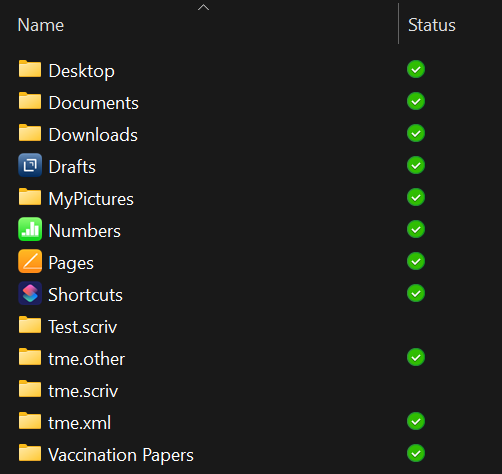
Folders with no . modifier.
Folders with .other added.
Folders with .xml added.
List of found file types not synced on iCloud Windows (zero bytes)
scriv
folder with .scriv will not sync
Why are scriv files/folders not syned in iCloud? iCloud syncs many other file types just fine. Why only .scriv file or folders won’t sync?
Meanwhile, I find that adding small amounts of unsweetened chocolate to spicy dishes really brings out interesting nuances in the flavour.
Why haven’t you tried testing any well-known “package” formats? That might be more interesting than listing all of the file extensions you can think of.
In any case, yes, we do indeed know how to test software and, as previously explained at length, we are satisfied that this is an iCloud issue.
As evidence that it is not, you are presenting a list of single file formats. But since Scrivener is not a single file format, iCloud’s ability to handle those formats is not relevant to the question.
The package format is MacOS. Scrivener makes both MacOS and Windows version. The issue is using iCloud to sync between the two. Please don’t insult my intelligence.
So, you are not going to investigate why OneDrive syncs Scrivener Projects perfectly well while iCloud for Windows does not? You are not going to investigate why any file or folder with “.scriv” will not sync on iCloud? Am I correct in assuming that is the case?
If so just tell users Scrivener does not support iCloud for Windows. Easy and then we can all stop wasting time trying to make it work.
I’ll make it even easier for you: we do not officially support any cloud services and never have. The only exception is Dropbox on iOS which by necessity uses it directly, but on Mac and Windows it has always been a matter of:
If it does work: use it at your own risk. We’ll provide advice on best practices, but it is ultimately your responsibility to take care of your work and use technology correctly.
This is pretty much how “cloud sync” works across the board, for all software. After all, what makes this technology appealing is that nobody has to support it, it just copies files around for you (well, good ones do anyway. Bad ones pick and choose which files to copy and don’t give you any choice in the matter).
And when it comes to sync tools malfunctioning or not working correctly, or maybe even in a way we would rather they not, the proper place to seek support for them is from the vendor that made it, not the software companies that you use to save files in their sync folders.
Got it! We are on our own. Maybe you should have opened with that?
After all the suggestions you and your compatriot gave in this thread, one might be forgiven thinking Scrivener supported cloud services. My bad I suppose.
Just one final suggestion. You may want to consider updating Chapter 14 of the Scrivener Manual. The one titled “Cloud Integration and Sharing” with this “official” position because it is confusing when one reads from the manual things like:
“Placing your Scrivener project into a cloud folder, so that it is available to every
computer you own, is today a natural concept that by and large works well with
Scrivener.”
I have already shown that .page files sync in iCloud for Windows. They are a package format. Your assumption that the package format is the problem is not correct.
All my issues continue to be with Scrivener files only.
Smart maybe, but you haven’t been following the thread closely.
Package files are not a problem. Why would I ask Apple about something that works perfectly?
In fact, I have yet to find any file type that doesn’t sync - except for Scrivener files.
Who is responsible for Scrivener files? What program writes them to the Cloud? Who devotes an entire Chapter in their manual explaining how to use Cloud services to share Scrivener projects?
You are partially right however. There is nothing L+L is going to do about it.
Consider yourself very lucky. I’ve yet to discover any file type that doesn’t challenge iCloud sooner or later. Things get stuck all the time for no apparent reason (between different Macs!).
It’s a remarkably shitty sync service, to be honest. Still, whenever I write that, some people will chime in and state that it never failed them and they happily synced their Scrivener projects this way for years. Uncompressed. I wouldn’t even dare to think about it.
Apple’s iCloud client. Scrivener writes its files to the (local) file system. Everything beyond that is out of its control.
I completely avoid Apple’s CloudKit and iCloud sync services as much as possible. It’s crap. Technical Term. And the idea that Apple has provided a bug-free top-notch Windows version of there software … well …
On my Mac, I’m unable to inspect the contents of a .pages “package.” How are you able to do so?
Point being that the relevant characteristic of a Scrivener package is that it is “open”: a synchronization service can poke around inside of it and synchronize some files but not others. A “closed” package, like a ZIP file, behaves as a single file to everything except its designated application. Scrivener packages are made this way on purpose – both for performance reasons and because we don’t want to hold user data “hostage” – but it does create some unique issues.
DevonThink’s databases are structured similarly, for much the same reasons. I thought of suggesting you download their trial and experiment with their format. But (1) they don’t have a PC version, and (2) they use their own internal synchronization mechanism, and explicitly do not support saving DT databases in “cloud” folders. (Also (3), I like their support team and don’t want to accidentally spawn a child of this conversation in their forum.)
Exactly what do you mean by “support” in this context?
We unambiguously support Dropbox synchronization with iOS Scrivener. There is code in iOS Scrivener that directly calls the Dropbox API.
That is the only service on any platform for which that is true. For all other services (including Mac/PC Dropbox) on all other platforms, Scrivener simply saves the project to the local file system and gets out of the way. That has always been true, and we have never claimed otherwise.
We do, in this thread and elsewhere, offer suggestions based on our own and others’ experience, explaining the most common ways in which things can go wrong and best practices to avoid issues. If that is going to be defined as “support” and we are going to be blamed for bugs in services over which we have no control, maybe we should stop doing that?
Rename the extension from .pages to .zip – it’s basically a zipped package (folder). I suspect that’s why iCloud doesn’t struggle with it any more than with a zipped Scrivener project.