My publisher contacted me to let me know his InDesign program does not correctly display the manuscript. Some text disappears, italic written text changes fonts, which cannot be changed back without being unreadable, and so on. Is there anything known about such problems? Does this happen often? And what causes it? Are there some settings, perhaps, that can prevent this from happening?
If nothing changes, my publisher will no longer accept manuscripts written in Scrivener.
Please help.
I haven’t heard of problems like that specifically, but before going to deep into it, I would try compiling to RTF, first. If they don’t accept that, which isn’t unlikely, then convert it to DOCX yourself using Microsoft Word, and see if that works better. The third-party DOCX converter that we use may be the thing getting in the way here, in other words.
3 Likes
Hello Amber,
thanx for replying to my question.
I’ve tried the solution you suggested, but there is no difference between .docx and .rtf or .odt for that matter. Somehow when compiling, Scrivener corrupts the file. My publisher reports the same problems in InDesign as before. (at least he is trying)
Text written in pagewide text is set back to right-side oriented, When i enter special characters (three dots in triangle shape), the next text is changed to Courier New 8 (while working in Scrivener) even thogh i was working in Times New Roman 12, but in Google Docs or LibreOffice, the text stays Times New Roman 12(or is converted ito it because it isn’t recognized). Also, when opening the file in LibreOffice and Google Docs, i see a hashtag between every paragraph and three stars at the end of every scene. (which must be removed before sending it, very annoying in a manuscript 400 pages long.)
This is becoming a problem; my publisher will no longer accept documents written in Scrivener, and he has about five or six authors who work with it.
There are several ways to export DOCX from Scrivener. Scrivener has native compile with three converter options in Settings (the legacy Java converter and the better native one @KB wrote).
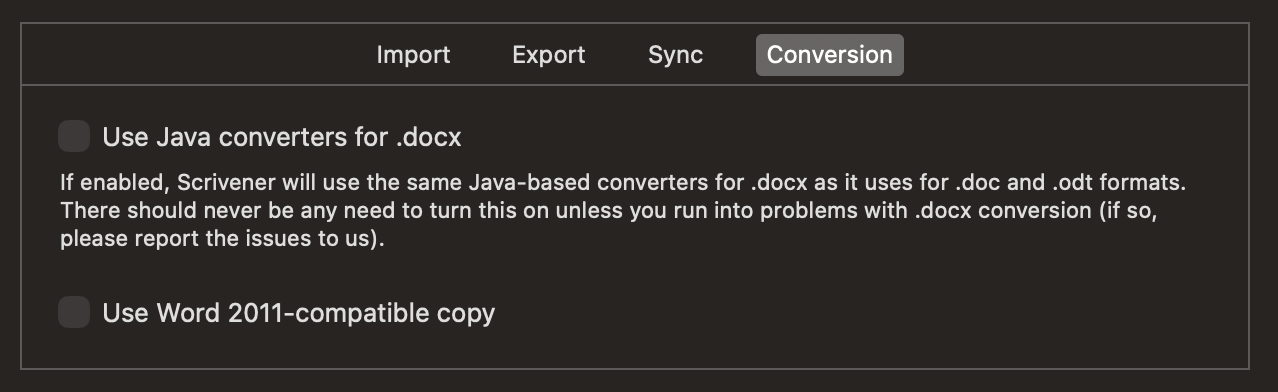
and there is also a MMD > ODT (that can be converted to DOCX, as I don’t think InDesign supports ODT natively?) and a Pandoc > DOCX (that produces very clean and styled DOCX). I use Scrivener > Pandoc compile and post-processing for DOCX that are very well structured and styled, though I don’t own InDesign, and can’t test myself.
It is hard from your description to know what exact settings you are using; Scrivener settings and the compiler options. The best thing would be for you to make a sample Scrivener project that reproduces the error your publisher faces, then we can have a look at compile output options. DOCX is really just zipped up XML, the problem space is pretty trivial to solve IMO.
I should point out, that Pandoc can export to ICML and thus Scrivener > ICML is another potential route. Adobe has extremely poor standards support and DOCX is not the best standards-compliant format either, this is a problem InDesign has wrought (leave it to the end user to scrabble around a problem space that could easily be solved by a corporation)…
3 Likes
Depending on how much troubleshooting your publisher is willing to do, you might try several tests.
* Create a very basic Scrivener document with no styles and no special formatting.
* Create the problem text directly in Word, without Scrivener’s involvement.
* Create the problem text directly in LibreOffice, without Scrivener’s involvement, and convert to .DOCX from there.
I’m pretty sure we would know by now if there were a fundamental incompatibility between Scrivener and InDesign. It’s more likely that there is something odd about either your specific project or the publisher’s InDesign template/import process.
Having special characters change fonts is a thing that can happen if the desired glyph does not exist in the chosen font. Likewise, if the chosen font doesn’t have an italic version, you might see the software fall back to an alternative that does exist. Hashtags between paragraphs can be due to a Compile setting (specifically the blank line separator).
3 Likes
That has nothing to do with RTF or DOCX, or even formatting in general. You will find existing threads on that.
This is becoming a problem; my publisher will no longer accept documents written in Scrivener, and he has about five or six authors who work with it.
Sounds like they need to display some adaptability. It’s kind of their job to take their clients’ work and reformat it for them.
2 Likes
Okay, after rereading different optons i’ve been raoming around in the settings and i think i found the problem. (a bit stupid i’m afraid.)
When compiling i never gave a second thought to which FORMAT to use. Standard mine was set on Manuscript Roman. Being Dutch where Roman translates to :novel, I assumed is was just that. Now i became aware that it meant the font Times New Roman, and what happens is that everything is filtered through that lens. So everything that did not fit the bill was changed with metadata behind it (i presume) with which InDesign could not work properly.
Now I’ve changed this setting to Default, and the document stays unchanged when converted to .docx. I’ve sent a test page to my publisher to try it, so if you don’t hear from me again, this issue is solved.
1 Like
There’s still something a bit odd going on, though, as forcing the font to Times New Roman should only do that. The output might not look like you want, but it shouldn’t be unreadable to InDesign or anyone else.
1 Like
I know what you mean, but still…
My publisher went on a quest for a solution but found numerous messages describing these kinds of compatibility issues between Scrivener and InDesign instead. So it isn’t a new problem.
In the meanwhile, I’ve created a custom profile for compiling a document and turned off a lot of features. I hope this fixes the problem.
Well, my publisher isn’t the only one who ran into these issues. A quick search in the internet reveals that it is a known problem in certain circles. Maybe no one has pointed it out, but it isn’t rare.
It would certainly be nice to get some details on this, so that we have something to look at—particularly given a lack of direct testing ability in InDesign.
I would also cast my vote in for the advice given in this post, above. Switching to a Pandoc-based DOCX output is perhaps not as much of an upheaval as you might think, given how Scrivener augments and supports Markdown so well. It is quite possible to not use any Markdown in your text, and indeed that means a project that already doesn’t have any can be made to work with it.
The main dependency on Scrivener’s side, I would say, is effective style usage. If you’re working closely to the start of the publication process as it sounds, then you might already be in a good place for that.
Here is a quickstart guide on Pandoc+Scrivener, which I think is the best place to cover both the basic idea, and provide a checklist of steps to follow to try it out. It was written specifically for those looking to add an index, which Scrivener’s basic output of course cannot do, but has built-in presets for doing with this alternative way of compiling.
Otherwise, maybe check around here for threads on InDesign. There have in the past been publishers on this forum that have posted how they use Scrivener with it. If it is as dire and unworkable as your colleague states, it seems we would have heard something from these posters, or any of the many more amateur and hobbyist designers that have posted their successes, too.
2 Likes
A quick search found texts like this on the Adobe InDesign forums where the advice is to export from Scrivner to Word, and then import to InDesign.
So it seems the solution is to find out what formats InDesign can digest and export to that format from Scrivener then import with InDesign.
I’m sure you can understand that “people on the internet say this” doesn’t give us anything actionable. We would be happy to work with you and/or your publisher to get to the root of the problem. That would require, as a starting point, a sample project and a sample Compile Format that produced a file InDesign couldn’t handle, along with details about exactly what InDesign did.
5 Likes