I know this has been raised before multiple times, but… this is the most irritating and pointless feature in Scrivener (for me, at least)!
Right click in binder should only bring up the context menu, without changing focus in the current editor. We have left click to do that latter task. I most often want to open a second document in the quick reference, copy holder, or even the other editor while keeping the existing document open in the current editor.
In my experience, right click only brings up the context menu in every app I use. However, if you have a problem resetting right click to “normal” behaviour, I’d happily settle for something like ctrl-right click to the to the context menu without resetting focus..
I use Alt+click
It opens the document in the other editor (splits it if not already).
As for the copyholder and the quick reference panel, I wouldn’t know. There are menu commands and shortcuts, but you have to tell Scrivener which document first, which means clicking it. And therefor it fixes nothing.
So overall yes, I somewhat agree, that behavior is useless.
Not annoying to me as I never work things this way, but useless for sure.
Perhaps you could develop the habit of opening the target window first (using shortcuts, which will load your current document in it) then use drag and drop ?
The other option would be to lock the editor, but that is quite extreme as a solution, and will most likely turn out to be even more annoying in the long run.
For myself, I’ve always just used history (⌘[ / Ctrl+[) to “undo” unwanted interface changes. They can happen for a number of reasons, and that is the simplest solution to the problem. It’s also an extremely useful tool to get accustomed to anyway, if you aren’t already—at this point it’s habitual to the point of barely noticing when I need to use it. Locking does somewhat solve the problem, but that’s two shortcuts instead of one—better for extended decoupled binder activity I would say.
Thanks @AmberV for the pointer to the tech details (I hadn’t found them). It makes sense as I am a tech guy to a certain extent(!) but it is truly a UI bug in the Win context and should be raised as such. Who would do that?
Thanks also for the work-around. It’s a bit clunky but the simplest I’ve seen.
Thanks @Vincent_Vincent … yes, alt+click is good for the other editor.
I guess my “problem” is that I’ve been on Win since the '90s and the context menu is in my bones!
Thanks also for the other work-arounds. I think the “undo history” suggesting from @AmberV looks the easiest.
It would be an enhancement request filed to Qt development, though I wouldn’t bother as we’ve already done so. I don’t know if it would be technically considered a bug. We might disagree with it, but the behaviour could be entirely intentional and working as intended in the code.
At four years and counting, you’d need some serious lung power I’m afraid.
It’s one of those thing where, for all we know, there is someone at Qt that still wears suspenders and vehemently believes right-clicking is synonymous with activation.
This is a serious usability flaw in Scrivener for Qt/Windows. Whether it qualifies as a bug-bug is kind of beside the point.
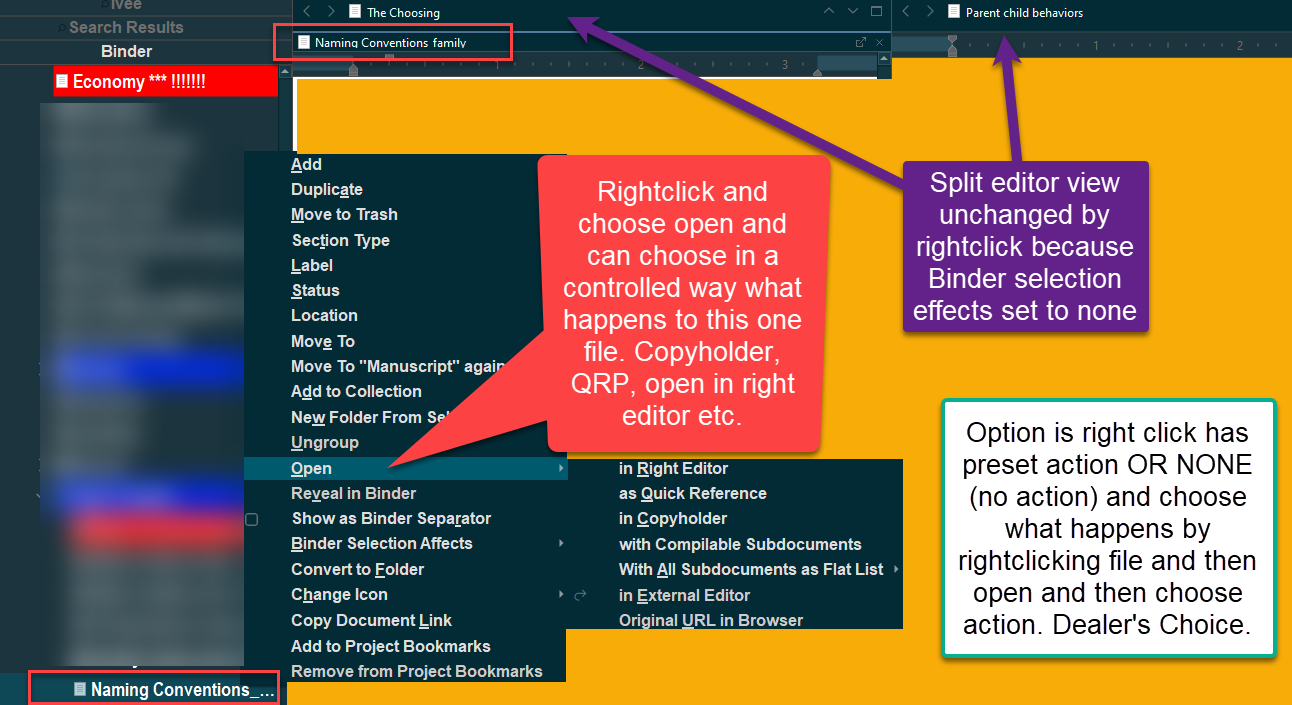
To avoid this, I make sure that my active editor is locked before I right click in the binder, then after right clicking, I use the keyboard to press letter O and then Q, which Opens the right-clicked doc in a Quick reference window.
Locking the editors, a useful feature in its own right, is also useful for avoiding all kinds of gotchas buried throughout the UI. Locked editors are more or less my default mode.
I so wish for a full-featured Scrivener-like program truly native to Windows.
Thanks for the validation @Mad_Girl_Disease … I agree with you on it being a serious usability flaw.
In fact, I struggle with navigation in general in Scrivener and have wondered if it is just me or if it is generally weird. Despite the many things I like about Scrivener, I’m getting more and more frustrated with the navigation…
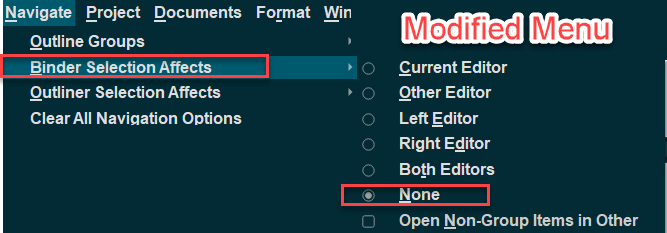
Having just discovered “Navigate > Binder Selection Affects > None”, it seems to that Qt must be capable NOT switching focus on a right-click (in contrast to what I understand from the technical details referenced by @AmberV ). Can someone explain?
In any case, there could be a decent workaround possible, if the Scrivener developers could simply add an option “In Current Editor” to “Open” in the right-click context menu of the binder.
Remember you can choose that right clicking on binder item causes an action (usual need) like open in current editor/right or left window, or both. If chose None as what happens when right click binder item, then use the open menu on right click and various options become available more like a windows environment when click on binder item.
see pics
That setting completely decouples the binder from the editor, so that it no longer receives messages from it (whether it be from left click, right click or up/down arrows, etc.). It’s a higher level of logic that what Qt does. We either turn it on or off (like the Lock does), and when it is on, both of these signals are the same.
Pretty, pretty please let us right click files in the inspector without opening them. I constantly open stuff up as a quick reference and it’s always a pain to have to click or shortcut myself back to the old file. Really don’t get why this isn’t already an option in the behaviors menu (feels like it should be the default, in fact).
Due to right-click changing what’s in the editor, I seldom use Right-click > Open > as Quick Ref.
Instead, I left-click the Binder item & drag-drop it onto the Quick Ref icon in the toolbar:
Another alternative, when I know the item name, is to type the first few characters of the item name in Quick Search. When the item is selected, press Shift+Enter.
It would be nice were the mouse-RC (ie, secondary mouse button) in the binder to open the file’s context menu rather than open the file in the active editor window.
Even if it is normal in some app families or ecosystems, in 30 years of FILE list navigation in Windows, I’ve never encountered this RC OPEN action. (I’m not saying at all that it ain’t so.)
Maybe I’ve been lucky, or sequestered, but still.
But as zornhau suggested a decade ago, as is, it requires extra step(s) to get the new file into a different location and restore my working file(s). (Perhaps the dual-window, multi-view situation is one that a survey might not have looked for.)
I have to work through this multiple times a day.
NB There are several options in the context menu that are not intended to open the file anywhere. eg, MOVE, add to collection.
This thread being a decade old, it’s for Scriv v1.
Unfortunately, Scriv v3 binder right-click works the same. I have resigned myself that L&L will not / can not change this behavior, and have adapted to it, as have others. The main change I’ve implemented is setting Navigate > Binder Selection Affects to None, then using RC or keyboard shortcuts or drag&drop to manipulate binder items.
Yes, in fact I’ve moved this over to the v3 thread since it contains much more relevant information and tips, as well as a link to an older beta thread.
Even if it is normal in some app families or ecosystems, in 30 years of FILE list navigation in Windows, I’ve never encountered this RC OPEN action. (I’m not saying at all that it ain’t so.)
Scrivener hardly takes any design notes from file managers though, being so very far away from one (e.g. the concept of “opening” something is as frictionless as “opening” an email). I’m on board with this behaviour being different, to be clear, but not for that reason—more that I just don’t see running functions on an item in a list as being the same thing as selecting that item in the list.
As an update: part of the work we’ve been doing behind the scenes on this up and coming new program has lead to finding a solution to override this behaviour in it, and we’ll be looking to migrate whatever such overlapping improvements we can, back to Scrivener.
 I don’t know if it would be technically considered a bug. We might disagree with it, but the behaviour could be entirely intentional and working as intended in the code.