Since this seems to be a newer thing than 20 years ago.
Anyway, I’m the author of this post:
which is relatively popular. And for that I created a bunch of tables. The problem is the latest version of Scrivener has a bug in tables which is better demonstrated in how it stores it in snapshots:
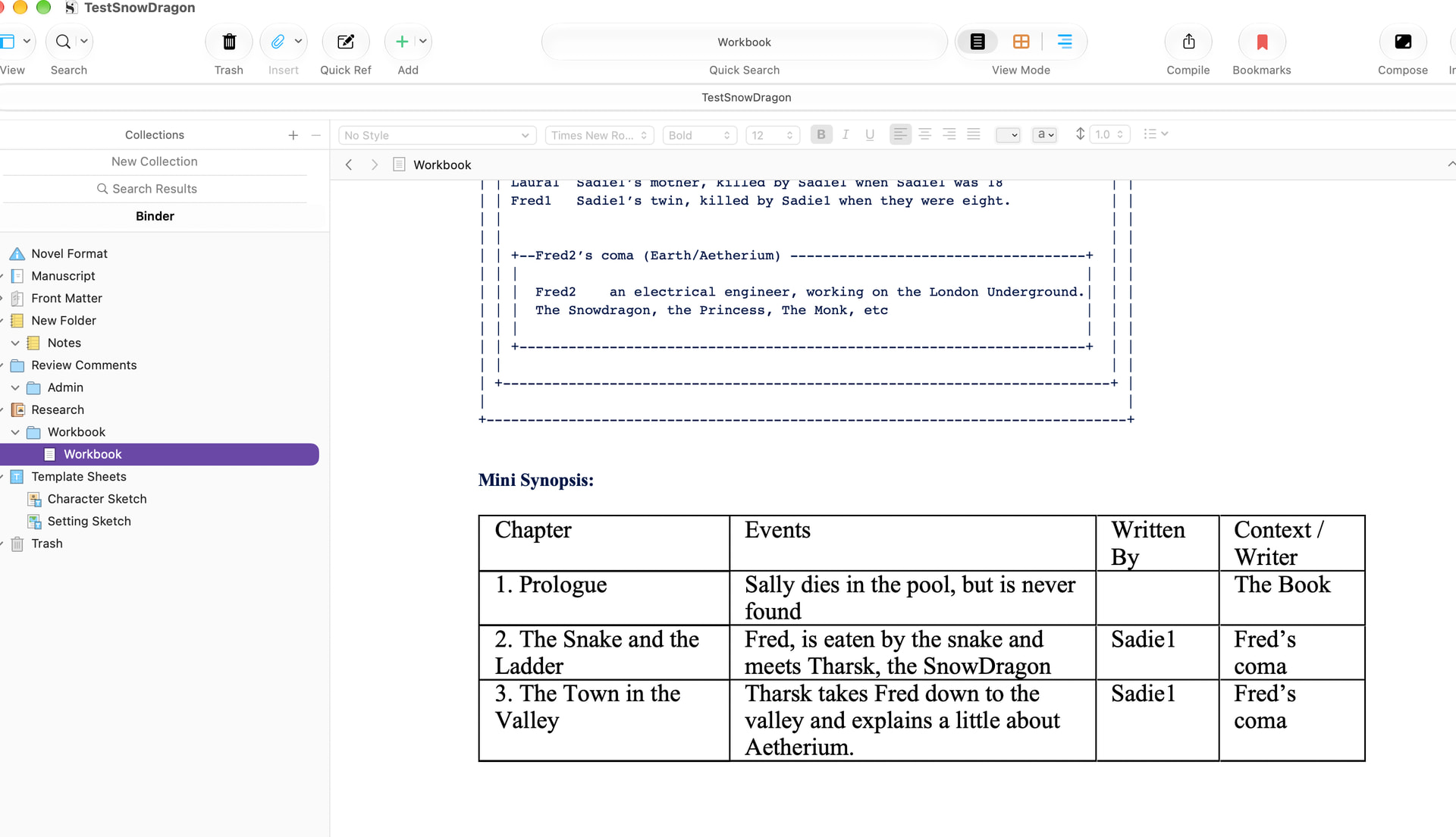
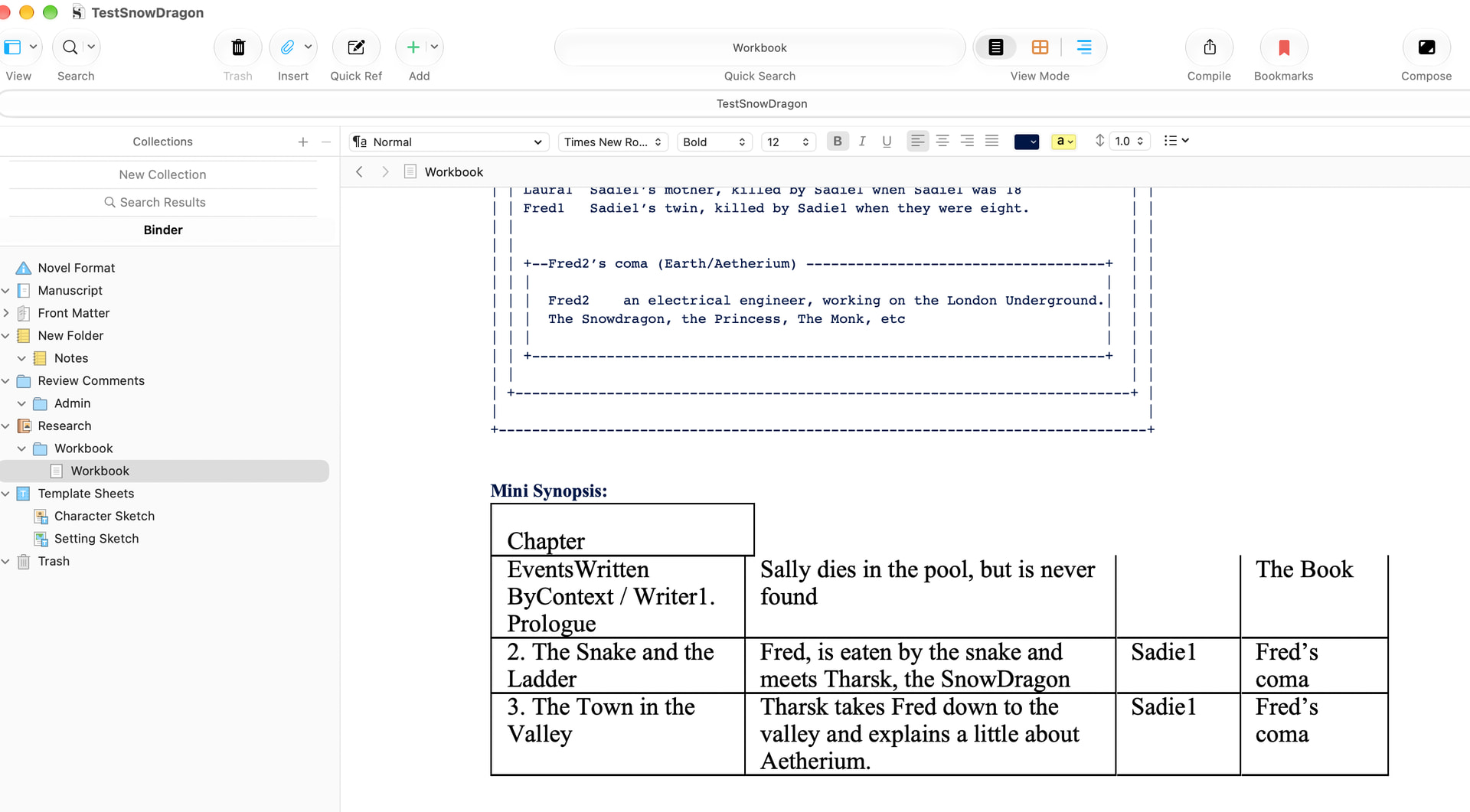
On the LEFT is how it’s supposed to store it. And is pretty much how I have it stored in templates. On the RIGHT, you can see it stores it in Snapshots incorrectly.
Thus if the computer crashes, which it does from time to time, it relies on the snapshot on the RIGHT and then the whole table settings are messed up. This is then hours of work to fix.
I can half fix it by putting a space in the empty cells, but then that is a pain because you have to remember to delete the space every time one uses the template. I’d rather the bug be fixed. Something like empty cells does not mean null in snapshot mode.
If every single last template I made with tables (which is a lot) is broken every time I create a file from that template, it’s not fun to use anymore.
Can you please fix it? It might be low priority, but it’s high on the annoyance scale for me. Almost all of the templates I make rely and store as a table (It’s because the left item is bold, but Scrivener won’t remember after creating a file from a template on the right is not bold). I save to snapshots as a “proof of copyright” type of deal.
This wasn’t an issue in previous versions, because I spent a long time doing extensive testing on the templates before releasing them. So I think it’s a newer bug.
Definitely not anything from 20 years ago (though I think it is very safe to say that there are +20 year old bugs in tables that are all on Apple’s side!). What you are describing here is a newer problem that has cropped up in the most recent updates—I have merged your report with the main bug thread on it.
It appears that something relates either to the macOS 26 release, or perhaps fixes we applied to the software in reaction to the great swell of bugs that updated foisted upon us.
Sadly to date we have no clear reproduction on it. It seems to impact particular projects repeatedly, but once the conditions are attempted in a test project, they either don’t show up for us, or not even for the person trying to make a sample project.
As this is happening in your template, in projects created straight out of it with no modification, it might very well be something we can see as well then. I tried to access the template, but it seems Tumblr doesn’t allow one to scroll without making an account (?!), so maybe if you could send it as an attachment in a PM to me, I would be grateful!
Don’t worry about the missing icons when you open it since that’s not what you’re trying to reproduce.
Replication off of the template I made on Mac:
Open template and load it.
Make a new project off of the project
Save the file
Create a New character profile from template
Create a snapshot of the character profile. It should show up wonky on the side.
“simulate a crash” (i.e. force your computer or machine to turn off suddenly.)
And when you come back the profiles should look wonky like in the snapshot.
My computer recently crashed and the profiles were fine until it crashed for the project folders that were open, and then the bug came back. I did spot the bug before, but as I could not figure out the source I did not report it. It might be the way the tables are being stored that’s at issue. That’s my best guess. I saw a version of the bug in the beginning of January-ish, I don’t know if that helps at all.
My old UX habits, but the bug is pretty reliable from there. Might be also because I shored up the margins, but I don’t think so. It looks more like it’s forgetting where the cell dividers are ( like in HTML the td /td markers) and thus combining cells together.
I don’t know if that will help you resolve it, and sorry if this is overkill. Again, UX habits of how to describe bugs. Intermittent bugs are the worst to describe.
Excellent. Okay, while I unfortunately could not reproduce the problem of it happening in the main editor (I didn’t try a cold power-off of the system, but did force quit Scrivener which should be sufficient to simulate a crash), the good news is that taking a snapshot very much does break the table immediately, and consistently, and that’s probably good enough for us to debug against.
We have indeed tried using snapshots before, but this is the first I have seen where it happens so consistently.
I’ll get this added to the investigation. Many thanks!
Is there any upate on this? I’m having a really frustrating time with my tables breaking every time I close and re-open. Wasting huge amounts of time. And I would have loved to store my project locally, but I just finally went through all the hoops to sign up for Dropbox, download the app, etc, etc, so that I could use the app for iOS, so I guess it has to live there in order to usable across both platforms. I made sure I’m up to date on the Scrivener software, so what else could solve this pernicious table bug?
I think I may have just hit the same issue. The particular thing I am observing is that blank cells used to preserve table alignment are frequently merged with other cells in the same row. Sometimes this actively breaks the layout, sometimes not. I tried using the Snapshot feature to record the table in “good” state but although it was correct when I took the snapshot, when I review the snapshot it’s broken.
Oh, and for the record: Mac OS 26.5, Scrivener 3.5.2 (17487). No iCloud (although I do have Dropbox connected), no “Optimize storage”, no Apple intelligent anything
Yes, unfortunately it looks like the damage might happen when saving, which taking a snapshot will do. So if the table is already in a state that will corrupt (the evidence appears after reload), it will be dutifully memorialised in that state in a snapshot.
Yes, I’m having this issue, too. The third column of my 3-column table disappears upon reopening the project, and the information from it is in Column 1, and displaced by one row, in front of the text in Column 1. Highly frustrating!
Why would the table be corrupt before saving? Is there a fix for this? I’m wasting a lot of time retyping this table each time I close and reopen. I’m running Tahoe 26.5.2, on a MacBook Air with M2 processor. I don’t use Apple Intelligence (if that’s an issue). I do save to Dropbox so that I can work from home or work. Thanks!
UPDATE: the problem in my case was the use of a different style in the table than in the rest of the text. So long as I keep the table in “normal” style, everything works. Hope that helps some of you.
I have been periodically finding that after I save/close and then reopen a Scrivener project, some tables in some documents have their layouts corrupted (and consequently data from one cell is getting put in with data from another cell). This happened consistently in certain documents but not in others. I’ve found it hard though to produce a testcase or a sequence of behaviour that reliable reproduces the problem. Though i think I may have finally cracked it.
The procedure is
Copy and Paste a specific table into a particular Scrivener document from a Word doc. (This is just a quick way of creating the table in the first place - typing it by hand each time would be tedious).
I’m using Scrivener 3.5.2 on a Macbook (M5) with Golden Gate 27.0.1
The project file is being saved to the local Downloads directory on my Macbook, not to the cloud.
The test project I have been using and the Word file with the table in it are relatively small - and I’m happy to provide them. Is this enough information to be able to have a go at debugging this problem?
Thanks for providing your notes on this bug! I’ve merged it with the ongoing report thread for it. We do already have a reproduction case on file, but would be happy to accept more, in case the other one stops triggering it. Feel free to send the test case in to technical support.
What would work best is a “before” case, we don’t really need the “after”. So if what you have is a DOCX file that can be imported, saved and corrupted on reload, that would be ideal. The other sample we have is contained within a snapshot that was saved before the bug hit, so we can now use that to roll back the main editor to this table state where it was still good, reload and watch it collapse. So that’s another way of providing a safe case, but the trick is getting a pristine snapshot at this point, since as noted above, saving a snapshot right now will corrupt the table making it of no use for debugging.
Thank you very kindly for that, and the clear instructions. I’ve added these notes to the ticket.
We’re currently finishing up the iOS update, and should be moving on to Scrivener next, so I wouldn’t suspect it to be around for too much longer (assuming it’s not some deep Apple bug we can’t fix, which would be most unfortunate).