…but the only anti-virus I use is the Windows one - it that likely to cause such problems?
It is a possibility.
I use AVG which in my opinion is a zillion times better and yet, I still had a major problem myself.
Somewhere in the settings of your antivirus there has got to be a place where you can set up exceptions for specific softwares. Add Scrivener.
I’ll try some things.
Need to go for now.
Here, I found the instructions :
Add an exclusion to Windows Security.
The other to look is are both versions of scrivener the same update . If not update the computer that is behind and save shutdown and restart. You might try backing up saves to USB and delete program and reinstall and see if install was causing the problem.
I’ve experimented with the laptop, a faster machine than the desktop.
I am observing broadly the same behaviour, but with this machine, rather than freezing up completely, the program hangs for 10+ seconds, and then recovers.
Adding an exception to Windows anti-virus has no noticeable effect.
Both versions of Scriv are the same.
Ok.
Then perhaps give the two other things I suggested a go.
Test with a newly created project.
And test a project that is located outside of your sync folder.
I can’t think of anything else.
agree with a fresh blank project and duplicate options causing the crash. If no crash occurs then create a new project of same type as current one (like a fiction novel) and drag all files and folders to new project and see if that can now function without crashing.
I would agree. If resetting the display doesn’t fix the issue, a good next step is to try a new project. If writing in a brand new project (without copying/pasting anything in from the old project) works smoothly, try dragging a couple of documents into it from the old project. Check for behavior issues. If all is well, continue importing until the projects have been merged.
I tried with a new project, and that seems to work ok.
I dragged in some of the old project, and that worked ok too.
However, not all of the old project was transfered, particularly the custom metadata. Is there a way to copy everything across? There is far too much metadata to recreate if there is not.
I noticed that if I want to make a change to the settings in the old project (eg the font for corkboard titles), it is now quicker for me to close the old project, open a blank project, make the change to settings there and then reopen the old project (where the change is now reflected). Clearly this can’t be right!
btw, what did you mean by:
She means when she had you delete the ui files earlier on.
Just to be scientific – and before going through the trouble of reimporting the whole of an old project inside a fresh new one – could you please test an old project (one that currently crashes) having it saved as somewhere outside of your sync folder ?
Perhaps the operation of importing old content in a new project only means at this point that a lighter project doesn’t cause enough of an issue (with your sync) to be noticeable.
→ Which would then explain/justify that the best of your two computers doesn’t hang for as long as the other when the problem occurs. (I think your issue is a hang – a long and very annoying one for sure, but not a crash… As in if you gave your older computer long enough, it would probably sort itself out of it on its own eventually. → I am not saying that would be in itself the solution, but a diagnostic.)
This strongly indicates that something in that project is causing performance issues. Scrivener seems to be behaving fine outside of this project. It may be that some bad code was copy and pasted in, that a web archive is causing issues, the file is too large, something is problematic with the project settings, there’s an issue with the save location, etc.
If you have a lot of custom metadata, an alternative to dragging and dropping would be to actually export the files and then import them into a new project. This allows you to maintain your metadata.
Select your Manuscript/Draft folder and then go to File → Export → Files. This will export each binder item as an individual file, rather than a compiled document as the compiler does, so it is easy to import into a new project. Be sure to check the option to include metadata and notes, if you have any.
Then, create a new project and go to File → Import → Files. Select your exported files and import them (I again would recommend doing this slowly, a few documents at a time, to see if there’s a specific file or folder that’s causing issues).
Ok, done. No noticeable difference.
Agreed. I left an old project for a while, and about 2 minutes later it was available again.
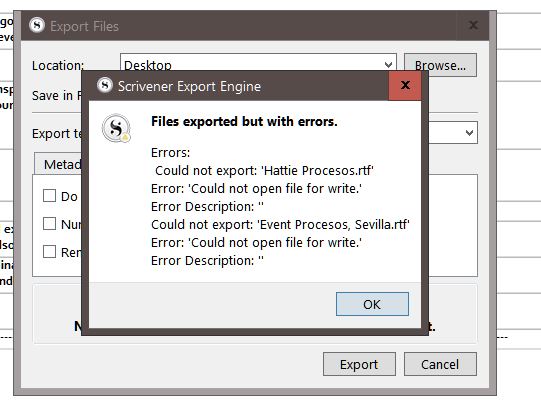
I get an error message when doing this:
When I do this, the result looks nothing like the original Scrivener project. I have separate files for notes, metadata, titles, and the file structure is lost. And several files are missing (see previous post).
Are you suggesting that I export and import each file one by one? The project has 1700 files.
Probably nothing but, when is the last time you defragmented your 10 years old computer ? (Assuming your disks are HDD and not SSD.)
And which computer is it that returned this error message ?
→ Seems now pretty obvious to me that Scrivener has a hard time writing to disk.
Why not drag files into new project 100 or so at a time and take screen shot of each group before transferring. With each successful transfer save project. When hit a group that crashes pull from that hundred in groups of 20 or so to narrow down to corrupt file. If none of files corrupt could be project or metadata setting