This error is on the older computer.
I completely reinstalled windows a couple of years ago from scratch.
This error is on the older computer.
I completely reinstalled windows a couple of years ago from scratch.
How to do this and keep the metadata? JenT’s method above did not work, or I am doing it wrong.
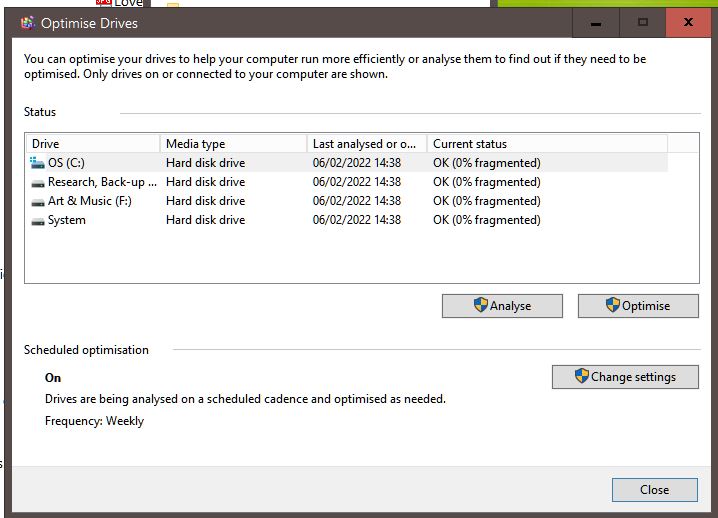
Hmm. 0% fragmented… really ?
I’ve never seen a 0% fragmented drive before, even after defrag. But that’s probably unrelated anyways.
Just drag documents from the old project’s binder to the new project’s binder. A few at a time, doing a backup then testing in-between each small batch.
Back to your fragmentation (just thought of it), what if you launch the analyse function.
Perhaps you never did (although the date says otherwise) and have garbled disks after all.
→ The date looks strange to me. 2 days ago ? All your disks same day same exact time ?
[Edit: nevermind, I just noticed you have it set to be done automatically. My bad.]
How many saves do you have of project? Do any earlier saves work if so would have most of metadata and rename and drag remaining new files 1 at a time and take phone picks of metadata and could rebuild just a few files if that is all that is involved between working and non working version
The files that could not be exported may be the culprits for why the project is misbehaving in the first place. It looks like it could be a permissions error. If you remove those files from the project (you might do a File → Save As to make a duplicate prior to doing this), close Scrivener, and re-open it, how does the project behave?
Absolutely, yes. That snapshot with the error exporting the project files is the best clue we have so far.
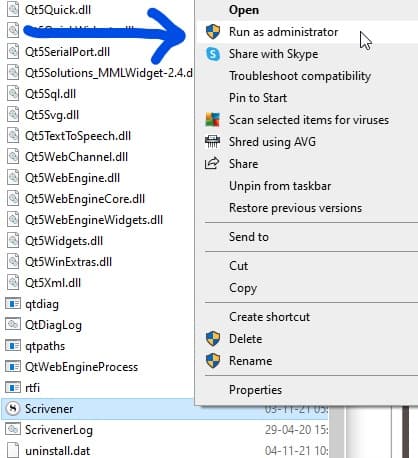
As I suspected before, Scrivener has here a hard time writing to disk. Since we cleared out the anti-virus denying Scrivener access to your files, that leaves administrator permissions.
What now if you try this :
→ Are you operating your computer from a guest profile ?
No. (see the Optimse drive screenshot above, with the Admin shields)
Ok. Well, we have exhausted all the factors I could see as potentially explaining your issue.
Before pulling out (I can’t be of any further help – we’ve reached the extent of my knowledge), here is a summary of your situation as I see it :
You have two computers with the very same issue across multiple projects.
Whatever the issue is, it either is common to both computers, or, if the issue is from within your projects, was transferred from one computer to the other along with the projects themselves.
Assuming you ran all the proposed tests, the problem is apparently neither your anti-virus, nor your sync/cloud service, nor permissions.
All this to say that in my opinion, the issue is probably not directly Scrivener related, but rather (and forgive me for saying it if it offends you) something that (if not by projects being transferred from a computer to another) was done (identically done) wrong in the settings (or the install of Scrivener3, but I doubt it) of both your computers – read only, compressed files or whatnot. (Should it simply be Scrivener having an issue with saving the project/witing to disk with no other reason than Scrivener itself, unless you are extremely unlucky, logically one of the two computers would do it without any problem. Probably even fixing/overwriting whatever the other computer messed up.)
Look for why Scrivener can’t open the files for writing and the answer will be there.
P.S. I am still also convinced that this issue is the same issue as in your other thread where your screen layouts won’t save properly.
P.S.2 I’ve edited patronizing as much as I could out of this post. If someone feels like there is still too much left, I can’t do much but apologize. 
No change. Project still hangs. (I deleted the two files, and then emptied Scrivener’s Trash).
Ah, no, wait, I didn’t close and re-open…
My goodness, I think that’s done it…
Got to put the kids to bed now, but I’ll try some more tests and get back…

It looks like that has fixed it. I removed the two files mentioned in the error message above, and there is now no lag or freezing when I change options on the older machine. I recreated the missing files, and copied their content across, and it’s still okay. I haven’t tried the second machine (the newer one), butI’ll carry on using the program and reopen this thread if the problem reappears.
It was only ever one project, on two computers.
I’ve got no problem at all with your tone, Vincent! But I don’t share your logic. imho, all the signs pointed to an issue with the Scrivener project file (as Jen mentioned), and that’s what it turns out to be.
Thanks to both of you for the prompt and engaged support.

For the posterity, here is why I stuck to my theory by which the issue was something else :
Simeva, you are right project worked till something effected those two files. So clearly a data corruption in those two files and removing them allows everything to work again. Wonderful that replacing data without file into a new file worked. God only knows what corrupted it. I am now starting to write my first book, 8500 words in, but use dropbox, but with new computer, backup everyday to seperate spot on hard drive different SSD drive as extra security so could go back one day if ever ran into similar problem (use carbonite for cloud backup as well-can never be too safe). Good luck going forward.
Fantastic news! Often, when I project gets wonky and resetting the displays and/or bringing the project into a new file doesn’t fix it, there’s something in the content itself causing the issue—an imported file, an image, a web archive, something. I’m glad you went through the export process even through that itself didn’t fix the issue, as it helped us identify the root cause of the problem. Best of luck with your writing!
I am having a hard time figuring out how I can possibly be the only one who sees this, but here is what I think :
– If (despite the fact that you clearly said you had more than one) you indeed only had a single project that was giving you trouble : Yay !.. issue fixed, I am happy for you, and hopefully whatever caused the issue in the first place won’t happen again.
– If you do have the issue across other projects, all that was done here is to put a bandaid on a single project, issue is unfortunately not fixed at all. Will more than likely happen again. Even in that “fixed” project.
If you have many projects crippled in the same way, the problem can’t be the projects themselves…
Not that I want to be a killjoy or anything… but all that looks like early celebration to me.
My understanding was that I discounted multiple projects later in the exchange.
It seems a little odd to me too that a mere corrupted .rtf file should cause all this trouble, but hey, what do I know about Scrivener’s internals?
Thanks for your concern. I will certainly reopen the thread if the problem recurs.
Hi! This was a bit ago so I can’t quite remember but I remember that it needed to update, and I believe customer service was helpful. Let me try and figure it out and I’ll get back to you if I remember more.
Edit: so it’s actually pretty important that you update your computer to the newest OS. At least that worked for me on Mac.