Sync Folder: A question about the round trip with Markdown

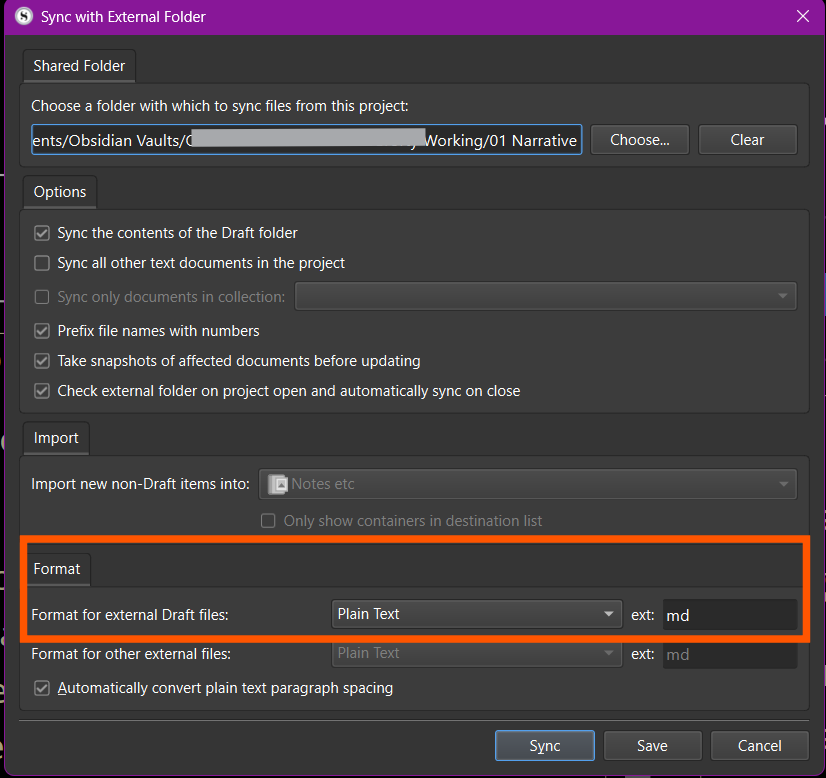
My Scrivener Sync folder is in one of my Obsidian vaults. I sync my manuscript folder to plain text files using the .md file extension:

My question is whether my understanding is correct that Scrivener does not convert rich text to Markdown or Markdown to rich text when syncing back and forth. It doesn’t seem to, but I just wanted to be sure I’m not missing something.

That is correct. As it is intended to be a Markdown editor, it would not destroy Markdown when syncing to .md files, importing them or pasting text with Markdown in it. As with all such editors, conversion to formatting is done on export (compile in this case).

I would also add that in most cases you do not want that checkbox at the bottom. That’s for rich text users who are using plain-text on the go, and wouldn’t want a wall of text. With Markdown, spacing between lines can be significant, and may not always be one way or another, resulting in damaged content (tables in particular, need their lines adjacent, as do definition lists with their terms).

1 Like

Thank you, @AmberV. This is helpful. I have a follow-on question:

So, a possible workflow decision could be to use markdown when writing in Scrivener. In this approach, the Markdown would be preserved when syncing to .md files in the sync folder, and, when I need a finished document for Word, I would use Compile to convert the Markdown to, say, italics, bold, or whatever for output to, say, RTF or Word. Do I have this right?

I would also add that in most cases you do not want that checkbox at the bottom. That’s for rich text users who are using plain-text on the go, and wouldn’t want a wall of text. With Markdown, spacing between lines can be significant, and may not always be one way or another, resulting in damaged content (tables in particular, need their lines adjacent, as do definition lists with their terms).

That’s good to know. I’ve unchecked the box.

1 Like

The three main ways of using Markdown with Scrivener are described in the introduction of Chapter 21. There is a big grey area between pure Markdown usage and none at all, where one can employ styles to help generate markup, but using external folder sync with additional Markdown tools really pushes one more toward the first option. It would take too much processing to compile all of the styles to markup on sync, and I’m not even sure if it would be possible to “decompile” all of the possible ways in which one might set things up (same complexities involved in those wishing to round-trip rich text, the compiler has enough flexibility that it makes comprehending its results back into the original very difficult).

I describe my typical process in this post, where there the intent is more to make the first drafting easier, in conjunction with a tool that has a bounty of typing aids. But at some point in the project, the advantages of using styles to augment the markup starts to outweigh that benefit, and I generally stop syncing once that transition occurs, since all styles become at risk of disappearing on sync. Where that transition sits differs depending on the projected complexity of the finalised formatting.

2 Likes

In another thread, I wrote:

One limitation is that Scrivener Sync does not convert its rich text to Markdown when syncing to the sync folder and does not convert Markdown to rich text when pulling the plain text back into Scrivener.

@popcornflix made an interesting suggestion:

Pandoc can convert RTF>MD>RTF; is there a way you could automate it with a bit of JavaScript and folder triggers? I’m on a Mac, and I could do this using built-in AppleScript or a macro app called Keyboard Maestro. I don’t know Windows well enough to work out the particulars.

After thinking about it, I think I have an approach that would work well in Windows:

As suggested, Scrivener drops RTF files into the External Folder Sync, and Pandoc is perfectly happy to convert those files to Markdown and back again. The missing piece is just a watcher that notices when something changes and runs the conversion automatically.

Caveat

I’ve not used Pandoc, but I read up on it a little to come up with this solution. I haven’t tested it, though.

On Windows, I’d probably use Python for this because it’s already part of my workflow, and the watchdog library makes folder watching straightforward. I’d point one watcher at the Scrivener sync folder so that whenever Scrivener updates an RTF file, the script immediately runs Pandoc to convert it to Markdown and saves the result to my Obsidian vault. Then I’d point a second watcher at the Obsidian folder so that when I edit the Markdown version, the script converts it back to RTF and drops it right back into the sync folder for Scrivener to pick up.

The only thing I’d be careful about is ensuring that Scrivener alone controls the filenames and folder structure (I can almost hear @AmberV warning me about that, haha). As long as the script only replaces the contents of the files and doesn’t rename or move anything, Scrivener is perfectly happy. From what I’ve read (see my caveat above), Pandoc doesn’t have any trouble preserving the filenames, so that part is easy.

Setting this up is not something I personally need right now because I’m fine working with plain text in Obsidian and occasional Markdown syntax when writing in Scrivener, but if I ever wanted a true round‑trip Markdown workflow, this is how I’d build it. It keeps Scrivener’s sync folder intact, gives me Markdown in Obsidian, and lets Pandoc handle the heavy lifting in both directions.

Thanks for the suggestion, @popcornflix. If I ever implement this approach, I’ll be sure to share how I do it.