I have a huge MS Word document of about seven thousand pages consisting of many reused subdocuments. In my case this is an anthology of artist interviews. What I have is seven themed volumes, one set of all volumes, and one abridged manuscript drawing on all volumes. Recurring MS Word corruption leading to rework and general inconvenience has led me to Scrivener.
I am hoping the Binder feature will allow me to maintain all 9 works (7 books, one book set, one abridged version) more reliably and easily.
I am looking for advice, warnings, maybe a relevant tutorial.
Can I maintain all nine works in one project? Or, what is the best way for coherent management of all nine works having shared content.
What is the best way for me to manage subdocuments (I am thinking of my understanding of them in Word, here) for reuse of them in multiple manuscripts?
Are there any warnings of mistakes to avoid before I go too far?
Yes. But it might become overwhelming. If your work is already done, if you don’t have a good reason to do so editing-wise, perhaps it’d be best to opt for multiple projects instead.
The question requires consideration, but only you can do that.
On the other hand, note that it is far easier to split a project into multiple smaller ones than to assemble small projects into a big one. So, in your case, I’d start with one project containing all 9 books, and if it feels wrong, split it. (You could then duplicate the project first, to retain the “all in one” version and go back to it later on if need be – once you’ve measured the implications.)
There is a placeholder <$include> for that at compile. This way you can edit only one document and all occurrences of that content/document will come out of compile the same (edits and all).
Check out this post of mine about mirroring documents in the binder. [The whole thread is worth it.] (Because no, Scrivener otherwise doesn’t per se allow it.) :
. . . . . . .
Exact same answer as the previous.
. . . . . . . . .
Scrivener can’t know what you intend to do. So, no ; not really. Unless it is an obvious misstep.
(I’m aware that’s probably not what you meant by the above question, so : )
My advice: first thing you need to do before you pour real time into real work is to make sure you’ve understood the backup system and you’ve got it set right.
Also – and not least –, go through the tutorial if you haven’t already. Your case is not so much of a “learn as you go” one. [Better: read the manual.] ← [I know, I know, … (either obvious or annoying), sorry.]
There is not much to add because @Vincent_Vincent’s advice is great as always.
Just two very disparate things:
Backing up: If you go for an all-in project and keep backups of it additional to local ones on some cloud service (best as zip), make sure that both the service and your data connection is capable of handling such a probably huge file.
Importing: The best way to get the Word document into your Scrivener project is the Import & Split function, because it will transfer the structure of your document into the Binder. How long that takes with such a beast of a document, I can’t tell.
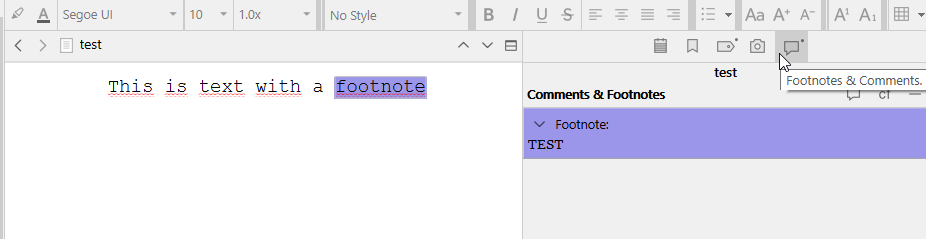
My “beast” is already in 32 separate docs, some of which are several hundred pages long. I have been experimenting with import, but am disappointed to see with the two DOCX Import Converters, I am not seeing my images (freeform placement, not inline) importing, and that is disappointing. It looks like footnotes don’t import as such…
This is out of my comfort zone, but I would say perhaps see if you can export the documents as RTF from Word, which would make importing in Scrivener more likely to work as intended. (Images and footnotes.)
Scrivener’s native format is RTF. When something doesn’t quite work, it is always a good idea to try with this format, if possible.
(Perhaps you’ll ultimately have to make your images inline. ..? Or fetch them back.)
In Scrivener, since there is no pages per se, footnotes reside in the comments panel.
If repeated materials are always in the same relative order in each distinct “packaging” — for example, alphabetically by artist or in chronological order — it may be that you could maintain all the component chunks in a single linear order — wherein each volume is a scattered subset of these components. Because in scrivener what volumes a chunk of text (this interview, this preface text, etc.) belongs in can be easily specified by keywords assigned to each document. And with Smart Collections you can then ask to just see in the Binder all the components of this one particular volume or all the components of this set of volumes. And, of course, you can tell compile to just compile the items associated with that smart collection.