Please don’t apologise, it is easy to be confused as Scrivener has many paths to turn a project into a final document!
By MMD/Pandoc, I mean to follow the hybrid mode as outlined in Section 21.4 of the user manual. Here you write in Scrivener using styles, no need for any markdown or TeX markup in your text. You just write, treating Styles as a way to not only visualise your text in the Scrivener editor, but to assign rules for transforming into the output. Citations are entered using [@citekey] Pandoc format:
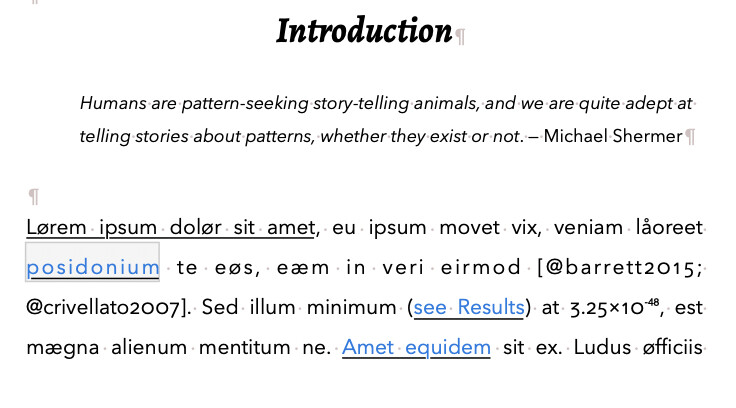
To specify which file serves as the bibliography source, and what style you want, you use a metadata file that can be added as front matter. This tells Pandoc where it is and how to format your bibliography.
File > Compile… is where the magic happens, the styles are turned into the correct markup, metadata is put in the right place, etc. In the Compile format editor, the post-processing pane will automatically run pandoc for you to generate a final PDF / ODT / DOCX as needed. Perhaps it is easier to just share a sample project I made a while ago for another user, slightly updated:
SimpleCitationsV0.32.scriv.zip (627.1 KB)
Read instructions and information sections in the binder, and look through the various compile formats. For the pandoc>typst compile format the Scrivener editor content shown above will give a PDF that looks like this:
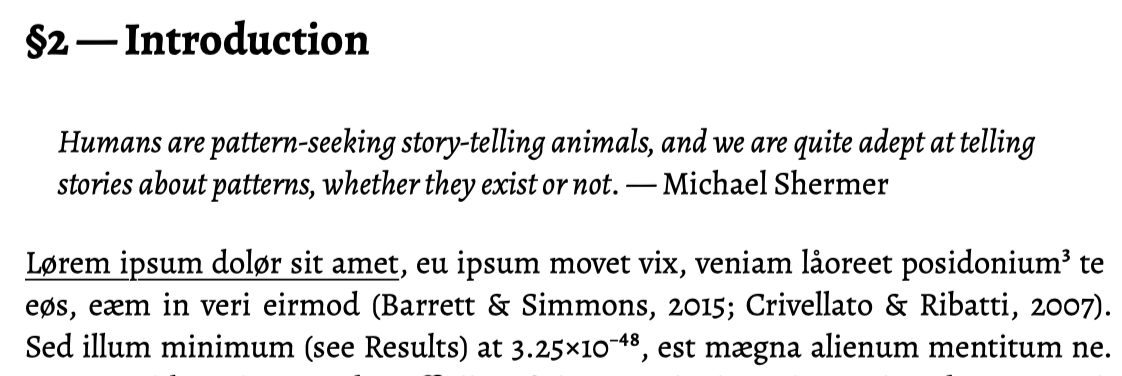
Scrivener Styles have been transformed to Typst markup and citations are now finalised.
I prefer to always use Pandoc and it will generate the Typst/TeX for you and run typst/latexmk etc. Typst is much easier to set up and use than LaTeX. Pandoc customises its output using either header-includes in the metadata, or templates you can tweak for your needs.
Mendeley is awful for anything other than Word, it isn’t very viable for Scrivener users (unless things have got better in the last year or so); stick to JabRef or Zotero or Bookends if possible…