Just to make sure I understand this correctly; if I export to a TeX format, I’ll have to run it through a LaTeX compiler with according LaTeX project setup first, right?
If you use MMD/Pandoc, you can compile (you said export but I think you mean compile?) from Scrivener direct to a LaTeX PDF without a need to touch a TeX compiler (e.g. pandoc and MMD has its own TeX template and pandoc at least runs the LaTeX engine for you).
For pure LaTeX (plain text compile) there is also a post-processing pane so you should be able to set up latexmk to run after Scrivener completes the compile.
From Jabref’s perspective these will be the same workflow apart from the temporary citation format used.
1 Like
I’m afraid you’ll have to explain a bit further what you mean by “using MMD/Pandoc”. Am I putting MMD-/LaTeX markup into my draft inside Scrivener? I know LaTeX on its own, but I can’t quite figure out how to make LaTeX commands/code work when compiling to PDF with Scrivener. I know there’s the preamble code somewhere. How would I best go about creating a Compile Format that visually matches my requirements (which I already have for compiling to Word/PDF without MMD/LaTeX) but for compiling to PDF with MMD/LaTeX?
A post-processing pane inside Scrivener? Where’s that? Where would I set up latexmk?
I’m sorry if I’m asking dumb, newbie questions, but apparently I’ve forgotten enough about LaTeX that it’s not clicking for me. Ideally, I’d like to be able to use citations in a way that is analog to the way it works in LaTeX with BibTeX references (using \cite{} inside the text, then \printbibliography at the end). Or to generalise it; have a cite-key with whatever necessary markup inside the text, then something to make a list of all included references appear at the end. Does that make sense?
(I also use Mendeley, but I didn’t see any info at all on that, and I’m happy to return to BibTeX if I can make it actually work.)
1 Like
Please don’t apologise, it is easy to be confused as Scrivener has many paths to turn a project into a final document!
By MMD/Pandoc, I mean to follow the hybrid mode as outlined in Section 21.4 of the user manual. Here you write in Scrivener using styles, no need for any markdown or TeX markup in your text. You just write, treating Styles as a way to not only visualise your text in the Scrivener editor, but to assign rules for transforming into the output. Citations are entered using [@citekey] Pandoc format:
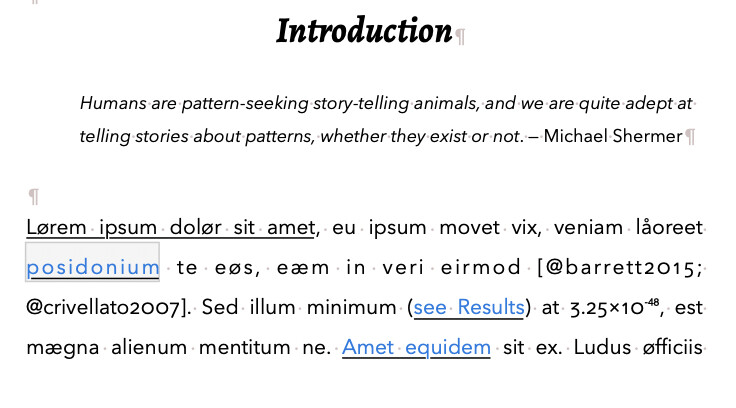
To specify which file serves as the bibliography source, and what style you want, you use a metadata file that can be added as front matter. This tells Pandoc where it is and how to format your bibliography.
File > Compile… is where the magic happens, the styles are turned into the correct markup, metadata is put in the right place, etc. In the Compile format editor, the post-processing pane will automatically run pandoc for you to generate a final PDF / ODT / DOCX as needed. Perhaps it is easier to just share a sample project I made a while ago for another user, slightly updated:
SimpleCitationsV0.32.scriv.zip (627.1 KB)
Read instructions and information sections in the binder, and look through the various compile formats. For the pandoc>typst compile format the Scrivener editor content shown above will give a PDF that looks like this:
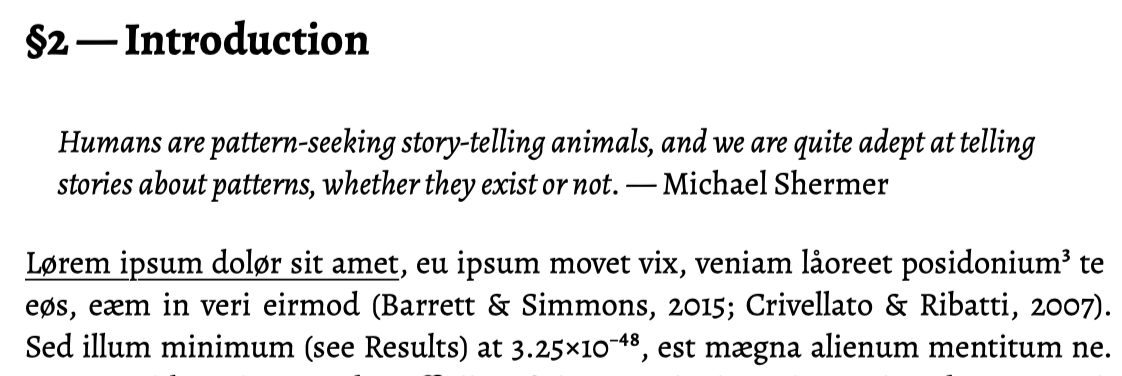
Scrivener Styles have been transformed to Typst markup and citations are now finalised.
I prefer to always use Pandoc and it will generate the Typst/TeX for you and run typst/latexmk etc. Typst is much easier to set up and use than LaTeX. Pandoc customises its output using either header-includes in the metadata, or templates you can tweak for your needs.
Mendeley is awful for anything other than Word, it isn’t very viable for Scrivener users (unless things have got better in the last year or so); stick to JabRef or Zotero or Bookends if possible…
3 Likes
Thanks again for this workflow, which I’m returning to try again after some months. I believe I have followed all of the steps up to this point, and was able to insert temporary citations with the methods noted above. But I found that the default citekey [auth.lower + shorttitle (3,3) + year] was too long for my purposes. (It significantly interrupts the reading flow, and avoiding such visual interruption is the primary reason I opted for this workflow rather than the RTF Scan option.) So I altered this in the Zotero > Settings > Better BibTeX menu → Citation key formula: auth.lower + year
This change, however, seems to have had no effect on the output when I paste (cmd + v). I am still getting output in accordance with [auth.lower + shorttitle (3,3) + year]. I shut down and restarted both Scrivener and Zotero. Uninstalled and reinstalled the Better BibTeX plugin, and both reset and updated my exported CSL-JSON library. None of this seems to have made a difference.
I’d welcome any suggestions that others have.
I’m pretty sure this is because Zotero has already assigned the BibTeX keys, and given the point of a key to be unique and unchanging, Zotero won’t replace already existing keys when settings change. But I think if you select your refs, right click in Zotero and try this:
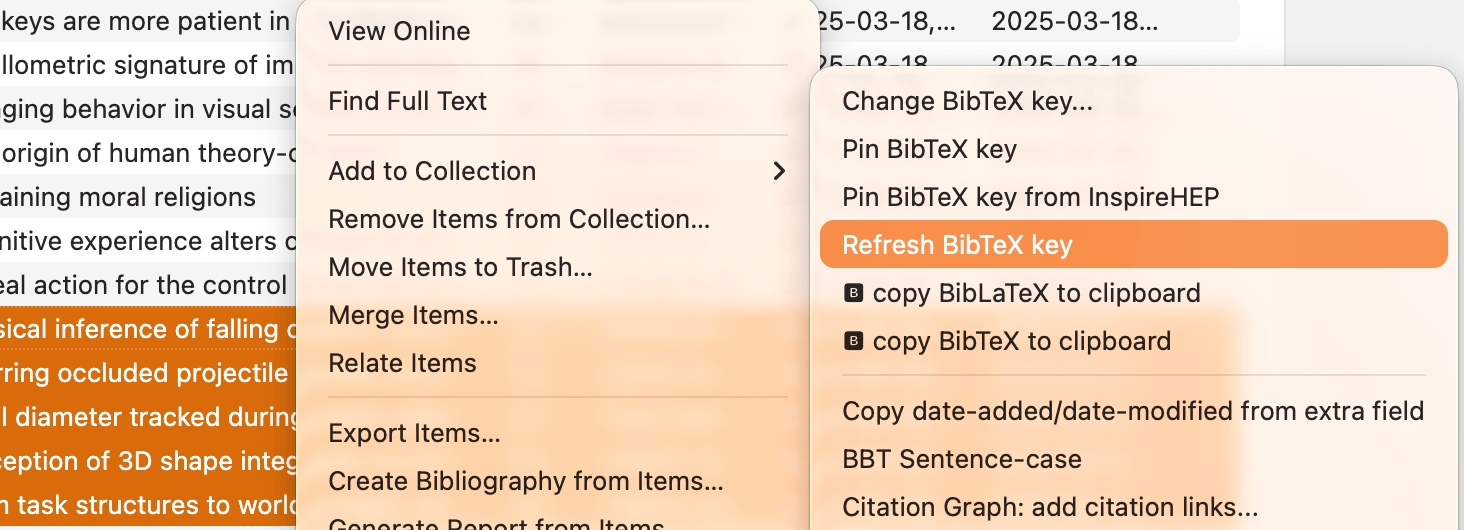
It should reset your keys based on new BBT settings. Try on a single ref first to check, then you can apply to the others (remembering that any existing docs that use the old keys will now break…)
2 Likes
Thanks very much! That did it!
Okay, after 10000 years I return to this again. My apologies for the delay, I resorted to ignoring my problems until I had no other choice (oops).
ALRIGHT, SO — I have Pandoc installed and followed the instructions in the sample file, but it’s giving me an error. Also either I’m dumb or Typst is behind a paywall? I’m familiar enough with LaTeX to stick to that if that’s the case.
Let’s say I have my text written with
- citations in Pandoc format (based on a
citations.bibfile that is in the same folder as the.scrivproject), - the metadata file is added as front matter and
- contains (presumably) the correct file paths for the
.biband.cslfiles, which are located in the same folder as the.scrivproject.
How do I get from this to a Word or PDF document?
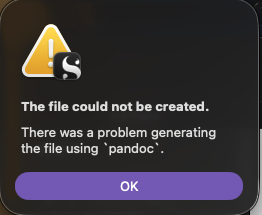
At the moment, when I try exporting that (or your sample project), it creates a folder with a .md extension and also gives me an error that it couldn’t create the file using pandoc.
I have a few guesses where the issues could be, so here are a couple more specific questions:
- When you say “compile folder” in the instructions, which folder exactly do you mean? The folder the .scriv project is in?
- Is it always TinyTex that’s being used? I have such a directory, but I don’t recall installing it — is that just what the LaTeX folder calls itself these days?
- If not, how do I find the correct path?
- (If yes, why???
Ignore this, irrelevant.)
I’ll worry about making the thing look correct in a second step, I can do that via LaTeX and then just add my custom preamble if I’m understanding the user manual correctly. Right now, I just want the citations working for a start.
Thanks so much again for your help, I apologise for answering so late with more questions and still clueless.
The folder that Scrivener’s compiler asks you to save to when you press compile:
Not the folder where the .scriv project is saved, which can be anywhere. The location of the project.scriv file is irrelevant to the compile process. IMPORTANT: you should always name the Compile folder ending in -mmd – so for example ~/Desktop/compile-mmd – Scrivener uses this folder name and compiles directly into it. So if you name your compile file project.md and set the folder to ~/Desktop/compile-mmd Scrivener will create ~/Desktop/compile-mmd/project.md – now other manually placed files in ~/Desktop/compile-mmd will be in the same folder as the markdown. Otherwise Scrivener creates a subfolder ~/Desktop/compile/project/project.md and any files you placed in ~/Desktop/compile cannot be read by Pandoc/LaTeX/Typst etc.
This totally depends on what you installed. TinyTeX is one of two “minimal” TeX packages, and TinyTeX can be installed by Quarto if you ask it to. I installed TinyTeX (using quarto) but you can delete that folder and install MacTeX or BasicTeX as you prefer. Which tool gets used depends on which one is first in your shell path[1]. You can install X different LaTeX setups but the one that is first in the path will be the one that is used. How can you know which one is used? In the terminal type:
> which pdflatex
/Users/ian/Library/TinyTeX/bin/universal-darwin/pdflatex
In my case it is TinyTex, but it could be anything you installed last (or if your path is not set up, you will see an error).
Right, that is a promising first step. You have your markdown file so you can at least debug manually. In terminal try the pandoc command directly in the compile folder:
> cd ~/Desktop/compile-mmd
> cp /path/to/refs.bib ./refs.bib
> cp /path/to/apa.csl ./apa.csl
> pandoc --verbose --bibliography refs.bib --csl apa.csl --citeproc -t latex -o project.tex project.md
See what the error is and post it here. Pandoc can use either its own ref engine (citeproc) or simply defer to biblatex, just change the command flags[2] as described in the pandoc docs.
in your terminal, your path is usually set up using the zsh init file
↩︎.zshrcand you can see your path by typingecho $PATH— however when Scrivener runs a post-processing tool, it does not use the shell path, and so you must add folders into theenvironmentfield of the post-processing panel in the compile format if you want to guarantee a particular tool is available…--biblatexor--natbibinstead of--citeproc↩︎

2 Likes
Okay, so doing the Terminal thing debut with your sample project works, but that just generates a .tex file. Is that correct? When I try to compile that .tex file, it shows me errors that \section is an unknown control sequence (which is wild as an error).
(Also the forum here has suggested to message you because it’s been +3 replies — would that be preferred?)
Others may find this useful so we can stay here. Yes, the terminal command was designed to give a .tex output, this is so we can try to identify where the error may be — scrivener > markdown > latex > pdf — the problem seems to be at the latex > pdf stage. But if you open the .tex can you see formatted references in the TeX source? Anyway, share your markdown and latex files in a zip and we can check why latex is not able to compile this to a PDF.
1 Like
FYI, I have also been getting this error message intermittently, after setting up and using this workflow with Zotero and Word. Sometimes restarting Scrivener seemed to fix it, but yesterday I couldn’t get it to work, even after starting my computer. Some documents or even specific sections would compile with no error, and others, using the same settings, would give this error.
Long story short, I did not have Zotero open on my computer, and the document sections that would give an error were those with citekeys. Opening Zotero seemed to fix the compile issue for me. Seems obvious but took me a minute to realize it, especially as the error references Pandoc. Not sure if this is what is going on with you though, but thought I’d weigh in.
1 Like
Because Scrivener is triggering Pandoc, all it knows is that the tool it started had an error, it cannot know the underlying cause. This is why splitting the post-processing into parts (Scrivener does not run pandoc, you do that in the terminal where you can more easily see errors) helps us understand what may be the issue.
Another very helpful trick I use in all my post-processing arguments blocks (like my SimpleCitations sample project linked above) is to redirect the post-processing tool’s outputs to a log file:

>simpleodt.log 2>&1 will redirect pandoc’s messages into simpleodt.log in the same folder as your compile. > replace a file, >> appends to a file. You should also probably always use the --verbose flag so pandoc gives you more detailed output as it converts your markdown, generates citations etc.
1 Like