Hey gang, I’m running Scriv 3.5.1 and can’t get a document to stick with the typeface, font size or line spacing that I set in the defaults. Any suggestions? Oh, MacBook Pro up-to-date.
Hi
If the document was created before you’ve set the defaults as you want them it then needs to be converted.
Is that your case?
Great point. I’ve not typed but a few lines so I’ll delete and try a new document.
New document. Not one thing held–not font, size, or line spacing.
OK. And you’ve set your desired default in the options or in the project settings?
Go have a look in the project settings:
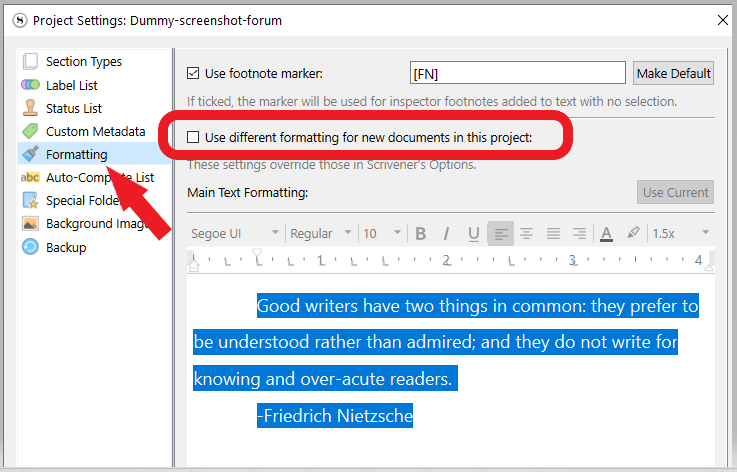
If you’ve set your default formatting in the options, make sure that this setting isn’t checked.
I notice that the font I used to create this manuscript–Georgia, 13 pt–is not the font at the top of any of the documents in the manuscript, nor is the line spacing. How do you get the rules to change? I’ve created the default in settings.
Vincent, just the opposite. I changed the formatting today to be a global choice. But, any document should retain whatever setting it’s given on the document. It’s not. Each time I open a document, shouldn’t it show the settings I have that specific document?
No. (If I understand what you said properly) That’s not how it works. Each document is imprinted with the defaults as they were when the document was created.
But, if you later change the font, font size etc, it should retain it. For whatever text you’ve so edited.
But not for new [unformatted] content.
Everything that is added as “no style” will default to what were the defaults at the time of creation of the said document.
“No style” is the default formatting, imprinted (as I explained above).
One thing you can do, if you don’t have a bunch of projects that rely on it being otherwise, is format a paragraph how you want your default formatting to be.
Then, select a little bit of it (a couple of words) without specifics like bold or italics.
Then :
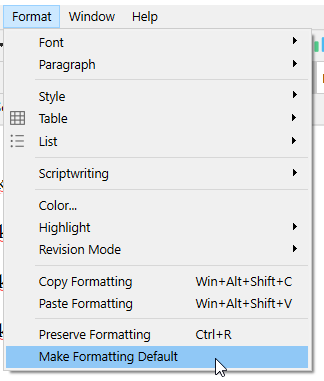
There will then appear a pop-up.
Answer whether you want the selected formatting for all of your projects (this will become the default formatting in the options/settings), or just for that current project (the formatting will become the default in the project settings, as per my project settings screenshot above).
After that, any newly created document should go by this formatting on its own.
Documents that predate that change need to be converted to the new default formatting for it to have any effect.
PS. If you create “new” documents by splitting at the end of one, that won’t do. The old formatting (if that’s what the current document goes by) will still prevail.
. . . . . . .
If the above doesn’t fix your current issue, it can then only be that I misinterpreted your problem.
1 Like
This remains puzzling. I can only think of two ways to make this happen in a project.
-
You have somehow not really changed Scrivener’s default paragraph styling. (Vincent’s last might help with this.)
-
You are working inside a fancy project which has in its project settings set a template document as the default new doc, and /this/ template doc has old styling in it. (It is unlikely that you would not know you had done this, if you did, but you could be working in a project started from a project template that is not of your own making.)
2 Likes
You guys have been such great help. Here’s what I’ve accomplished: *global settings created; *project settings that mirror the global. (Georgia regular 13 pt, double spacing) So, everything is the same; however, when I create a new document, the settings are changed back to Courier 12 pt and single spacing.
Am I missing someplace that should be changed? Kinda feels like that because it changes to a setting that would be used for printing a book. I do not want to do that at this time. Currently, the documents are used to send to my editor who has requested the Georgia (etc) settings. Any ideas?
That’s not normal.
See if you are set to use a template:
(credits to @gr )
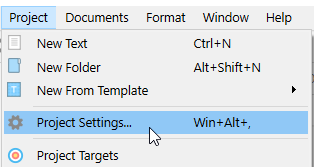
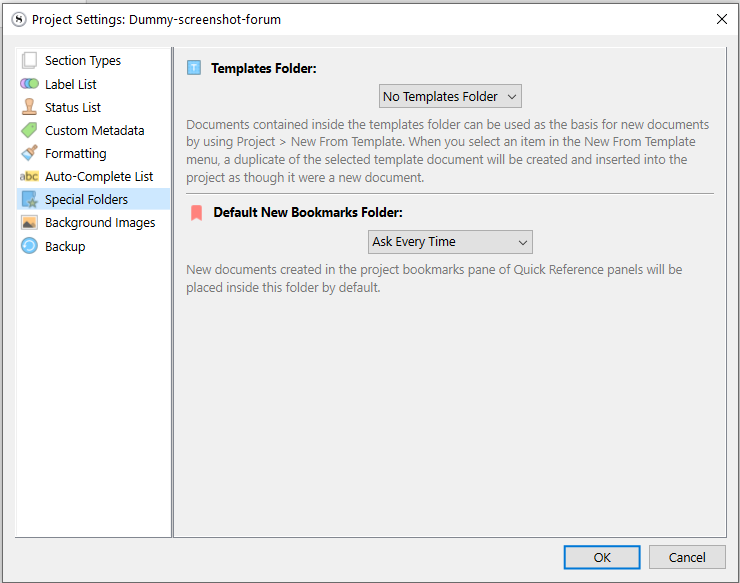
Does it say “No Templates Folder” ?
Like this :

. . . . . . . . .
No need to do that.
. . . . . . . . .
Just so you know, everything can be reformatted at compile.
What you see in the editor could be for your eyes only.
1 Like
Gosh, so much trouble on this. I set the project to mirror the global as an attempt to not allow the program to misbehave. Overkill for sure.
RE: settings you suggested–templates
Checked that. BTW, I use Mac not Windows so tracking your suggestions is difficult, not impossible, though. So, that said, hope I got to the correct places. I feel confident about that because I didn’t know you could change this which means I wouldn’t have made a change. The settings are the default in this case.
I think you should contact support directly.
This is too abstract.
Meanwhile, what I personally would do is create a new blank project.
See if the issue persists.
If not, then it means that there is a problem with your project itself. Not with global settings.
And if the issue persists, then it means that the problem is with the global settings.
1 Like
Vincent, you’ve left me chuckling over the reasonable logic. Thanks for giving this a go.
They’ll fix your problem in no time.
They’ll ask for your settings file if needed.
Things like that.
We’re simple mortal users. We can point in this or that direction, but that’s pretty much it.
2 Likes
I just had a flash.
Tell me, what does it say in the footer of your editor?
Does it say something like “17 words”, centered, or not at all?
This :

Or this:

??
2 Likes
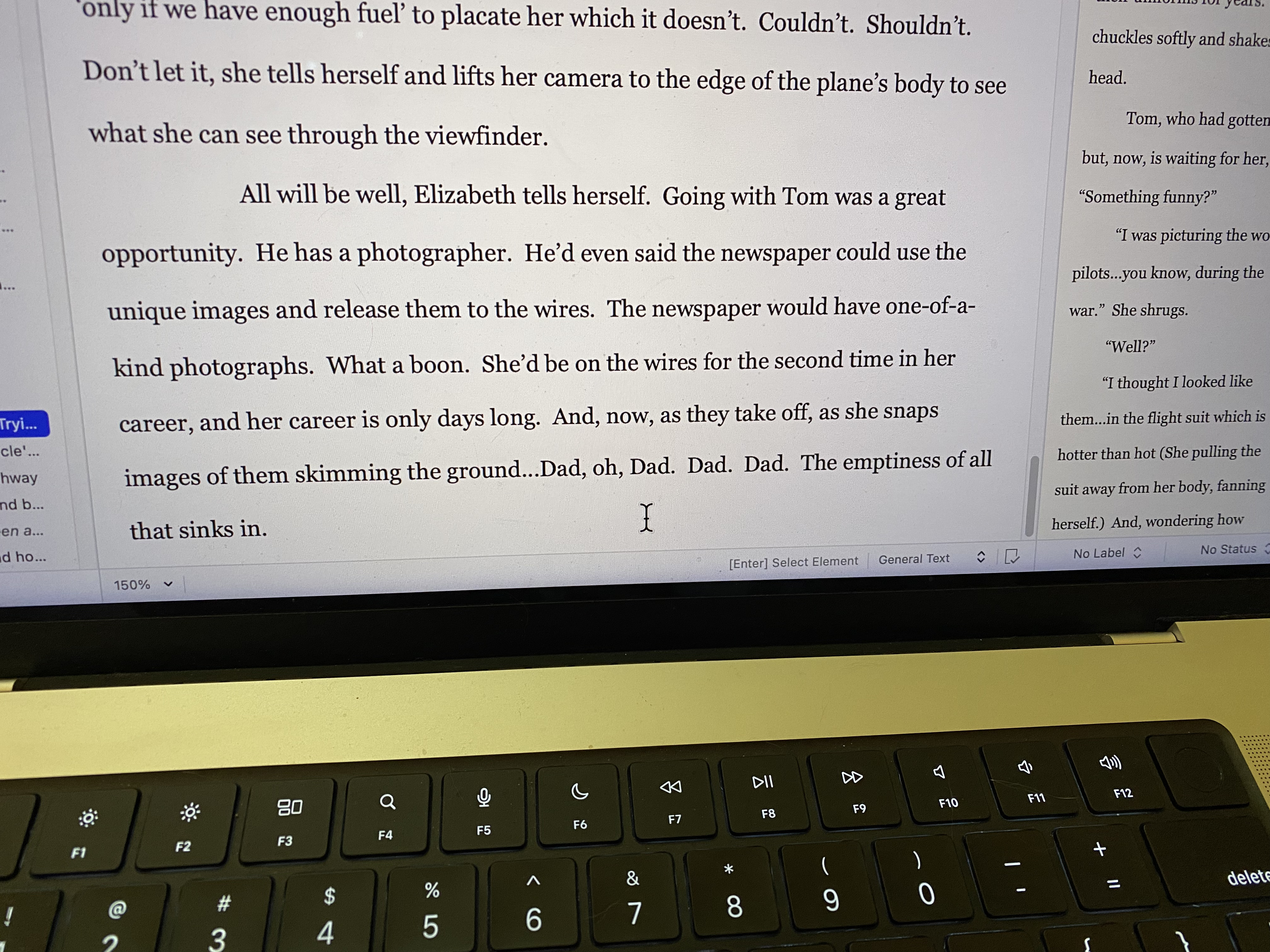
2 Likes
You’re in Script mode. Cmd-8 will set the document back to normal editing mode. Script mode has settings specifically required for film/play scripts.

Mark
2 Likes
That’s just one heck of a thing, Mark. I’ve never written in script mode and I didn’t make a change to that. Go Figure! Where should I enter this command?
⌘-8 (Cmd-8) turns Script mode on and off. A fair number of people hit it unknowingly, it seems, and then post here, like you did, asking “What’s going on?” or words to that effect.
Mark
2 Likes