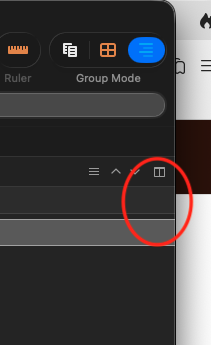
Last night I was using Outliner mode on my Manuscript directory, and adding custom columns with the little triangle/arrow in the upper right corner of that view. This morning, I saw there was an update, ran the update, and I don’t see that arrow/triangle anymore, so I can’t continue adding more columns. I also don’t see any other way to add columns.
You can also right-click anywhere in the column headers to add additional columns. The latest update made some adjustments to drawing the view in the outliner to work around a macOS 26 bug, and this button seems to be a casualty—I’m only seeing it now if there are enough items that the vertical scrollbar appears. I’ll check up on it to see if we can restore that button regardless (although it is nice visually not having the extra empty gutter along the edge of the view!).
Thanks for the replies, but I don’t see how to add a new custom header with either of those approaches. I’ve tried attached screenshots from right-clicking, and going to view→Outliner options on a brand new project, but I don’t have permissions on this website. What am I missing? I honestly don’t see how to add a new custom column. There isn’t an option to bring up the dialog that lets me manage those columns.
When selecting Manuscript in the binder, then switching to Outline mode, the little chevron on the far right that shows the available metadata for columns is missing. Is it in a setting somewhere? I’m not sure if it’s permanently gone or if I’m just missing something.
Fortunately, you can still navigate to Project | Project Settings… and create the new column entries there, under Custom Metadata, but I also noticed the Alignment assignments are incorrect.
However, both the chevron icon and the alignment assignment are still present / correct on my older MacBook Pro running the latest Scrivener, but on macOS Monterey, so I’m pretty sure it’s a bug specifically for Sequoia (unless it’s also present in Tahoe, which I don’t have installed).
I can confirm your observation (same software / OS version). Never thought about it, just using the right-click context menu for this purpose. Is this a bug or is the manual outdated in this instance?
I’ve merged this with the bug report for this issue. What you found before was something else, surely, as this only recently came up as the result of trying to fix another problem with how scroll views were suddenly changed a couple of months ago.
This button has always been the superior option to use if you want to make a number of changes to columns at once, as it opens a semi-persistent popover that you can check boxes on and off in. So it’s definitely not removed on purpose.
I don’t think the person that responded understood the poster was looking for the place to create custom columns, and so their answer was correct within the narrower case of simply wanting to toggle available columns (not make new ones). Custom columns can of course be toggled from the main menu, as described, or by right-clicking too. They were not describing a bug, they just did not know how to find the configuration settings.
There are two conveniences that lead to Project ▸ Project Settings..., Custom Metadata tab: the missing button, which will be fixed in the next update, and the Inspector metadata tab itself, where one can click the ••• button in the middle section, but I don’t recall there ever being one from the main View menu.
I’ve aways battled to find the tiny spot just below the split view button in the outline view to add or remove columns but today it seems to have completely vanished!
I do a “two-finger” touch pad on with cursor pointing at the column labels … I think that’s what you are looking for, in addition to @Vincent_Vincent’s suggestion?