Hi.
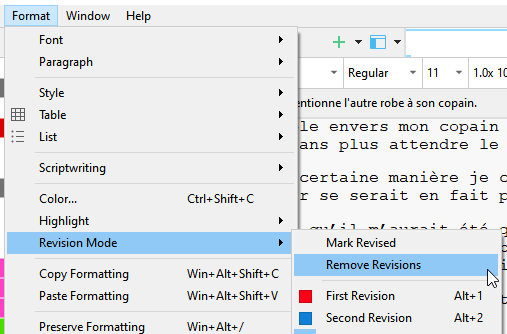
Could this feature be made assignable to a shortcut please.
When I want to confirm edits done within a revision pass, I simply remove the revision color for whatever I am satisfied with. But it is kind of annoying that I have to navigate the menus every single time in order to do so.
(What I mean is that I am doing it as I am reading. Bit by bit.)
This one :
(The one that is available in the menu only when some text is selected.)
You have lots of keyboard commands suspect people have never used. what not put out survey to see which commands people have never tried and ask for keyboard commands people would like to see for future builds of the program.
Like the commands for paragraph indents, with styles once people set it suspect would never use these as might interfere with compile setting, would be perfect commands perhaps to drop out and give to revisions.
Overall I agree. I can’t imagine, for example, that many people toggle View ▸ Use Label Color in settings frequently enough to merit keyboard shortcuts on them. Settings like that seem to be the kind of preferential thing you toggle and forget, or save into a custom template so the behaviour is always the way you prefer.
Agree a lot of the use label color in options are one or done or rarely changed as well as corkboard options with short cuts. Maybe people will give feedback on functions currently missing shortcuts that would be most popular to add if take others away.
Actually it occurs you might be surprised with people toggling Label colors
Just to say this is tricky business, though a great idea, as there is such a forest of commands which probably are hardly used. The point about the para indents…though again, some might align on using that one, even as good point is made about compile, but maybe these persons aren’t using compile.
This is the kind of situation where I use AHK, to get shortcut access to commands that can’t be customized – and sometimes even for commands that can be customized, but where the AHK key sequence would be more convenient or memorable .
I would like to see all commands/functions, regardless of their current default position, be assignable not only to key combinations but also to any menu and toolbar. Basically, no differentiation between commands assigned to menus, toolbars, or keyboard shortcuts: any command, anywhere.